
- Title: Kingzone Z1 Update 20150606
- Listed: July, 2015
- Last modified: 07/07/2015 5:56 am
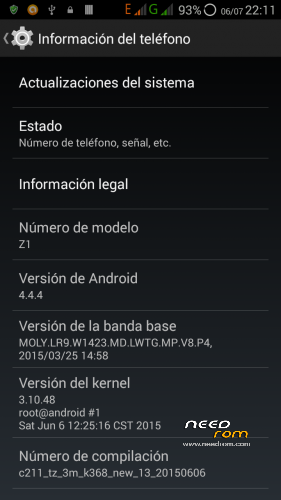
- Version: 4.4.4 - 20150606
You must be logged for ROM download.
22707 total views, 2 today
3 Total favorites
 Member Info
DESCRIPTION
IMPORTANT..!!
Dear friends, I request you that before giving a rating of 3 or 4 stars, please make inquiries on this site because generally all presented problems, are caused by faulty installation (eg.: not wipe process).
I thank you in advance.
I received the Z1 with 20150606 update already installed. Here is the full backup file via TWRP .. It should be stored in the SD card, the decompressed file, within the directory "TWRP" wich be created when install recovery process is done.
I've made some changes:
NOTE:
BE SURE ONLY TO RESTORE THE SYSTEM FILES. Will work fine.
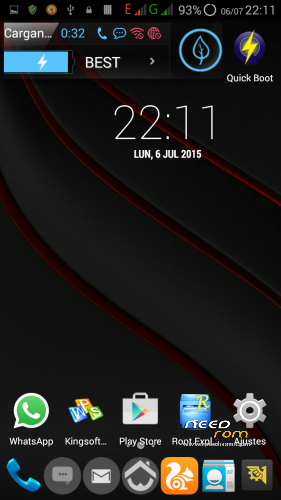
- Rooted
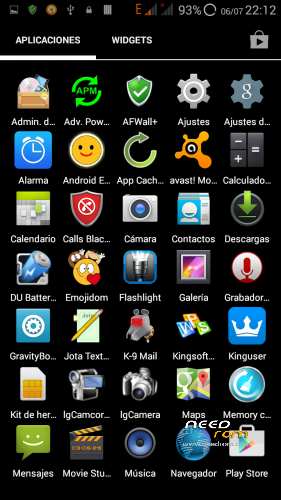
- Cleaning of Chinese applications.
- Xposed for Status Bar
- Some useful applications were added.
I tried for two days and the phone works very well .:
- Photos and Videos of good quality.
- Audio poor quality, improved manually.
- Good reception of telecommunication signals.
- Fast and stable WiFi and data connection.
- Leds working.
- I do not use GPS, so I do not report their operation.
Root permissions work, however, could not create the CWM recovery with MTK Droid Tools.
They are in include files with applications: Rashr and TWRP recovery. Rash must be installed on the phone and with it the same, install the TWRP recovery. The operation is very simple. The recovery was created for "psanlu" published in movilesdualsim.com. Thank you, friend.
Already installed the recovery, it should be used to backup the Rom in use.
You must save to SD card, the file is decompressed with the support I did
Then reboot into recovery mode to run the cleaning process with the "Wipe" option.
Already done, you must run the "Restore" option, choosing the decompressed file I uploaded with the update 2015,june06.
Carried out the steps properly, you must restart the phone in normal mode.
I hope will be useful. I so far fully enjoy this wonderful phone.
Regards.
※Please make a backup of your device before installing or updating ROM
The’ve tried more than 5 times,
and all the times I made this flicker on the screen,
even recovery and opening the logo!
The phone is the first with original Rom 11/3/2015
If you are possible clean backup and upload.
I rate 5 stars for effort anyway, thank you!
Sorry for my English!
Dear, I'll try tomorrow make backup without apps added for me. I can not make a Spflashtol rom version, because MtkdroidTools have problems to identify this phine. I can try again, but I need the stock recovery, wich I lost when install TWRP. If someone have stock recovery please let me know link to download and use it.
My friend Jocamaney has some problems. When we check phone, found "autorun.exe" file inside internal phone memory. Corrected this problem, phone now working fine.
I belive you can have problems with some directory in your Sd Card. Can you take out yhe sdcard, check it with your Pc antivirus._?
Also you can format iSd card and then put inside your phone. When you restart phone, save again firwmare and reflash.
Sorry about typing errors but I'm from Z1.
Hi dimi1982,
I have the same version, and like you had the same problem.
Maibe even worse, no backlight at all.
Solved it by shining a flashlight on the screen this helped me see what was on the screen.
And then i recovered it back to my 0319 backup, after this installed this 0606 backup using ONLY the System backup and uncheck everything else.
Now i have 0606 rom on it with good backlight.
Hope this helps
Regards JGXZR
We have 3 categories of firmware … it depends by the starter firmware:
1) z1 bought with c211_tz_3m_k368_20150311 version has a FOTA update to -> c211_tz_3m_k368_20150509
2) bought with c211_tz_3m_k368_new_20150331 has -> c211_tz_3m_k368_new_20150509
3) now i see this … c211_tz_3m_k368_new_13_20150606
Why this?? I had new_20150331 but to solve a problem i've installed 0319 …
I don't want to install twrp recovery … can someone upload 0331?
Thankyou
hi guys, i have a problem with gps that i compromise the use of this wonderful phone. i tried various updates from 319 to 519 , 606, but on all problems of inaccuracy. i'll explain in detail, not a problem finding satellites and once hooked remain stable, but whit all the browsers tested ( maps, sync, tom tom, copilot) is imprecise, very very inaccurate, does not update position frequently and often mistaken street and tells me on the streets nearby. i tried several apps for the fix and even from engeneermod, but no way, can anyone help ? thank you very much in advance. sorry for my english
Hello … my smartphone also blinks screen, is not operative. That we can have solution? Thank you
Dear makinof, it seems that you have not carefully read this thread, because our friend Jgzxr on 13,July,2015 wrote:
"I have the same version, and like you had the same problem.
Maibe even worse, no backlight at all.
Solved it by shining a flashlight on the screen this helped me see what was on the screen.
And then i recovered it back to my 0319 backup, after this installed this 0606 backup using ONLY the System backup and uncheck everything else.
Now i have 0606 rom on it with good backlight."
I belive is the best solution for now.
Be lucky.
Hi, did anyone of you using this 0606 ROM check Bluetooth?
I have installed this version as described, everything besides Bluetooth works fine. I installed this ROM on my 0509 version several times and checked Bluetooth immediately after the TWRP recovery even before I change the Language. Bluetooth does never turn to blue when I try to move the slider in settings->bluetooth from 0 to I. Maybe someone has an idea?
are this rom deodexed and compatible with exposed framework?
Friend, this firmware is not deodexed but gas installed xposed gravity. Only works for status bar.
To activate the navigation bar is necessary to modify "build.prop" to unlock, but the operation becomes unstable and causes many problems.
Hello JOCAMANEY. already try that way and on having entered to enter local update the mobile it goes out and initiates the recovery but it is the modified recovery and does not install. Not installing for zip either … can it help me? Thank you
i need old original recovery
Can it make copy of revovery.img and share with me?
Sorry makinof, but I've lost original recovery when TWRP was flashed. But you can try installing TWRP with rashar app (you can download from here).
Rashar let you to flash TWRP recovery. After installed, you need to restart you phone in recovery mode, and then, use the "restore" option, sellect the update file posted for suricatoy (previously saved in your SD card), and let program working for you.
When finished, restart phone and….ready to go.