
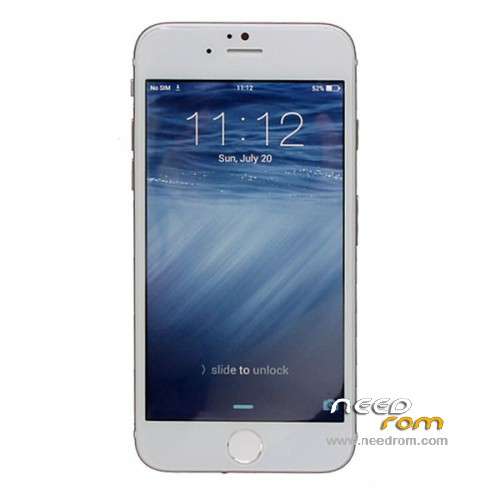
- Title: Kiphone i6 Lte / Goophone i6 / Wico 6
- Listed: August, 2014
- Last modified: 08/15/2014 2:12 pm
- Version: 4.2.2 with ROOT
You must be logged for ROM download.
38481 total views, 2 today
13 Total favorites
 Member Info
DESCRIPTION
ROM/backup with MTK Droid Tools from Kiphone i6 Lte MT6572 from FCT
(also called Goophone i6 / Wico 6)
- Prerooted with SuperSU
- Playstore
- Android 4.2.2 with iOS8 skin on top
- Multilanguage
More info about the phone here:
http://forum.xda-developers.com/android/general/iphone-6-concept-kiphone-i6-lte-silver-t2848058
Guide how to flash:
http://forum.xda-developers.com/showthread.php?t=2730031
IMPORTANT/PS. Before flash write down your IMEI. If you can not make calls after the flash (if you get Call Ended if you try), check that your IMEI is still in the phone! Factory reset can make the phone loose its IMEI on this model. Just flash the IMEI back into the phone afterwards with MTK Droid Tools, and you can do calls again.
Hardware : MT6572
Build number : ALPS.JB3.MP.V1.2
Build date UTC : 20140723-020913
Android v : 4.2.2
Baseband v: MOLY.WR8.W1315.MD.WG.MP.V2, 2013/07/02 17:21
Kernel v : 3.4.5 (linux@XzServer) (gcc version 4.6.x-google 20120106 (prerelease) (GCC) ) #1 SMP Wed Jul 23 10:06:58 CST 2014
Uboot build v : —– should be root shell
LCD Driver IC : 1-otm9605_qhd_dsi
※Please make a backup of your device before installing or updating ROM
Can you please upload the whole rom? I mean with the CACHE an USRDATA images?
I tried to install the rom in my Goophone i6 and I get an error. Searching the web It seems that the problem is that I need this 2 images that are not included in this rom.
You don't need to flash the CACHE and USRDATA, just flash the other files anyway. CACHE will be rebuild on the phone by use, and USRDATA is userdata, you don't want my personal userdata.
PMT changed for the rom… Any help please ?
When flashing Kiphone i6 (MT6572) with this ROM I receive an error:
"BROM ERROR: S_FTHND_FILE_IS_NOT_LOADED_YET (5007)
There is not loaded file yet!…
[HINT]:
1. Please check if the DA path is correct
2. Please check all the ROM files exist
3. Please check if the scatter file description is sync with the existing ROM files"
Well, the DA path looks to be correct for otherwise the process might not have reached the flashing stage.
I am not sure about the existence of all the ROM files, but I have downloaded your archived firmware thrice. I suppose the scatter description must be correct for you might have checked when making the distribution.Hence, I am stuck with no obvious solution.
Could you, please, advise any possible way to solve the problem?
Thankmyou in advance.
OS: Win7 x64 Pro ): Gophone i6, MT6572
SP Flash Tool: 5.13.52.200
Phone (brick
For Confirmation before i flash this rom, is this possible to work on my Iphone i6s clone please see details below
Hardware : MT6572
Model : IPHONE 6S
Build number : ALPS.JB3.MP.V1.2
Build date UTC : 20141010-083814
Android v : 4.2.2
Baseband v: MOLY.WR8.W1315.MD.WG.MP.V2, 2013/07/02 17:21
Kernel v : 3.4.5 (linux@XzServer) (gcc version 4.6.x-google 20120106 (prerelease) (GCC) ) #1 SMP Fri Oct 10 16:35:58 CST 2014
Uboot build v : —– should be root shell
LCD Driver IC : 1-otm9605_qhd_dsi
How to enable apple boot logo on this rom anybody knows?
Thanks for the rom its working but the question is how to enable boot logo? There is " HOLP " string when phone is turning off and on.
And the other problem is multitouch not working properly in this firmware, software testers and a lot of games recognize only single press
*#37# logo
BOOT ANIMATION : *#31#*
maaf gan punya saya tidak bisa di flash usb nya kadang kedetek kadang tidak,, selalu begitu ada solusi ga
Normally it works Google Play?