
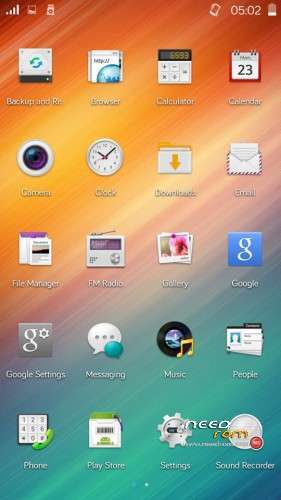
- Title: KitKat based Color OS
- Listed: December, 2014
- Last modified: 12/11/2014 11:45 pm
- Version: 4.4.2
You must be logged for ROM download.
16678 total views, 2 today
CUSTOM

 Member Info
DESCRIPTION
- Download ROM.zip from any of above link and copy them to your sdcard
- Now reboot into CWM or TWRP recovery
- Now choose ‘Select zip from sdcard’ and select the ROM.zip and flash it
- After its completion, just reboot simply reboot your phone
※Please make a backup of your device before installing or updating ROM
how can i download this rom, plx help
I can’t download this rom….
disable addblock
2 bad it can't be flashed…
Actually fixed it.
Just delete the following lines from "META-INF\com\google\android\updater-script":
set_perm(0, 0, 0777, "/system/etc/init.d/01turbo_engine");
set_perm(0, 0, 0777, "/system/etc/init.d/02turbo_tweaks");
set_perm(0, 0, 0777, "/system/etc/init.d/03zipalign");
set_perm(0, 0, 0777, "/system/etc/init.d/sqlite_optimize");
set_perm(0, 0, 0777, "/system/etc/init.d/OROCHI.txt");
This fixed the (Status 7) error on my Allview V1 Viper, but some othe errors occured after rom was flashed.
Like FC of UI, camera not working…
I'll try to fix them for the Allview V1 Viper.
You don't have to delete all those lines
and that is the reason why the camera is not working or other features.
I had the same problem when I tried to update my 4GB V1 Viper from official source
you only have to delete the line where it says for what model is the ROM made for.
Here is a more detailed video on what to delete
https://www.youtube.com/watch?.....v=h5QbsUsQx70
I forgot to ask, is this dual sim 3G?
how to download?
make an account(it is free)and then you can download from the given links
@toxick69
Where is that line you are talking about?
This is a custom rom, and does not have that line as the original Allview update.
You reffer to the line with "assert" in it right? And it is in the first lines of teh updater-script…