
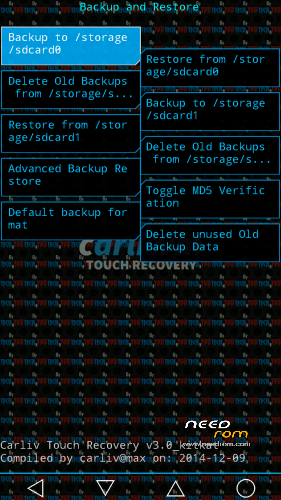
- Title: KITKAT CTR Recovery v3.0
- Listed: April, 2015
- Last modified: 04/07/2015 8:39 pm
- Version: 4.4.2
You must be logged for ROM download.
15128 total views, 1 today
3 Total favorites
 Member Info
DESCRIPTION
For install this custom recovery, the first make sure your phone is running on kitkat 4.4.2 Based Firmware..
If you are running on Jellybean 4.2.2, Please upgrade first to kitkat 4.4.2 Based Firmware..
And make sure your PC has installed Mediatek USB Driver
Tools :
1. PC/Laptop
2. SPFlashtool
3. Scatter file [kitkat]
Guide for installations :
1. Save the CTR.img & Scatter file in one folder
2. Open SPFlashtool
3. Click on scatter-loading > Select MT6582_Android_scatter.txt that unpacked from Scatter file [kitkat].zip and scroll down see the recovery is checkly
3. Click download, if Flashtool give notification click yes
4. Turn off phone, remove battery, plug usb cable from pc to ur phone, insert battery
5. Wait until the proccess loading a red bar to success with a green circle checkly
6. ENJOY!! now you has installed CTR recovery on your device
7. Remove battery, insert battery, turn on ur phone….
*Try boot into CTR recovery: at device position off, just hold the power+vol up button
==============D.W.Y.O.R…!!!==============
*Original Source : https://mega.co.nz/#!8M8URaoB!ILXfFXDpcIR8nmRfpxeye-otrbgE6_ZXkfUQ364At1g by almasim95
Sorry for this…:)
※Please make a backup of your device before installing or updating ROM
Why do people forget to give credits for the others work…. At least you could have posted the source…. Thanks for using my work without asking for permission….: Original link from my cloud…. https://mega.co.nz/#!8M8URaoB!.....6_ZXkfUQ364At1g
almasim95@ iam sorry sir i forget,,
SP FLASH TOOLS DOESNT RECOGNISE THE SCATTER FILE. WHAT TO DO
Thanks bro
Please give me a direct link