
- Title: Len. K3 Note Omni(Final) Oreo Stable
- Listed: January, 2020
- Last modified: 01/30/2020 1:54 pm
- Version: And. 8.1
You must be logged for ROM download.
23470 total views, 2 today
2 Total favorites


 Member Info

DESCRIPTION
Please First Money for donation universal iban = TR42 0001 0003 1361 1202 9450 01
*Bugs:
- No – Nothing – Every Things Good Working Baby
*Features:

_Full Google services
- Android voice match (Google Assistant(Ok Google)
- Android trusted face (Face Unlock)
- Android face detection
- Optimized Google Go apps (Low Ram Use)
- No Bug and no Lag
- Good Gaming Performance (Pubg, Call Of Duty and more)
- 1.2gb Swap(Virtual Ram) size (kernel adiutor)
*The following errors have been fixed:
- Internet selection points.
- Work SIM cards and ussd.
- Work with a memory card and much more.
*Improvements:
- Present: gapps, busybox.
- Corrected poor design and brought to the state of Pixel UI.
- Discarded all useless applications and replaced with the best.
- Disabled selinux mode on an ongoing basis, which did not make it possible to safely use the firmware.
- Improved the quality of the Internet.
- Improved performance and autonomy.
- New Google Sans fonts from Android 9 (Pixel 2 XL).
- New emoji also from Android 9.
- Other bug fixes and improvements.
Install Steps:
1-.) Minimum TWRP 3.1x
2-.) Wipe Dalvik, cache, system delete
3-.) "*1-OmniROM-8.1.0-aio_otfp-OFFICIAL >|>
*2-Open_gapps-arm64-8.1-nano-20191221 >|>
*3-[AE][Light]ViperFX2710_DolbyDigital-2019" install – restart and waithing for opening system
4. Than Your Optional Root Medthod(Magisk or SuperSU) 
Method 1: Magisk = Go TWRP Flash "4.1-Magisk-v18.1(18100).zip" restart and install MagiskManager7.apk
Method 2: SuperSU = Go TWRP Flash "4.2.1-SR5-SuperSU-v2.82-SR5-20171001224502.zip" restart
ENJOY
NoTe :=: if the application is not installed. Download and install the old version from apkmirror.com and update it from PlayStore.
for example: Chrome = Google Chrome: Fast & Secure 55
And : Some System Apps Cannot Open (Butonmatter, Raging thunder) = Convert from system App to user App https://rexdlfile.com/index.php?id=titanium-backup-pro-apk Or Download TITANIUM BACKUP PRO
You need to install the firmware through the stable version of TWRP.
At the moment, this is: TWRP v3.1.1-3 MOD
Detailed firmware installation instructions:
1. Go to the cleanup section and make the "format" sections: data, cache, dalvik cache and system.
2. Via the file manager built into TWRP, find the firmware and confirm the installation.
3. After installing the firmware, reboot the device in TWRP again and install root.
Attached Filesupersu_pro_v2.82.zip (1,43 МБ)
PS. After installing supersu_pro_v2.82, the SuperSu application does not appear, it must be installed separately.
Attached file Superuser.apk (654.87 KB)
—————————————————-
There are practically none, at the moment this is the most stable firmware of all Oreo-based firmware for this device.
To enable the video recording function in the camera, you need to go into the camera settings and enable the "Camera2API" mode.
For the Internet to work correctly, you must enable the APN access point, select the "desired" network mode, which you most often use. After that, it is advisable to clear the network settings.
If for some reason the firmware does not suit you, then you should not write about it, in this case use other firmware.
Respect someone else's work! More than half a year of time was spent working with the firmware.
BIG THX: VERGIL777
shuchvadim
mugik04
derak1129
Amolak
Drashkin
Кродович
Daniel_HK
※Please make a backup of your device before installing or updating ROM
Service logd crash , can't see logcat output , Others working good , Thanks
not work….
Video bugs sir
I can't install in my k3 note please will you send me a tutorial
Button Mapper keeps stopping does not start. Any solution?
Win 10 Security on my PC warns that the ROM file contains a trojan. It has deleted the file!
Can you please explain?
Funciona muy fluida la rom,el unico problema que tengo es que el cajon de aplicaciones me aparece en en color negro solo se ven los iconos sin el texto del nombre de la aplicacion, no he logrado encontrar desde donde cambio el color del cajon de aplicaciones para ponerlo en color claro asi se pueden ver los nombres de las aplicaciones. Espero que puedan decirme como cambiarle el color, desde ya muchas gracias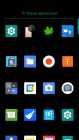
The rom works very smoothly, the only problem I have is that the application drawer appears in black, only the icons are seen without the text of the application name, I have not been able to find from where I change the color of the application drawer to put it in light color so you can see the names of the applications. I hope you can tell me how to change the color, thank you very much in advance
Fix heating issue i not rooted my device
Fix heating issue i not rooted my device now and don't want to root but my device not verified as shown in playetore.
YouTube video is not playing correct videos are shifting colour automatically
I need another kernel for this rom can anyone send me any other kernel link for Android 8.1