
- Title: Lenovo A6000/Plus MIUI 7 Lollipop Custom Rom
- Listed: April, 2016
- Last modified: 04/19/2016 11:33 pm
- Version: 5.1.1
You must be logged for ROM download.
12291 total views, 2 today
4 Total favorites

 Member Info
DESCRIPTION
Hello Lenovo A6000 and Plus users now your favorite MIUI 7 custom rom is available based on android lollipop version 5.1.1 and we can assure that this rom is one of the best custom rom for lenovo a6000 and plus users. The user interface of MIUI custom roms has been always one of the superb features and with its wide varieties of themes available.
DISCLAIMER : Rooting or flashing custom roms results breaking the warranty of the device. Techolite and its authors are not responsible for any damage which is incurred in the process of flashing custom roms or rooting the device. We highly advice to take a backup of your device prior to performing the process.
Pre-Requisites
Lollipop pre-installed – Read the guide to upgrade to lollipop here
TWRP Custom Recovery – Read the guide from here
MIUI 7 Lollipop Custom Rom
Google Apps
About The Rom
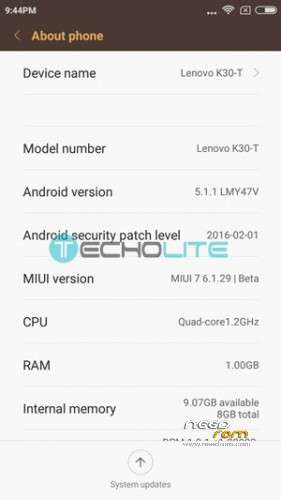
Android Verion : 5.1.1
ROM Version : 6.1.29
Type : MIUI 7
Author/Credits : Delee/FlourMo
Rom Size : 432 MB
Features
Pre-Rooted
32 Bit
Xposed framework
SuperSu
Custom themes
Heads up bar
Much more
How to Install MIUI 7 Lollipop Custom Rom
Step 1 : Copy the MIUI 7 Lollipop Custom Rom and Gapps on your SD Card
Step 2 : Boot into Recovery
Switch off your device
Now press Volume Down + Power Button together for 2-5 seconds until you see the bootloader
Connect the USB to your PC/Laptop and then flash TWRP recovery (read the guide here)
Step 3 : Make full wipe including “system” (data, dalvik, system, cache)
Step 4 : Now go back and click install and then click one level up
Step 5 : Flash the ROM and then the Setup Removal Wizard
Step 6 : Reboot (the first boot can take up to 2-5 minutes)
Bugs
None so far reported
Screenshots


Pre-Requisites
Lollipop pre-installed – Read the guide to upgrade to lollipop here
TWRP Custom Recovery – Read the guide from here
MIUI 7 Lollipop Custom Rom – Download it from here
Google Apps – GApps 5.1.x
Android Verion : 5.1.1
ROM Version : 6.1.29 v2
Type : MIUI 7
Author/Credits : Herman Koeman
Rom Size : 460 MB
Features
Pre-Rooted
Xposed framework
SuperSu
Custom themes
Heads up bar
Much more
How to Install MIUI 7 Lollipop Custom Rom
Step 1 : Copy the MIUI 7 Lollipop Custom Rom and Gapps on your SD Card
Step 2 : Boot into Recovery
Switch off your device
Now press Volume Down + Power Button together for 2-5 seconds until you see the bootloader
Connect the USB to your PC/Laptop and then flash TWRP recovery (read the guide here)
Step 3 : Make full wipe including “system” (data, dalvik, system, cache)
Step 4 : Now go back and click install and then click one level up
Step 5 : Flash the ROM and then battery patch, gapps, xposed
Step 6 : Reboot (the first boot can take up to 2-5 minutes)
Bugs
None so far reported
Recent search terms:
miui lollipop a6000 plus
miui for lenovo a6000 plus
best custom rom for len
rom miui 5 1 1 lenovo a6000 plus
Miui7 lollipop custom rom
※Please make a backup of your device before installing or updating ROM
nice will try