
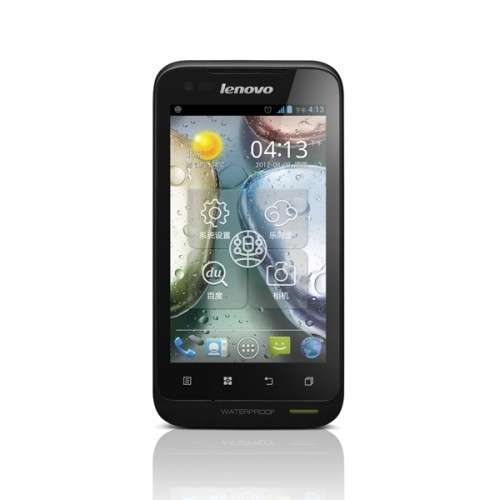
- Title: LENOVO A660
- Listed: November, 2012
- Last modified: 11/08/2012 1:27 pm
- Version: ROM Android 4.0.4 A660 ROW S106 cybermaus ICS v3.1
You must be logged for ROM download.
52089 total views, 2 today
 Member Info
DESCRIPTION
ROM LENOVO A660 – ROM Android 4.0.4 A660_ROW_S106_cybermaus_ICS_v3.1
Instructions:
Summery of mods I made to it remain the same as before, to repeat:
- Rooted the phone with Chainfire SuperSu
- Set to boot in US-english, changed name of ROM
- Added MoreLocale for extra languages in 3rd party apps
- Removed Chinese apps, incl Chinese keyboard, removed SmsReg.apk
- Updated Google GAPPS, Play Store, Maps, etc
- Added MobileUncle toolbox, SManager (root explorer).
- Added fix for location services
- Added Skype, Whatsapp, Titanium backup (free version) and some others, as auto-install upon userdata wipe / factory clean
- Prepared busybox (you need to run script /system/xbin/installbusybox as root if you want it)
- Replaced bootup animation with silent Lenovo butterfly
- Removed FaceBook and Google+. They were huge, /system was full, and they are autostart, so always consume a little resources. You can install them from play store if you need them. Removed Chrome too.
- Fixed WiFi to use all 14 channels rather than 11 US ones (may be undone when selecting new Locale)
- Fixed so the Debug-USB notification is no longer shown
Language support: EN/IN/RU/VI/CN
Instructions:
- Put zip on SD card
- Reboot into recovery
- Apply the ZIP.
ROOT:
Your Lenovo A660 shutdown, will open your USB debugging in the off state (do not connect the data cable), then press the "volume down" key, press and hold the "volume down" key is not to put, and then presspower key (the order to be clear), hold down the Do not place, until the phone is a four-line interface in English, you can let go.

After downloading, unzip, then click inside the SuperOneClick.exe

Then we see the upper right corner, there is a drop-down box Exploit where the choice to pull down, and then select the "zergRush", as shown:

Then we click on the "root" on the left, the pop-up dialog box, we select "YES", then the text box below, you will move up and began walking data appear until the last line of "waiting for device" Figure:

download this software ROOT-adb

Prompted, press any key, and the next, the Lenovo A660 will restart, a total restart three times, remember, the second time, every time you want to wait for the phone to reboot into the interface of the phone system, press any key!
After the second restart, appear, as shown:

See If "uid = 0 (root) gid = 0 (root)" and the like, then congratulate you, the Lenovo A660root success! According to the prompt, press any key!
※Please make a backup of your device before installing or updating ROM
Thank you but any idea how to get out of the wiping loop ? can get into debug mode (adb) but cant boot the phone into phone mode.
I presume some where in nand there is a flag set to rusume. which is causing the phone to return to wiping loop. with other chipsets we can use fastmode to reinstall the android OS to original rom state which would cure the wiping loop as im only (i believe in softbrick). Any input from anyone who has resolved this issue (wiping loop and or full restore to original rom) via adb or SP tools (everytime i have used SP tools i get error 8083)
Thanks
DanTheMan
what does it means: "download this software ROOT-adb" ??
What am I supposed to download?
Please help – there is no way to use this phone without a new ROM
ROOT-adb program for root the mobile ,
you can download program
look links
I can't find it unfortunatelly… anywhere..
And if it comes to rooting with different methods – mostly programs, during rooting procedure ask me to click some button I.. don't have
And than it's done – nothing i can do..
MTK Droid, some chinese programs – each one – same problem..
Hi to all i have found this video of SP Tools very informative, would or could some kind soul follow the video and extract the full lenovo a660 rom for me. I have solved the error with SP Tool not being able to write to the phone but inadvertantly i can not boot the phone or get responce from it except to write with whole rom again with SP Tools (ie a TFT). if some one could extract the rom as in theway the video shows i`m quite positive i should be able to write the whole rom again and be back up and running
Thanks to onyone that can help
https://www.youtube.com/watch?.....v=f-Hp1-Bd7so
DanTheMan.
I looked at the video link you posted Dan, yes informative.
I'm also trying to root my A660, mostly just for the GMAIL app and Play Store.
I've made some progress using both SuperOneClick and SP Flash Tool… or really just have gotten familiar with the program interface.
It looks like the scatter file in the Recovery folder has no extensions, therefore it is useless.
I think the adb file in the SuperOneClick may work but the drivers in there don't seem to work.
Let me know if you've made any progress please, and I'll do the same.
Kerry
@ kerry
if you have not rooted your a660 yet as the video shows backup the whole of the phones rom first else you may endup in my predicument. and that is what i need an entire backup of all the a660 rom as shown how to do in the video. lol that way we can fix our phones should we screw up
Dan
@ Kerry. i have an a800 full factory rom which was extracted as shown in the video, here a list of file which we need to have to rectify soft bricking the phone .
files would be similar to this
Volume in drive C has no label.
01/03/2013 17:45 <DIR> .
01/03/2013 17:45 <DIR> ..
15/12/2012 20:40 7 android-info.txt
15/12/2012 20:59 3,985,408 boot.img
15/12/2012 20:49 10,678,552 cache.img
15/12/2012 20:37 24,612 DSP_BL
15/12/2012 20:34 512 EBR1
26/11/2012 15:10 86,122,496 fat_a800_row_R2.img
15/12/2012 21:00 57,197 installed-files.txt
15/12/2012 20:35 3,388,668 kernel_a800_row.bin
01/03/2013 17:45 0 list.txt
15/12/2012 20:34 343,402 logo.bin
15/12/2012 21:03 304 manifest.xml
15/12/2012 20:34 512 MBR
15/12/2012 20:34 422 MT6577_Android_scatter_emmc.txt
15/12/2012 20:33 106,520 preloader_a800_row.bin
15/12/2012 21:00 1,188,784 ramdisk-recovery.img
15/12/2012 20:59 592,405 ramdisk.img
15/12/2012 21:00 4,581,376 recovery.img
15/12/2012 20:59 4,333,716 secro.img
15/12/2012 21:00 525,761,132 system.img
15/12/2012 20:34 181,888 uboot_a800_row.bin
15/12/2012 20:49 12,800,304 userdata.img
21 File(s) 654,148,217 bytes
2 Dir(s) 14,117,150,720 bytes free
as you can see these are the files needed for SP Tools to do full reinstall and what SP Tools would extract from an original unaltered a660 phone as a full factory rom backup.
if you look in the custom roms all of thes files are missing
Dan
If I was to backup my original A660 ROM would you have been able to unbrick your phone with it or is the ROM somehow specific to the phone?
I have an Official a660 rom and have unbricked the phone with A660_S019_1208024. if anyone need it leave a message and i post it a link to it
Dan
So you're no longer bricked.
Have you given up on a modified ROM?
My need is to get all of my google contacts into my A660… I've hesitated to begin using it at all because of this one reason.
I see that the uploader of this ROM has uploaded more modified ROMs for the A660. I'm thinking to try the newest of his.
Hiya Dan.
Hope it's not late to ask for that official A660 rom, because the only backup I made before bricking my phone was the one CWM did dump into my SD card. I can't manage to convert it to something flashable with SP tool, moreover when I've unexepectedly fully wiped my phone "playing" with the SP tool memtest feature and trying to know the tool comprehensively. —> It's been noticed by developers, ticking the EMMC and NAND test boxes before starting a memory test will drive your phone into a pure piece of crappy waterproof plastic (It completely erases the phone, preloader included).
My only hope now is, before having to disassemble the phone to testpoint it, try to fw-upgrade the exact ROM a Lenovo A660 could expect, with exactly the same preloader and other stuff it left the factory. So I need every component of SP tool lists into its download tab.
Thanks in advance, expecting to hear from you ASAP.
Check my contact data in my profile.
Hi Dan
Do you still have the Official ROM A660's? Can you give me a link which is available?
Formated the A660 wit SP Flash now not swithing on what to do.
hi,
can't root there are an error message after the 1st reboot.
Can anybody help me?
hi,
solved the problem (permition denied) ,
disconect all other usb device except keyboard and mouse, turn to usb storage only if you are using windows 7 or vista.
launch the script then it work,
work only on android 4.0 ( lenovo a660 ) but not in 4.1 ( hero 9300+ )
I cant seem to get it working for me though. I got all the ADB drivers installed. Recovery mode and even debugging mode I just get Permission denied : let me post the whole log of the DOS window:
adb server is out of date. killing…
* daemon started successfully *
link failed File exists
Íěđ┬â» – ╝╠đ°úČĎ╗Áę╔Ŕ▒Ş═ŕ│╔Íěđ┬â»íú
Press any key to continue . . .
/system/bin/sh: cannot create /data/local.prop: Permission denied
Íěđ┬â» – ╝╠đ°úČĎ╗Áę╔Ŕ▒Ş═ŕ│╔Íěđ┬â»íú
Press any key to continue . . .
uid=2000(shell) gid=2000(shell) groups=1003(graphics),1004(input),1007(log),1009
(mount),1011(adb),1015(sdcard_rw),3001(net_bt_admin),3002(net_bt),3003(inet),300
6(net_bw_stats)
╚š╣ű¤ď╩żí░uid=0(root) gid=0(root)í▒╚╗║ˇ╝╠đ°úČĚ˝ď˛CTRL + C╚í¤űúČ▓óÍěđ┬┐¬╩╝íú
Press any key to continue . . .
remount failed: Operation not permitted
failed to copy 'files\su' to '/system/xbin/su': Read-only file system
Unable to chmod /system/xbin/su: No such file or directory
Unable to chmod /system/xbin/su: No such file or directory
Removing changes except ROOT
rm failed for /data/local.prop, No such file or directory
rm failed for /data/local/tmp, Permission denied
failed on '/data/local/tmp.bak' – No such file or directory
failed to copy 'files\superuser.apk' to '/system/app/superuser.apk': Read-only f
ile system
Íěđ┬â» – ╣ž¤▓úí─˙Á─┴¬¤ŰS560│╔╣ŽROOT┴╦úí
Press any key to continue . . .
What Am I doing wrong here ?
I succesfully rooted P700i with ease. But this is a piece of sh1t that dont work for some reason.