
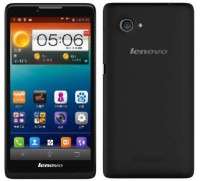
- Title: Lenovo A880
- Listed: March, 2014
- Last modified: 03/11/2014 10:18 pm
- Version: Android 4.2.2
You must be logged for ROM download.
45192 total views, N/A today
74 Total favorites
OFFICIAL

 Member Info
DESCRIPTION
ROM Phone LENOVO A880 – ROM Android 4.2.2
Official ROM Lenovo A880 Version: Lenovo A880_S018_140102
The most stable official rom. Multilanguange
No Chinese Apps
Pre-rooted, with gapps
Flash using Flashtools
※Please make a backup of your device before installing or updating ROM
can u gime step by step todo it successfully??
work fine with ap set ? tq for respons
work just fine with ap set.
u can google how to upgrade firmware using flashtools
If you dont even know how to flash please dont visit ROM upgrade sites , we dont spoon feed babies. You need to have a basic knowledge of ROOTing and flashing for your phones or else you RISK spoiling your new phones just to satisfy your ego of having the latest firmwre the biggest "c%&k" and a spoiled phone at the other side of the world and expect forum members to help you from the other side of the world??
This ROM has a recovery similar to CWM can install zip and do data backup. To enable daydream download an app called DAYDREAM from Playstore and set your daydream to "while charging" "while docking" or ".both". This cannot upgrade the SuperSU like my original 013 have to use VROOT to reroot the phone and you can uninstall SuperSU because the Chinese when they root it using SuperSU never put in any busybox in the either /bin or /xbin folder therefore nothing is "symlink" to the system. Maybe after using VROOT to ReROOt the phone and can download again the SuperSU and then install "busybox" because as it is it has NO "busybox". Therefore the SuperSU doesnt work correctly cannot even update the "su" binaries but still have half root the applications that requires root can still work but not 100% performance - like you cant change the permission/ownership of /system/app or unisntall system app. Only after ReROOt with VROOT can the ROOT work correctly, then can uninstall SuperSU and leave the VROOT Superuser.
I used S020 but having trouble with ROOT and need to install modify for GApps but cannot do so I reverted to S018 with GApps and put in the OTA update app inthe system/app and can get OTA but OTA succeeds to downlaod but fails to update the firmware (reported by many users who uses S018)
Any further discussion please go to XDA forums : http://forum.xda-developers.co......php?p=50352804
S018 which is this one do support move to sd card?do they?
Unable to flash using flashtool…no userdata found when i click on firmware updgrade..why?? i have done put it manually..still go nothing.. answer me pls..is there another way to flash? and 1 more thing..how to update recovery CWM for A880? thanks for your advice sir
..
i replace recovery.img with recovery2.img from s013 file. then rename recovery.img to recovery2.img in scatter file. after flashing, u will get easy recovery menu. then put lenovoOTA.apk inside system app folder. Set permission to re-r-r and ownership as root – root. Install lenovosafe. everything will ok. ( except OTA still cant install into system. i think because 018 has modded gapps and its signed blocking OTA to install )
how to flash using flashtools. when my phone connect to computer flashtool can’t start
Have you visted the XDA Forum to get help yet? Your problems seems to be incomplete installation of drivers MTK USB ADB dirver installed?VCOM drivers installed? How to do you start your flashing process – the phone must be off and then take out the battery 10-20secs, (then you can put it back in or you dont want to put it in back its up to you.) Start the Flashtool and press the "download" button, only then you attach the USB cable to the phone and please dont touch the cable or move the phone while doing the flashing (the original cable supplied is loose and can easily loose contact with phone) So the first thing is to attch the smaller USB connector to phone and put it down flat in front of you (it shoud be off after remove and put back battery). the run the Flashtool (if all of the divers are installed correctly already) press the "download" button then attach the bigger USB connector to the PC without moving or shaking the phone. Vist XDA forum : http://forum.xda-developers.co......php?p=50352804
salam cracktech,which version more stable s013,s018,s020?that has root n gapps function properly…thanks in advance
Please use the latest posted A880 S020 by MANNUR kalau visit the A880 page his firmware will be the first one dont use the Chinese posted S020. I have just finished flashing his firmware and i find it is the BEST. the MANNUR version comes with GAPPS and TWRP touch recovery rooted with SuperSU latest version except that right now I discussing with him where to install the "busybox" location. So far even without "bsybox this ROM rock!! only need to download Gmail and GoogleSearch/Google Plus (optional for everybody else but critical to me).All of the rest of A880 firmware is 'SHITTY" job done by the Chinese. except that one by MANNUR a Russian.
Just remember before flashing tick the DA,DL box a the top right hand corner of FlashTool or else you will have a "success" flashing but your phone will not boot up.
So please dont use the SHITTY -Phtoooiii ! Chinese posted firmware. The S018 is close 2nd posted by our fellow country man. but now you have S020 the latest why use S018?
I have tried ALL (except MIUI because too many Chinese bloatware) the firmware on this A880 page but I can vouch that MANNUR S020 is the BEST.It desnt randomly reboot itself.
how to flash this rom to my lenovo a880?
Must flash the "recovery" from the other MANNUR ROm 1st version (that is the TWRP recovery) you can flash the whole ROM or just the "recovery" alone and once it is done you reboot into "recovery" and then install this ROM (which is in zip format)If you dont knw just stick to the first MANNUR version which is already GOOD.
f you dont know what is being said here dont do it till you have read through other forums on how to flash zip update through TWRP/CWM recovery.
this rom can move to SD or not?
Dear Kecik,
We are already on S027 why use this S018? It is correctly rooted with busybox installed. But nope the answer is still the same cant move to SDCARD with 8GB data storage and 1Gb system memory is more than enough to do the most demanding task EXCEPT IF you want to play GAMES which serves your right. You should have bought a PAD with build in 32Gb data storage like mine (even then I dont /never in my life since I own the first PC in 1982 have I load any games on my devices)
This is the most stable rom and i can confirm this will run 100% prefect with phones purchased with directd and 1gadget malaysia.
Previously i had problems with connecting to wifi and it will be stuck in "obtaining ip address".
this comes prerooted and supersu. if khrfkr can post the 4.3 update i will definitly getting his/her version.
I beg to differ it is the MANNUR S027 which is the most stable and no hassle with either TWRP/CWM option and I've been on it since MANNUR appeard on the scene , Malysia's A880 owners club are all for it to upgrade to S027 and none of them have reported ANy problem withSuperSU/busybox updates.No random reboots/no losing 3G/SMS but of course there is no app2sd function have to port over from MIUI kernel and systems file.