
- Title: Vibe P1
- Listed: September, 2016
- Last modified: 09/11/2016 9:21 pm
- Version: 6.0.1 ROW S285
You must be logged for ROM download.
20825 total views, 4 today
5 Total favorites
 Member Info
DESCRIPTION
Introduction
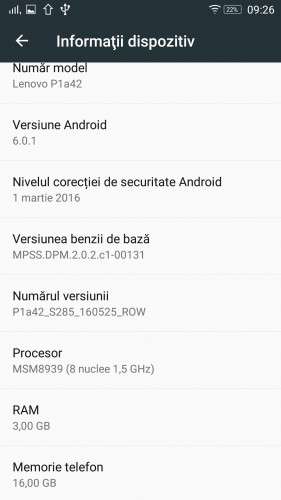
The archive provided on the links on this page is a full factory update ROM designed for Lenovo P1a42 devices (2G RAM, 32G Storage, NFC, fingerprint, etc). As this is a ROW (Rest Of the World) ROM, all Google services and apps are installed and usable, there is no China bloatware loaded.
There is no alteration of the ROM (no root), what you have here is a full untouched ROM that:
- can be used to restore P1a42 devices to 'factory' state
- can also used for Vibe P1c72 and P1c58 devices also. So far, it is known that NFC function doesn't work when using this ROM
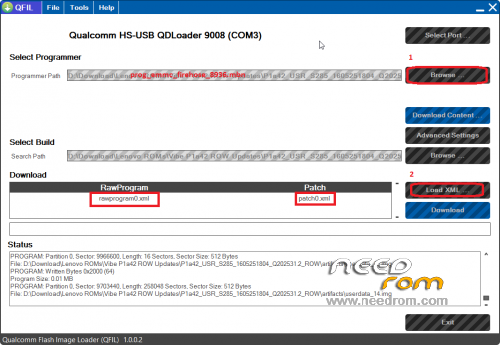
The ROM is flashable with QFil tool.
This ROM is not meant for Lenovo P1m this device is using a totally different hardware.
Installation
1 – Download P1a42_USR_S285_1605251804_Q202531.2_ROW.part* files, unrar them to a folder.
2 – Make sure you have the qualcomm drivers installed and the qualcomm QFIL tool available
3 – power off the phone
4 – connect the USB cable between the PC and the phone with the vol-up key pressed. The phone should briefly light up the screen
5 – open the qfil tool (start/programs/…/QFIL)
6 – check at the top of the window for a port detected, then click on the "Browse…" button right side of the "Programmer path", browse for the 'prog_emmc_firehose_8936.mbn' file extracted at the first step
7 – Click on 'Select XML' next to 'Download', browse for rawprogram0.xml, on the 2nd popup browse for patch0.xml
8 – Click on 'Download' button, wait for the transfer to complete.
9 – The phone will restart, will ask for initialization (similar to a factory reset). Leave the OTA update for later, for it might influence setting of the country (bundled apps / radio bands) below!
10 – Optional – Open dialer app and dial in ####5993# , the phone should display "Internal version P1a42_USR_S285_1605251804_Q202531.2_unset. The sequence above is used to see what country is set on the device (not language!, that's a different thing), it will display the country code instead of 'unset' after proper configuration
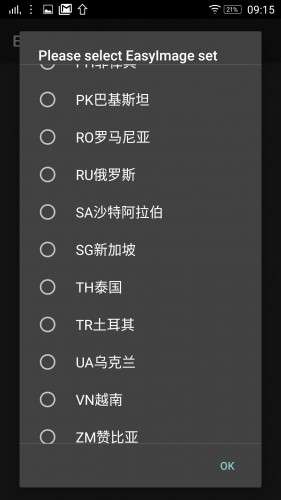
11 – Connect the phone to the PC, copy 'easyimage.zip' to phone storage, open dialer app and dial in ####682# , pick the country where you are located, then set it.
12 – Wait for the supplemental reboot and app installation (depending on country, the list of value-add applications actually installed will differ. You can check if the step 11 finished successfully, by executing step 10.
13 – Delete easyimage.zip from the phone, it is no longer needed.
14 – Continue the phone setup (setting WiFi / Google accounts, etc)
If you omit the step 11, then subsequent OTA updates will end up with a harmless red error message and the baseband might not have enabled 3/4G frequencies that are actually used on your country (ie: 4G Band 38 for Digi.Mobil RO).
Notes
- the SIM designed as voice-only (non-data) will always be set to use 2G networks. Because of this, it is not possible possible to use non-2G network (Digi RO, for example) as non-data/secondary SIM, the phone will insist to use it in 2G mode, regardless of network lack of support for 2G.
- the ROM is loadable in P1c72 devices also. It will use 3G RAM, 16G storage, and it will be update-able over the air, but the NFC function will not work.
- Visit this page again and share your experience with this ROM!
- please consider making a donation to me if you think I saved your time and money, using 'Donate vith Paypal' buton below on this page. This way I will be motivated to test more roms and devices. Also, please click on the stars next to author 
- When installing easyimage (started after dialing in ####682#), there is a list of apps installed, depending my selected country. The following apps contain SMS paid services and are identified as "Potentially unwanted apps" by some antivirus programs: Guvera Music, Tap The Frog. These 2 apps are only installed if the selected country is one of the following: ZM, AE, EG, VN, CZ, IN, ID, RU, LB, NA, TR, LK, NG, TH, PK, PH, HK, DZ, SG, OM, MA, KE, UA, SA, MY. The virustotal reports for these 2 apps are available here and here .
Also, a 3rd app, Guvera Music, is installed for the following countries: AE, VN, IN, ID, RU, TH, PH, HK, SG, UA, SA, MY. Guvera Music is identified as a downloader app, see the report here.
If you suspect these apps might behave in an undesired way, please go to settings / apps, tap on their name, then go to "Permissions" and then unselect any undesired permission.
※Please make a backup of your device before installing or updating ROM
After extracting about 99% it asks about path to provide
How could this problem be solve?
Hi. Where do I get the easyimage.zip from???