
- Title: Lenovo P70-A TWRP & ROOT
- Listed: July, 2015
- Last modified: 07/17/2015 7:30 pm
- Version: 2.8.6.0
You must be logged for ROM download.
25171 total views, 2 today
12 Total favorites
 Member Info
DESCRIPTION
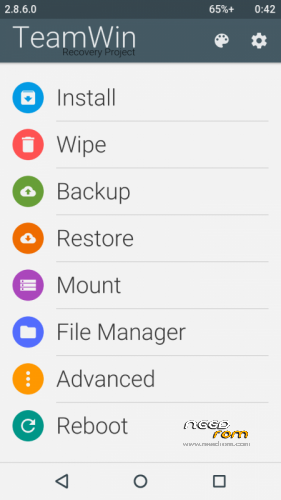
Here is the TWRP recovery & ROOT guide for Lenovo P70-A the International Version with 2GB RAM
All needed files are in the download links below
1-Turn Off Your Phone
2- Connect your Phone While Turned Off
3-Download and Install Lenovo SP Drivers
3-Extract the Scatter file and the recovery image from the rar file and put them in the same folder
4-Open SP Flash tool and choose the scatter file
5-Unplug your phone and Press on Download in the SP Flash tool and replug your phone again
6- Wait till you see a Green message telling you that the procedure was a sucess
Rooting for who wiches to root their phones
1-Turn Off your Phone
2-Download SuperSU-v2.49.zip and put it on your internal storage in your phone
3-Press on VOL+ & Power till you get a scren with 3 Options
4-Choose recovery using the VOL+ key and VOL- to confirm
5-Press on Install in recovery and choose the SuperSU-v2.49.zip file from your internal storage
6-Enjoy.
※Please make a backup of your device before installing or updating ROM
I have install 5.1 lolipop
then I not install TWRP 2.8.6.0
then erro message is "pmt changed for the rom
it must be downloaded"
why??
no comand ????????
I can confirm this works fine (including the root bit too!) with Lollipop 5.1 build number P70-A_S139_151214_16G_L_ROW.
However when I've tried updating the SuperSU app from appstore and the SU binary after that, using the TWRP method it failed to update the binary, and using the Normal method softbricked the device (blank screen, stuck in boot loop with short vibrations every 10-15 secs), so beware of that. But using the SP Loader I've flashed the TWRP again, then went to recovery mode and installed the SuperSU zip again and it's now booting fine again (although SuperSU didn't show up in the app drawer, had to reinstall it from Play Store). I didn't update the SU binaries this time with SuperSU, but it's working fine, all root requiring apps are working fine so far.
Update: the trick to update the SU binary with SuperSU without soft bricking your phone: when SuperSU asks if you want to update binary, say yes and choose TWRP option, but when the dialog shows that the device needs to be rebooted, don't click OK, instead turn off your device and turn it on while pressing volume UP and the power button (recovery mode). TWRP will start and perform the automatic update of the SU binary then reboot and voilá!
Sip
I solved the problem of downloading TWRP to flash, using the new version of sp flash tool v5.1952 for Windows! Identify the port COM AS MUCH BETTER!
THANK YOU , HSaber !