
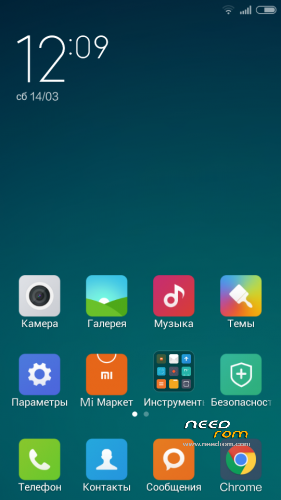
- Title: Lenovo S650 MIUI V6 _5.5.29 multi
- Listed: March, 2015
- Last modified: 05/31/2015 7:19 am
- Version: Lenovo S650 MIUI V6 5.5.29 multi
You must be logged for ROM download.
37927 total views, 2 today
171 Total favorites
 Member Info
DESCRIPTION
NOTE: Firmware for placing in memory CN Installation on Android 4.4.2
Adding more languages
Numerous bugs fixed
CWM / TWRP
Step 1: Load the custom ROM are copied to the root directory of the external SD-card-
Step 2 :. Disable able to keep:
-. The power button + volume button to enter the recovery mode
- Wipe Data / Factory Reset -> Delete all user data
- Wipe cache partition -> Wipe Cache
Step 3: Return to the restoration of the main interface for the installation disk SDCard -> choose zip from SDCard -> select the disk
Step 4: Flush the restart your phone requires patience – the first boot will take some time,
5. Select TnemeManager set the theme SDCard
NOTE: Firmware for placing in memory CN Installation on Android 4.4.2
Adding more languages
Numerous bugs fixed
CWM / TWRP
Step 1: Load the custom ROM are copied to the root directory of the external SD-card-
Step 2:. Disable able to keep:
-. The power button + volume button to enter the recovery mode
- Wipe Data / Factory Reset -> Delete all user data
- Wipe cache partition -> Wipe Cache
Step 3: Return to the restoration of the main interface for the installation disk SDCard -> choose zip from SDCard -> select the disk
Step 4: Flush the restart your phone requires patience – the first boot will take some time,
ПРИМЕЧАНИЕ: Прошивка для размещения в памяти CN Установка на Android 4.4.2
Добавление большего количества языков
Многочисленные ошибки фиксированные
CWM / TWRP
Шаг 1: Загрузите пользовательский ROM копируются в корневую директорию внешней SD-карта-
Шаг 2:. Отключить в состоянии держать:
-. Кнопка питания + кнопка регулировки громкости, чтобы войти в режим восстановления
- Wipe Data / Factory Reset -> Удалить все данные пользователя
- Wipe кэша раздел -> Wipe Cache
Шаг 3: Возвращение к восстановлению основной интерфейс для установки диска SDCard -> выбрать почтовый из SDCard -> выберите диск
Шаг 4: Флеш перезапуск телефона требует терпения – первый загрузочный займет некоторое время,
5. Выберите TnemeManager установить тему SDCard
ПРИМЕЧАНИЕ: Прошивка для размещения в памяти CN Установка на Android 4.4.2
Добавление больше языков
Исправлены ошибки Многочисленные
CWM / TWRP
Шаг 1: Загрузите пользовательский ROM копируются в корневую директорию внешнего SD-карты-
Шаг 2 :. Отключить в состоянии держать:
-. Кнопка питания + кнопка регулировки громкости, чтобы войти в режим восстановления
- Wipe данных / Factory Reset -> Удалить все данные пользователя
- Wipe кэша раздел -> Wipe Cache
Шаг 3: Возвращение к восстановлению основной интерфейс для установки диска с SDCard -> выбрать почтовый из SDCard -> выберите диск
Шаг 4: Флеш перезапуск телефона требует терпения – первый загрузочный займет некоторое время,
5. Выберите TnemeManager установить тему SDCard
※Please make a backup of your device before installing or updating ROM
No polish language.
Пожилание к разработчику,прошивка лучшая что я видел
1.Добавь украинский язык.
2.Для пользавателей с Украини при вставке сим вискакует ошибка каждие 2-3 сек.
com.android.phone возникает у пользователей с Украины, нужно отключить время по сети
plz help me
i need cwm costum recovery
just CWM
give me a link to download plz
thanks
use MTK Droid Tool V 2.5.3,then u will get cwm. Google search for how to install cwm on MTK Droid Tools.
There is PhilTouch Recovery for CN and Row.
Key in password to download from cloud Yunpan.
http://yunpan.cn/cw5KWz7I8GYmv password: 2f44
http://yunpan.cn/cw5KntCEiZGjY password: e657
Please only write ENGLISH in commentary
Как войти в инженерное меню?спасибо
Anybody please write a review about the ROM. Which bugs? And how much Lag?
help me fix the eror boot in the logo lenovo when i update this rom please
Always do your nanandroid backup before u install update in case something gone wrong!!!
Dual sim is work in this new version?
The phone does not see the SD card.How to fix it?
Great rom thanks for sharing. My opinion for V5.5.8 – battery saving/fast wifi connnection/responsive and smooth.
Able to change theme after registered with Mi account . Support WSM tool and Plak .
Only bugs I found so far is sometimes phone fc when turn on flash on scanner .
Dear Sir pls specify on how to do OTA update in detail .
Could please tell more about the ROM?
Also did you try Samsung S920-F ROW ROM?
Please try it and give us a review.
I'm having errors in flashing. Hoping that you might give us a review