
- Title: Lenovo-s850-update-latest-firmware
- Listed: May, 2015
- Last modified: 05/21/2015 1:53 am
- Version: 4.4.2
You must be logged for ROM download.
42387 total views, 3 today
27 Total favorites
OFFICIAL

 Member Info
DESCRIPTION
if any one need hlp plz txt me whtzapp 9733921524
ROM Description :
- Build Number : ROW_S207_140814
- Date : 14-08-2014
- OS : Android 4.4.2
- Language : Russian , Ukrainian, English, Arabic, Spanish, French, Chinese, Vietnamese, Indonesian, Malaysian, Thai
Downloads :
- S850_ROW_S207_140814 ↦ 1.1 GB, contains all required files to update your Lenovo S850 to Android KitKat.
- S850_ROW_S205_140729 (Mirror, Main link is corrupt. Wait for update)↦ 1.1 GB, contains all required files to update your Lenovo S850 to Android KitKat.
-
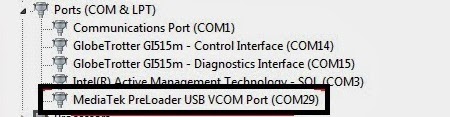
USB VCOM Driver ↦ Install this driver first on your computer, Turn off your device and remove the battery, using USB cable connect your device while look at My Computer ↦ Manage ↦ Device Manager there will be MTK65xx Preloader Devices show up for 5 second than disappeared, before disappeared right click on it and select Update Driver Software point it to USB VCOM Driver extracted folder. When it finish disconnect and connect again there will be Mediatek PreLoader USB VCOM Port on your device manager.
- SP Flash Tool v3.1324 ↦ this is an optional download, this tool already include in ROM download, but in case something happen you don't need to download a whole ROM file again.
Lenovo S850 Update Latest Firmware Android KitKat ROW_S207
- Download all required files needed to update your Lenovo S850, Please make sure that USB VCOM driver completely installed before continued to next step.
- Extract S850_ROW_S207_140814, this will contains a target_bin and flash_tool folder, these two folder must be on the same folder for easy operate it. We just only need these two folder you can ignore the other folder.
-
Go to flash_tool extracted folder and run Flash_Tool.exe, on the Flash_Tool program please make sure that DA DL All with Checksum option already checked, then please click Scatter-Loading button and point it to target_bin/MT6582_Android_scatter.txt, this will automatically load all the required files for update to Flash Tool

- Finish configure Flash Tool, now press Download button or you can hit F9, Flash Tool will begin to initialized and become stand by mode.
-
Now turn off your device. Wait 15 seconds until phone completely turn off then connect your device to your computer. Flash Tool will begin to recognize your device and start the upgrade process, upgrade process will take 5-10 minutes and will be mark with RED, PURPLE, and YELLOW bar on the bottom Flash Tool. When you see GREEN CIRCLE on the middle of Flash Tool, this mean flashing process already finish and you can disconnect your device.

- Done, now you can try to boot your device. First boot will take longer than usually be patient. Successful boot go to System Setting ↦ About Phone look at build number section.
Congratulations, now you have successful update your Lenovo S850 with the latest firmware, please leave any comments if you found any problem regarding this guide. Thank You
if any one need hlp plz txt me whtzapp 9733921524
if any one need hlp plz txt me whtzapp 9733921524
※Please make a backup of your device before installing or updating ROM
I'm wondering – how to remove battery in this mobile?
sry i dnt knw
link eroro
#prasadcellcare link iz gd plz check out
hi… i already downloaded, but requires password.. what is the password?
Hi there.. this can use in Malaysia? or only can use in your country only? scare for ivalid IMEI
Hi guys! i have a problem i bought kenovo S850T from china and used above procedure to change its rom to S850_ROW_S207_140814 by using download option as mentioned in above procedure but then i got an error which was referring to some mismatch of "key id" so i used firmware upgrade option. It was sucessful and after rebooting everything was working fine google play store was working however when i insert my sim card then phone did not detect it. Can any of you help me what to do now as i cant use my phone for making calls.
Urgent response is apprecaited.
Thanks
Irfan
hi , he works very good on mai lenovo s850 , no bug no error ! Work perfectly thx!
danut.popa91
how to do it?
is dont work
My imei lost.no network and WiFi problem
Link Not Working Pls Update Link
Not Working this link plz another link