
- Title: LeWa OS
- Listed: April, 2014
- Last modified: 09/21/2014 1:57 pm
- Version: 14.09.19
You must be logged for ROM download.
27559 total views, 5 today
1 Total favorites
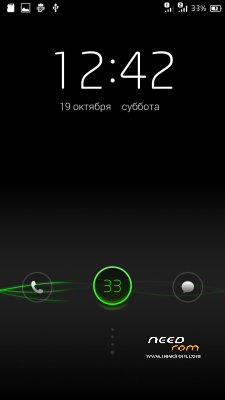
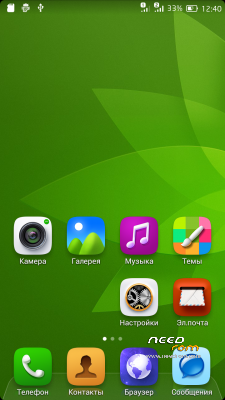
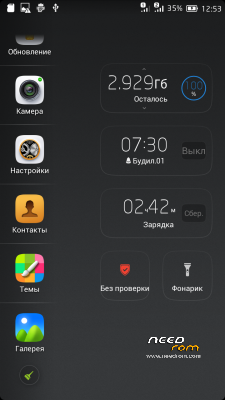
 Member Info
DESCRIPTION
OTA update install from TWRP 2.7.1.0 without wipes. If was changes system files (system/…..) OTA update not established, there is an error.
Enable Root: On Desktop open folder "System" than start "Security Center", go right on top to "protect", then on "Permission managment", then left on top "Perm" and scroll down to last entry "Root" 
Languages: Russian, English, Chinese;
Best smart phones and other equipment at low prices on GearBest.com
Download file (Dark Theme) – UnZip and put this to LEWA/theme/lwt
IF YOU LIKE MY WORK PLEASE DONATE . EVEN 1 $ IS APRECIATED.
1. Download the. Zip file and dump the firmware to the memory card.
2. Loaded in Recovery
3. Making wipes:
1) Wipe Cache
2) Wipe Dalvik Cache
3) Wipe Factory Reset
4. Select Install / Instal zip from SD
5. Choose. Zip firmware file and wait for the end of the process.
6. Boot the system is ready.
※Please make a backup of your device before installing or updating ROM
Ok, now i found Root
For other who has allway problems to found:
On Desktop open folder "System" than start "Security Center", go right on top to "protect", then on "Permission managment", then left on top "Perm" and scroll down to last entry "Root"
For now, it seems the best Rom ever for the 990+ !!
But one issue and this is in all other Rom for the 990+:
The SD entry card is wrong. My external SD card is shown as internal and so, every files like cache, temp files etc. where written to external SD card.
So i have change the the vold.fstab in system/etc. and change the this two line from:
dev_mount sdcard /storage/sdcard0 emmc@fat /devices/platform/goldfish_mmc.0 /devices/platform/mtk-msdc.0/mmc_host
dev_mount sdcard2 /storage/sdcard1 auto /devices/platform/goldfish_mmc.1 /devices/platform/mtk-msdc.1/mmc_host
to
dev_mount sdcard /storage/sdcard1 emmc@fat /devices/platform/goldfish_mmc.0 /devices/platform/mtk-msdc.0/mmc_host
dev_mount sdcard2 /storage/sdcard0 auto /devices/platform/goldfish_mmc.1 /devices/platform/mtk-msdc.1/mmc_host
And now, the cards are correct mounted.
Thanks, in next version i fix it!!
DO you think about an multilanguage version? German where fine
I play the last hour with your Rom and find it very nice! Very smooth, better then stock or other costum rom.
is it possible to change the background color of the notification bar? Some text is hard to read, for example: weather, background is light grey and weather text is white. Hard to read
If i find languages for LeWa i try to add it.
You can try install dark theme from header, i add it to description.
Thank you for theme. Will test it.
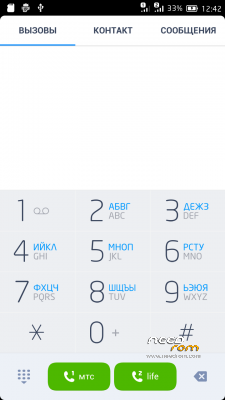
Found another litle problem: In the phone dialer pad every number and sign was double, one normal big number and right the number (sign) again and in background of each key there where russian letter
Ok, I try to fix this in next version
Day 2 with this Rom and i must say, the best Rom for the 990+ !
Online now about 11 h, 1 h display on and battery left 80%, Wifi and Data allways on.
And for alle people who want test this rom:
It is possible to make it in your own language, ok, not the system apps but all google or your own app will work in your language. Open the "Appstore" (not google market!). It is in chinese but no a great problem. Type the left letter on top, so you can search. the type in "language". The first entry found was "Locale+Language" install the app and you can change to your language. Note to root first!
When you install the rom it is in russian (please greeshan fix it please to english), so its hard to change the language because it is in Cyrillic letter. So open the setting icon (the icon with the gear symbol), found the 3 heading and then go to the 3 entry, there you can change the language to english.
Find another little "bug": Camera works only to 9,5 Megapixel. Install the Lenovo Camera up and now i have full 14MP.
Greeshan, i wnat to donate you, but here i came only to an russian site, Have you paypal?
Thanks! Stock Camera works with 12Mp and sometimes run bug "gray screen". Open camera settings and select Preview size – Standard (4:3). After select Picture Size… I advise to put another camera, for example Lenovo Camera or Snap Camera.
I from Belarus and i dont have PayPal, because we can not use it to pays, but i have WebMoney….
I mean : You are right with the camera and 4:3. Sorry i was to slow to edit
English is not my preferred language
And sorry but webmoney is not my way… have you a friend with paypal?
Sorry, Dark Theme is not my theme. I just added it !
I dont find german language for LeWa OS, engaged in translation, I will not, since it would take a few months …
Hi
Great
I have just one problem.
In the Security menu, anti-theft security when I enter a mobile number. Log error message into the number phone.
Iran will enter the mobile number
Please help me.
Yes, i too find this error. I try to fix in next version.
more application crash
for example?
i use LeWa two week, no errors…
in the second version of facebook does not work.
while in the first version everything worked perfectly!
What can I do?
i try to fix it in next version!
Привет, спасибо за классную прошивку, очень понравилась, thx !
привет, спасибо)
Thanks for this firmware, very much, easy to manage, errors or other shortcomings, I do not have noticed, many thanks again