
- Title: LEWA V5
- Listed: October, 2013
- Last modified: 10/20/2013 3:29 am
- Version: 13.10.18, 13.10.11, 13.09.30,
You must be logged for ROM download.
41437 total views, 3 today
28 Total favorites
 Member Info
DESCRIPTION
|
IMPORTANT :-
-Backup your current Rom before flashing
-Do It On your Own Risk I Will Not Responsible For Any Damage
Flashing Instructions
|
For best performance in developer options menu set this:
Window animation scale ->Off
Transition animation scale ->Off
Animator duration scale ->Off
※Please make a backup of your device before installing or updating ROM
support multilanguage?
jen čínsky a anglicky
zopo c2 platinum the rom is nice,gaaps not included and iam having this issue when installing some apps the problem is the apps won't install and message apeare says"couldn't install on usb storage or sd card"
using snappea to uninstall system applications is NOT possible, and by the way the ROM is not rooted so you can't even install an app that removes system apps
Ideally , as I said, if the developers were to bring a rom without any extra apps – in particular chinese – then we could install what we wanted – via gapps most likely.
What's the point of installing lots of apps if people are going to unistall them anyway?
so i install the gapps after install the rom work very well . Next update i hope no app chine . Thanx very much for this rom
btw: I was trying on ZP980 16gb B version, and doesnt work. is not possible flashing.
You need a rooted phone(use eroot very simple and used by gizchina) to access sytem aspps in snappea and you can remove system apps, i have used it before and have just used snappea to remove all the chinese stuff on this rom. This rom will unroot your phone, but easy enough to put right with Eroot, just make sure you follow these steps and its a doddle:
MAKE SURE YOU BACK UP ALL APPS/CONTACTS/ETC BEFORE PROCEEDING!
1. Do factory reset
2. clear dalvik cache
3. clear cache data
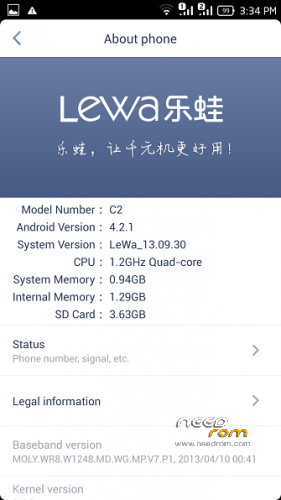
4. Flash LeWa_ZOPO_C2_JB2_ROM_13.09.30_l4921zd.zip
5. Reboot
For install GAPPS
1.Download the GAPPS
2.Copy in sd card
3.Reboot in recovery mode
4.Install from sd card gapps-jb-20121212-signed.zip
5.Reboot
Best Rom i have tried upto now but GPS is still a problem and have tried every trick out there.
how do u hide unwanted apps
You can delete the chinese app with snapea!
the rom is a lettle bit laggy it needs some improvements. it eats alot of ram, I get about 150 free only.
BTW if u wnat to uninstall chinese system apps u can use uninstall master but u need to be rooted.
https://play.google.com/store/.....ster&hl=en
Love this ROM. Snappea removes a lot of China-junk. You can use RAMexpander for more RAM.
ZOPO C2 A 4GB