
- Title: LightROM V3.5
- Listed: July, 2017
- Last modified: 07/31/2017 3:54 pm
- Version: 7.0
You must be logged for ROM download.
11358 total views, 2 today
2 Total favorites
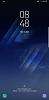
 Member Info
DESCRIPTION
*Keep IMEI/EFS Backup Ready If you lost your IMEI and Blame us, We are Not Responsible
*If you Altered System Files in any way then dont report bugs
*Dont Report Bugs Which Are Caused Due to Third Party Apps, Only Report if there is any problem in this rom
*Battery life will get better over the time, at first few days it may be awful
*Feel Free To Post Fixes if you have a Solution to it
*Use Of Xposed is Your Choice, " Dont Report Bugs on using Xposed "
*Please use the Search button, as I have answered for almost all queries
*Finally, Don't Ask for ETA's, We will update you if we make any update to Rom
*** Read Post #1 For ROM Information ***
*** Read Post #2 For Credits ***
*** Read Post #3 For Instructions: ***
*** Read Post #4 For Download Links, ROM Update Zips & Changelogs: ***
*** Read Post #5 Guides, Mods & Fixes ***
*** Read Post #6 For Video Reviews/Tutorials & FAQ ***

*Samsung Galaxy S8 SM-G950F/FD/N & S8+ SM-G955F/FD/N
*TWRP Recovery

-ROM Supports Both S8 & S8+
-Supported Variants
——Samsung Galaxy S8 SM-G950F/FD/N
——Samsung Galaxy S8+ SM-G955F/FD/N
-Based on AQG5 Base
-Android Security Patch Level – 01 July 2017
-Aroma Supported
-DeOdexed
-Zipaligned
-Knox Removed
-Removed few Google Apps
-Removed few Bloatware Apps
-Added Navigation Bar Colors
-Magisk Root
-SuperSU Root
-Jesse_Semi_Stock_R6
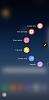
-Note 7 FE Air Command
-Multi CSC Supported
-Added CSC Tweaks
-Added UPSM Tweaks
-Added Build.prop Tweaks

-Aroma Supported
-900 mb Bloatware moved to Aroma ( Choose what you need in Aroma, when installing ROM)
-Jesse_Semi_Stock_R6
-Stock Camera
-Stock SystemUI
-TouchWizHome
-SecGallery
-SamsungSans 1060 Fonts
-Weather
-SBrowser
-StockClock
-Stock Keyboard
-AppLock
-Smart Manager
-Samsung Contacts
-SMusic
-SCalculator
-MyFiles
-SCalander
-Sound Mod ( Medium )
-MultiUser support
-Navigation Bar Colors
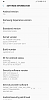
-Changelog To About Device
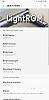
-ROM Logo TO About Device
-Watch Dogs v1 Boot Animation
-Updated Samsung Apps
-Updated Google Apps
-SysScope Edited - Device Status Official
-Custom Boot Animations
-Custom Sound Mods
-Custom Camera Mods
-Multi CSC Supported
-Added CSC Tweaks
-Added UPSM Tweaks
-Added Build.prop Tweaks
-Floating Message
-Signature Check Disabled
-GooglePackageInstaller Overlay
-Camera FlashLight Can Be Used Till 1% Battery
-Added Toggles to UPSM Mode UI Panel
-Added Toggles to DEX UI Panel
-FOTA Upgrade Screen Black MOD ( Stock is Green Color )
-LTE Only To Network Mode

-NO ROM CONTROL [ I Dont have Time to Make One  ]
]
ROM OS Version: 7.x Nougat
ROM Kernel: Linux 4.x
ROM Firmware Required: Samsung Galaxy S8 SM-G950F/FD/N & S8+ SM-G955F/FD/N, TWRP Recovery
Version Information
Status: Stable
Current Stable Version: v3.5
Stable Release Date: 2017-07-30

Android File Host Link :https://www.androidfilehost.com/?w=files&flid=197694

Download the TWRP From Original Thread
TWRP Links :https://forum.xda-developers.com/gal…xynos-t3595102

Modem & Bootloader – AQG5 Baseband
Download this zip, Extarct and then load it in ODIN
See Post#2 how to Load it in Odin
Android File Host Link :https://www.androidfilehost.com/?w=files&flid=198423
Or use this
TWRP Flashable Zip – ( Bootloader, Modem & TWRP )
AQG5 – Bootloader, Modem & TWRP
For Samsung Galaxy S8
Android File Host Link :https://www.androidfilehost.com/?w=files&flid=202332
For Samsung Galaxy S8+
Android File Host Link :https://www.androidfilehost.com/?w=files&flid=202339


Update Patch For S8 v Users:
Android File Host Link :
Update Patch For S8+ v Users:
Android File Host Link :
Changelog v3.5
Fixed:
-Some Issues
Added:
-Jesse_Semi_Stock_R6
-Zero Camera Mod v3
-Updated Camera Firmwares
-Full Lib and lib64 is AQG5
Removed:
[*]Note:
-ROM Supports AQG5 Bootloader (BL)
-FLASH NEW BL AND CP
-FLASH NEW TWRP


Link:https://www.androidfilehost.com/?w=files&flid=197698

*** Bixby Voice Assistant ***
Bixby Voice Assistant Works with XAA csc only,
So Do the Following to get it working properly
Download the CSC zip and replace the files in it with your country CSC
except system/omc/XAA/etc/sales_code.dat
sales_code.dat should be XAA in it
( You Can Get Your Country csc files from my ROM Zip )
Then Install the Bixby Apks Manually,
Then
Clear Cache & Data For The Bixby Apks in Application Manager in Settings
and Reboot once
Now Bixby Voice will Work With English US Language
BIXBY Apks
Link:https://www.androidfilehost.com/?fid=961840155545583848
XAA To Make Bixy Voice Work – INS csc in XAA csc
Link:https://www.androidfilehost.com/?fid=889764386195917834

*** – ***
Link:

*** Stock NN Kernel ***
Link:

*** Sound Stock ***
Link:https://www.androidfilehost.com/?fid=961840155545584549
*** Bottom Speaker Volume Mod – Medium ***
Link:https://www.androidfilehost.com/?fid=889764386195918561
*** Top Speaker Volume Mod ***
Link:https://www.androidfilehost.com/?fid=961840155545584550
*** Dual Speaker Volume Mod ***
Link:https://www.androidfilehost.com/?fid=889764386195918562

*** ***
※Please make a backup of your device before installing or updating ROM