
- Title: LineAgeOS 14.1
- Listed: February, 2017
- Last modified: 02/12/2017 6:04 pm
- Version: 7.1.1
You must be logged for ROM download.
13121 total views, 1 today

 Member Info
DESCRIPTION
Steps For How To Install Lineage OS 14.1 On Lenovo A6000 (Android 7.1 Nougat)
First of all, Download the LineageOS Zip and GAPPS Zip file from the below given link.
If you have downloaded the zip file in your computer, then connect your device to computer using USB cable.
Now move the downloaded LineageOS and Gapps zip to the root of internal memory of your smartphone.
After transferring the zip file, Now turn your phone off. Reboot to recovery by pressing the Volume Down + Power button simultaneously. (You can use Volume Up and Down buttons in order to scroll up and down and you can press Power key to select.)
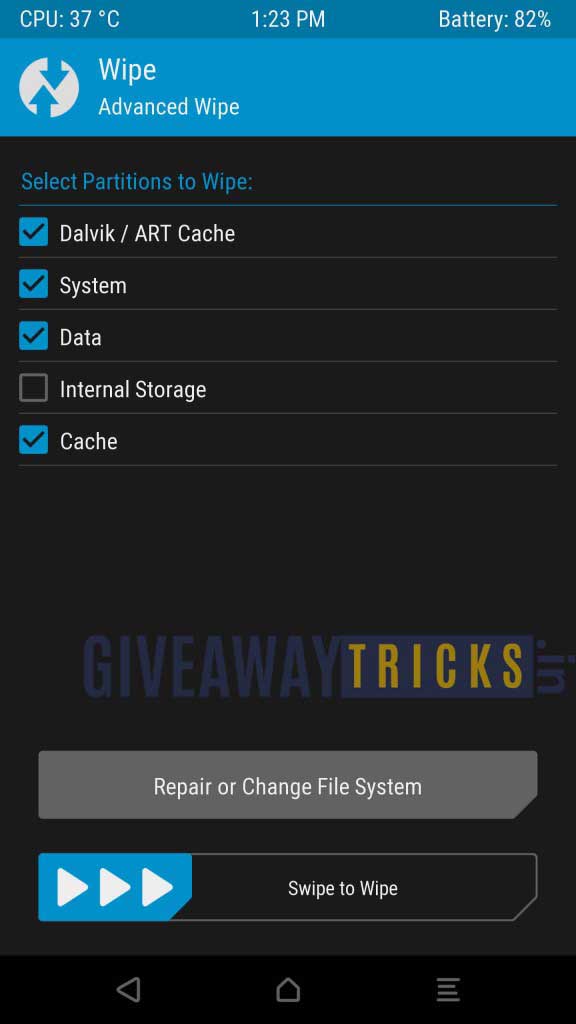
Before installing the custom ROM, it’s better if you Wipe all the data by Clicking the Wipe button and Select Advanced Wipe – Tick all except Internal Storage
Swipe to WIPE
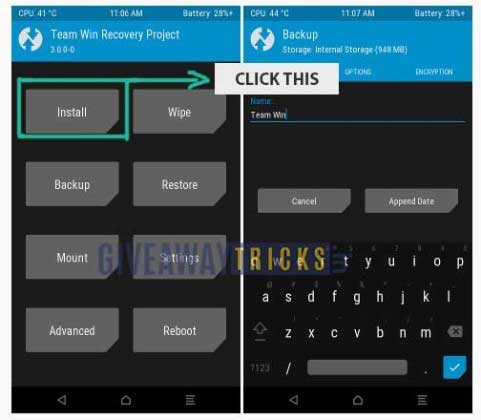
Now Click the Install Button to install the LineageOS zip file.
Now Browse through the files of Internal memory where you have uploaded the Zip file of Custom Rom (better move the custom ROM zip into root of your internal memory)
Select the Custom Rom Zip File and Swipe to confirm the installation. Then reboot.
Now follow the same steps from Step one to install Gapps.
That’s it ! Now reboot your phone. You have Install Lineage OS 14.1 on Lenovo A6000 (Android 7.1 Nougat) Successfully.
※Please make a backup of your device before installing or updating ROM
any bugs
it works on a6000 plus
volte support?
Is it compatible in a6010
not working
Please Give me Twrp recovery link