
- Title: MDM Bypass Tool
- Listed: December, 2024
- Last modified: 12/20/2024 6:05 pm
- Version: Android
You must be logged for ROM download.
8232 total views, 1 today
10 Total favorites
 Member Info
DESCRIPTION
MDM-Bypass-Tool
Features
-
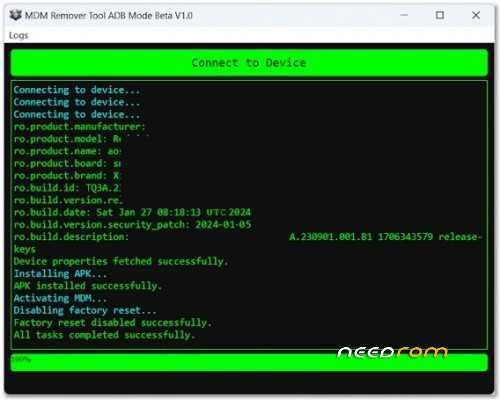
Connect to Devices Instantly
Easily connect to Android devices via ADB and fetch critical system properties such as manufacturer, model, version, and more. -
Detailed Device Information
The tool retrieves and displays detailed device information, including security patch levels, build dates, and descriptions. -
Activate and deactivate MDM seamlessly to regain full control of your device.
-
APK Installation
Install necessary APK files to facilitate MDM bypassing or other essential operations. -
Disable Factory Reset
Prevent factory resets to secure device configurations from accidental or intentional reset operations. -
A sleek, hacker-style interface makes navigation intuitive and engaging. Logs, progress bars, and error messages are clearly displayed to ensure smooth operations.
System Requirements
- Operating System: Windows 8/10/11 (32-bit or 64-bit)
- Additional Tools: ADB must be installed and configured.
- Permissions: USB Debugging must be enabled on the target Android device.
How to Use
-
Download and Install
Download the program and double-click the executable file to install it on your PC.
-
Connect Your Device
Connect your Android device via USB and enable USB Debugging. -
Run the Program
Launch the MDM Remover Tool and click the Connect to Device button. Follow the on-screen instructions.
-
Execute Operations
Install the provided APK, activate MDM, or disable factory reset as needed.
-
Monitor Logs
View live logs to monitor progress and ensure successful execution.
THANK AND DONATE… 
FILE FREE
※Please make a backup of your device before installing or updating ROM
the bestttt
THANK AND DONATE..
where is link
nice, thank you
this app blocked my phone