
- Title: Miracle Box + Loader
- Listed: May, 2017
- Last modified: 05/05/2017 1:16 pm
- Version: v2.27A
You must be logged for ROM download.
26447 total views, 1 today
22 Total favorites

 Member Info
DESCRIPTION
Miracle Box is the best solution for backing-up, restore, unlock, write IMEI/NVRAM and flash several stock- and custom-ROMS, Apps & Tools.
This version includes the loader, which makes the dongle/Box unnecessary!
HOW TO FLASH MTK ANDROID DEVICES USING MIRACLE BOX
Author: RomShillzz
Using the Miracle Box is quiet complicated to some people, although to some its easier!
On this post i will show you on how to flash MTK Android devices Using Miracle Box.
Requirements
MTK Android Stock ROM
Download Miracle Box Setup + Loader
Download Miracle Box Drivers
STEPS
Launch Miracle Box
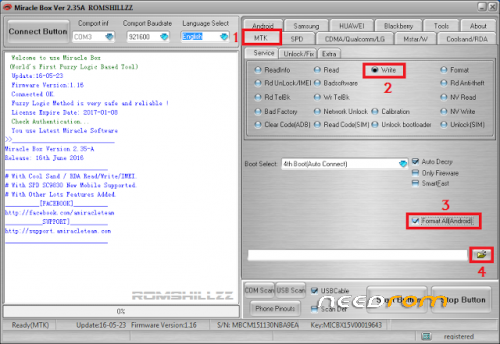
Click MTK
Select Write
Select Format ALL[Android] (Optional but recommended)
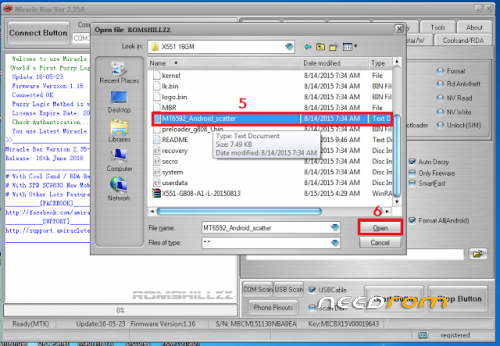
Click on the folder-like button to select Stock ROM/FIRMWARE on the location it is saved
After Selecting Stock ROM/FIRMWARE,
Click on the Start button
Connect device holding volume + and volume – key or power key only <- usually no need
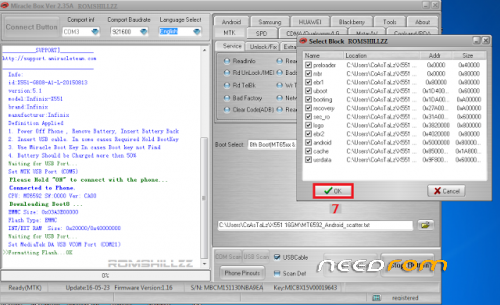
When device is connected, Select Block will pop-out, Click OK
Patiently wait while the process completes
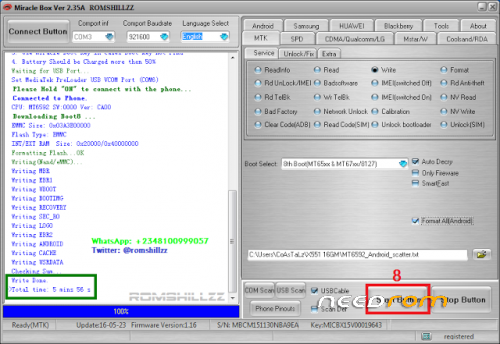
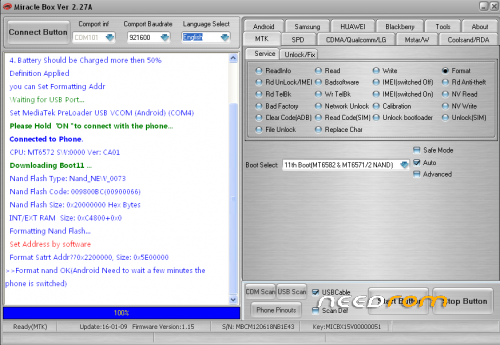
Once the process has been completed, it displays the following:
Write Done.
>>Total time: 5 mins 58 s (depending on the time taking)
WARNING!
Flashing will erase all of your data
All described operations you are doing at your own risk.
==> Learn how to flash SPD Android devices Using Miracle Boxfroom the external Link <==
Thanks to droidmobitech from Hovatek &
RomShillzz from romshillzz.blogspot
for the tutorials, pix and videos!
Here´s an example which I´ve copied from my ZTE Blade L6-Thread, since almost all steps are the same for any other devices:
.:HOW TO FLASH via Miracle Box:. (recommended)
First read before doing any action!
-Download, unzip & install "MTVCOMP.rar" (contains MT65xx USB VCOM Preloader Drivers)
-Download, unzip & install "MiBo.rar" (contains Miracle Box Setup + Loader)
-Download & unzip "MiBoBackupL6.rar" (contains ZTE Blade L6 Backup)
After installing the MT65xx USB VCOM PRELOADER driver or to be sure it´s already installed:
-Install the "Miracle Box v2.27A.exe" to PC-root-directory (e.a. C:\Program Files\Miracle Box) (uncheck "read" and "start Miracle Box" after installation! So, just close the installer!)
("PL2303_Prolific"- driver will be installed automatically)
-Copy and paste all files within the "Miracle Box v2.27A Loader" (replace)
-Right click and open as admin on Miracle_Loader_2.27A.exe (which u´ve copied to the installation-folder)
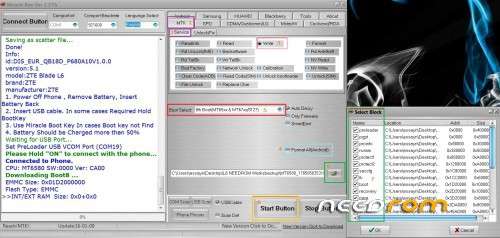
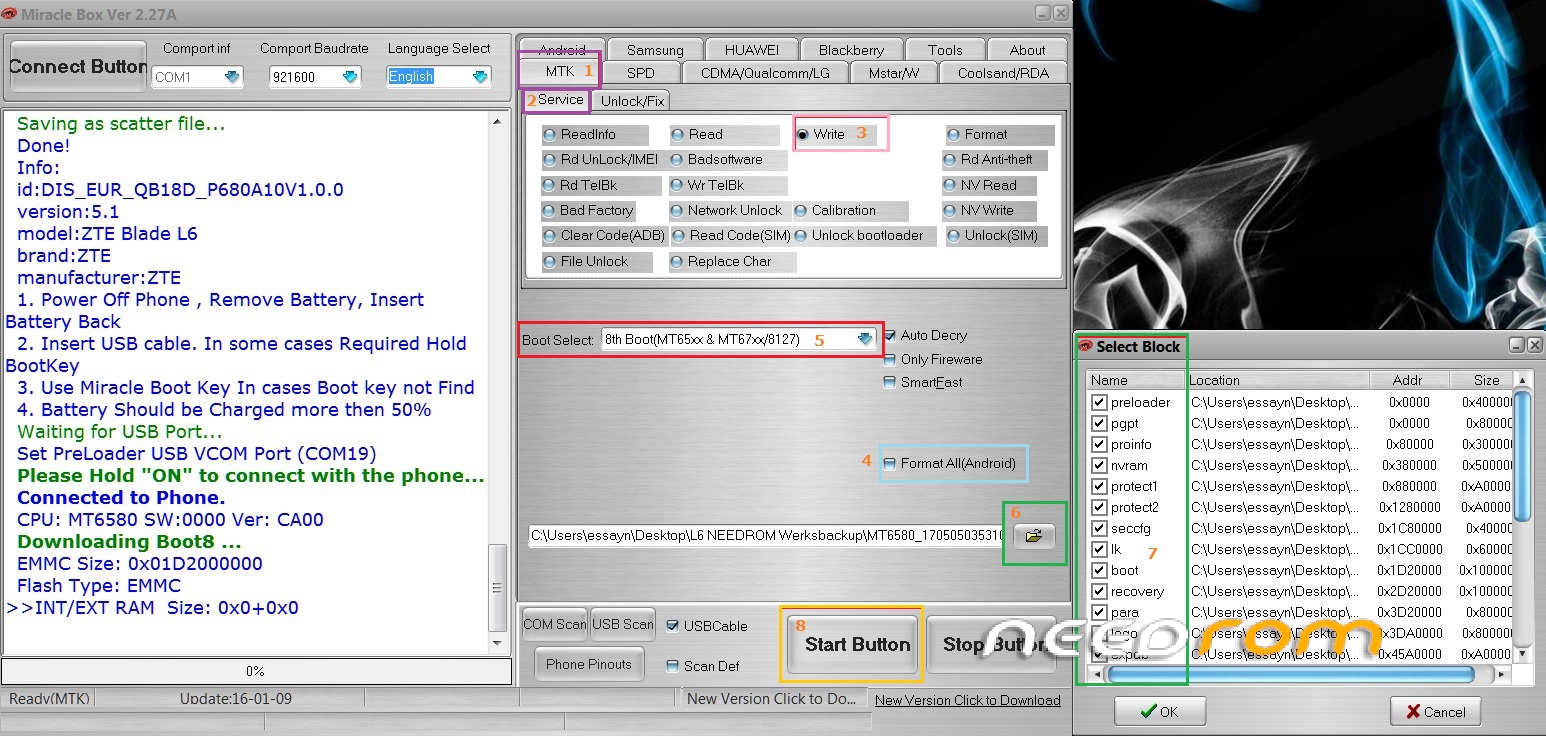
-Settings in Miracle Box (watch picture): MTK (1) -> Service (2). Check the box write (3)
Optional: Check "Format All (Android)" (4)
-Choose in the "Boot Select"-dropdown "8th Boot MT65xx & MT67xx/8127" (5) open the downloaded L6Backup via the folder-sign (6) and select ALL Blocks! (7)
-Hit "Start"-Button (8) and wait until: "…waiting for USB-port"
-Now connect your turned off phone via USB-Cable with PC
-MB starts writing (needs 25-30 minutes)
-When "Write Done.
(e.a.) >>Total time: 29 mins 57 s"
-Unplug phone and boot as usual
※Please make a backup of your device before installing or updating ROM
this is too old Latest version available
Verson 2.47 is available but need a paid Box + Dongle (300$+).
As for v2.29 doesnt work properly atm, v2.27A is the best and reliable method.
works. thank you.
password protected
Nope, non of the .rar-files I offer are pw-protected. If u get a CRC-error (like pw-protect) than its not commpletly downloaded, even if the download-manager declares it as done.
Just download the file again and be sure it´s completely downloaded.
The MiBoSetup-size is: 168 MB (176.195.252 Bytes)
Thanks Brother….
thanks
Top
can u show how to instal the setup,.confused:mode
Check this:
https://youtu.be/rpMJGzauT5k
does it support g570f
It's a standard Samsung J5, so yes of course. You also may try "Volcano Tools".
thanks
for SPC l52 , its support ?