
- Title: MIUI-8 Ver. 6.9.8
- Listed: September, 2016
- Last modified: 09/12/2016 1:44 pm
- Version: 5.0.2
You must be logged for ROM download.
13024 total views, 2 today
2 Total favorites
 Member Info
DESCRIPTION

1. Go to Security app > Permissions > Autostart > Enable the perticular app which you want to be autostart.
2. Go to Security app > Battery > App battery saver > (click on pertucular app which u don't him to be sleep & keep running in background) > choose "No restrictions"
New – Swipe to the edge of the screen to hide Quick ball
Optimization – Record music in stereo quality
MIUI Forum
New – Added search in the Forum
Optimization – Redesigned interface for replies
Quick Ball
New – Swipe to the edge of the screen to hide Quick ball
Lockscreen, Status Bar, Notification Bar
Optimization – Tap the date in the status bar to open Calendar
Fix – Issues with volume level notification in Second space when using earphones
Home screen
Optimization – Hold the empty spot on the Home screen to enter the editing mode
Fix – Device didn't respond after updating and rebooting
Fix – FC issues when switching between themes
Recorder
Optimization – Record music in stereo quality
New – Slide down to exit fullscreen preview
New – On/off switch for screenshot sounds
New – Call recording in the form of folders and separate with ordinary recording display, which make recording list page more clean.
Lockscreen, Status Bar, Notification Bar
Fix – Notification shade issues in Second space
Fix – Status bar wasn't working properly with third party themes in some cases
Gallery
New – Slide down to exit fullscreen preview
New – Turn off screenshot sound in screenshot settings
Weather
Fix – Icon wasn't displayed properly
FOR DOWNLOAD:
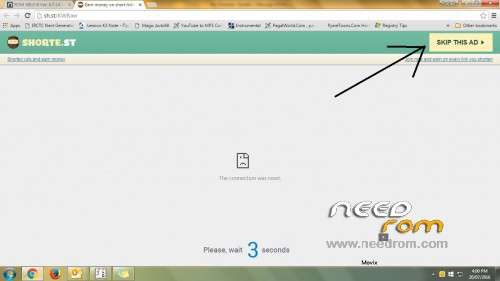
Click on link which come up after 5 secound in right top corner. (See image under all scrn shoot)
※Please make a backup of your device before installing or updating ROM
THANKS..
very love with ur work.
but why dont have player in notification?
Pushpit thanks for your rom,very good ,I have gone the install instructions as you have a weekly rom can we just flash the new rom over the old rom so we dont have to loose the theme manager and other apps as I found out today after restoring data only and nivram
thanks
Yes u can install over prev. rom but i recommand to clear sytem & cache not wipe data before install & after install do clear dalvik which apper after install of rom.
Thanks pushpit waiting for next buid 15
today will release 6.9.15
6.9.15 posted & will show you soon…….
I don’t understand how to replace them and NVRAM file….please tell me step by step….
hey pushpit..can fix this bug?
-miui music app din't read .m4a format
plss fix it thanks
cant use jio4gvoice please help
i m from india…cant jse jio4gvouce to make call please help..