
- Title: MIUI 9 OFFICIAL
- Listed: August, 2017
- Last modified: 08/30/2017 9:46 pm
- Version: 7.0
You must be logged for ROM download.
9954 total views, 1 today
3 Total favorites

 Member Info
DESCRIPTION
How TO INSTALL MIUI 9 on Redmi Redmi 3S
Connect your device to the Windows PC/laptop via a micro USB cable, and copy the ROM file downloaded in Step 1 into the folder ‘downloaded_rom’ in the internal storage of your device.
Launch ‘Updater’ app on your device:
MIUI 6/7/8:Click the ‘…’ icon at the top-right corner, select ‘Choose update package’, and choose the ROM file you’ve put in ‘downloaded_rom’ in Step 2.
MIUI V5:Press the Menu button, select ‘Choose update package’, and choose the ROM file you’ve put in ‘downloaded_rom’ in Step 2.
After choosing the right ROM file, your device will begin upgrading. Your device should automatically boot to the new version when the update is completed.
After choosing the right ROM file, your device will begin upgrading. Your device should automatically boot to the new version when the update is completed.
lineagosrom.com is not responsible for any damage happened to your device(s) while following this guide, Proceed at your own risk.Install MIUI 9 rom at your own risk.
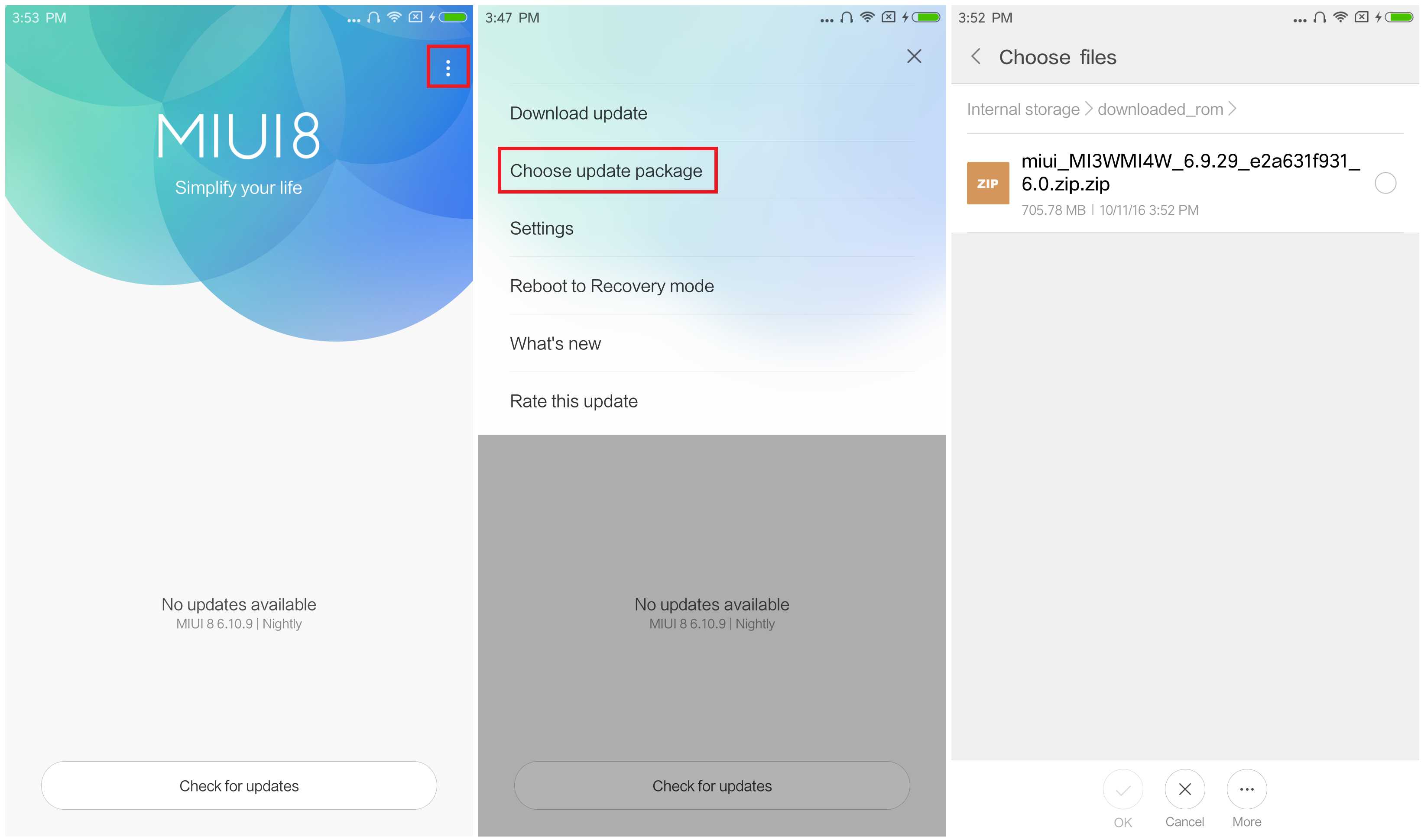
1.Connect your device to the Windows PC/laptop via a micro USB cable, and copy the ROM file downloaded in Step 1 into the folder ‘downloaded_rom’ in the internal storage of your device.
Launch ‘Updater’ app on your device:
2.MIUI 6/7/8:Click the ‘…’ icon at the top-right corner, select ‘Choose update package’, and choose the ROM file you’ve put in ‘downloaded_rom’ in Step 2.
3.MIUI V5:Press the Menu button, select ‘Choose update package’, and choose the ROM file you’ve put in ‘downloaded_rom’ in Step 2.
4.After choosing the right ROM file, your device will begin upgrading. Your device should automatically boot to the new version when the update is completed.
5.After choosing the right ROM file, your device will begin upgrading. Your device should automatically boot to the new version when the update is completed.
6.If you see the following image after rebooting, it means that you have succeeded in flashing MIUI ROM.
※Please make a backup of your device before installing or updating ROM
link not working
or blocked in india
link nie aktywny
not 7.0 please correct, miui 9 with nougat was not yet officially released for 3s.
thx.