
- Title: MIUI V5 – Weekly Updates
- Listed: October, 2013
- Last modified: 10/26/2013 3:55 pm
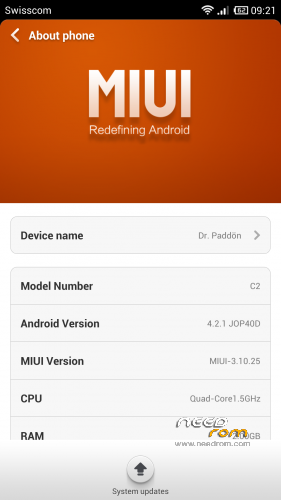
- Version: 3.10.25
You must be logged for ROM download.
19418 total views, N/A today
 Member Info
DESCRIPTION
This is the official MIUI V5 ROM with weekly updates provided on Needrom.
What is MIUI?
MIUI is one of the biggest Custom Roms like CYANOGEN MOD, which is developed for different devices.
Which languages are delivered in this ROM?
Chinese, English and Spanish. All other languages like German, are not 100% translated but availlable to choose.
Is Google Play Store installed?
Yes, you can use all Google Services on MIUI. (Youtube, Gmail, Play Music, etc.)
Why are you providing a seperate MIUI V5 Thread on Needrom?
First of all, fast and english commentary support. Weekly rom updates, and a daily updated FAQ at Needrom.
How to install?
First, root your phone with framaroot (http://www.android-hilfe.de/root-custom-roms-modding-fuer-samsung-galaxy-s3/378461-framaroot-app-one-click-loesung-zur-aktivierung-des-root-accounts-ohne-zu-flashen.html)
Than install TWC Recovery: https://www.needrom.com/mobile/zopo-c2-twrp-v1/
After that, boot into recovery (turn off your phone, start with Volume + and Power Button pressed),
wipe data, system, dalvik, apps, sdcard, etc. (full wipe will delete ALL OF YOUR FILES AND APPS!!!),
mount your SDCard for USB datatransfer (Mount, Mount USB Storage), copy the MIUI ROM Zip File to your C2+/ZP980H, eject, unmount,
Install, choose the zip file, swipe to confirm flash,
wait, restart, done!
If you have any random reboot after screen unlocking, check FAQ!
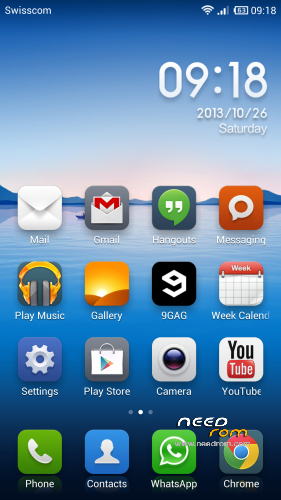
How does MIUI V5 looks like?


FAQ Part:
* My phone restarts after flashing and unlocking screen. What should i do?
Your Simcard can be the reason for that. You have to delete your Simcard PIN on a other phone/rom and try it again. This worked for me.
* I can't use the auto updater. I'm recieving an error on flashing. Why?
I don't know why, but in the official updates are a model check. For some Zopo C2+ and ZP980H it just don't work. I corrected a line in the "updater-script". I'll provide all weekly updates with this correction.
Known Bugs:
- Lights Sensor does not a very well job
- Changing from WLAN to GSM/UMTS is taking a bit longer than it should. (30-60 seconds.) But it works after this time without problems.
- Some GPS problems in UK (thanks to daneyboy)
If you have any questions, post them into the comments!
Donations for saying "thank you" are everytime welcome.
laxtor
—————————————————————————————————————————————
Thread log:
27.10.2013:
*Added YouTube Flashing HowTo
*Moved to correct Category (Zopo C2+ / ZP980H)
*Added Thread log
29.10.2013:
*Added gps problems in uk to known bugs.
※Please make a backup of your device before installing or updating ROM
anyone know how to get that carrier name from notification bar
This rom is great been using it for a while now, never crashes, cannot get a screen shot of the problems i am having with GPS, all i can say is, it locks on ok, but when driving it loses its lock, thanks.