
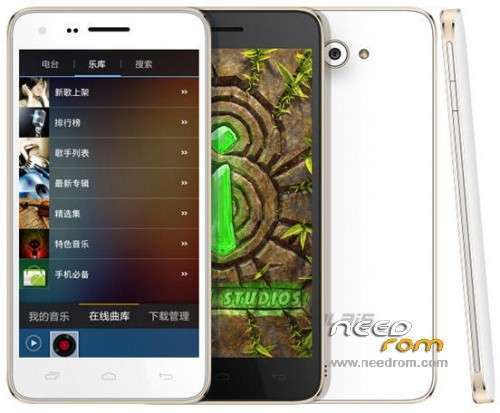
- Title: MLAIS MX28
- Listed: April, 2014
- Last modified: 04/07/2014 12:13 am
- Version: ROM Android 4.2.2
You must be logged for ROM download.
17455 total views, 1 today
 Member Info
DESCRIPTION
ROM MLAIS MX28 – ROM Android 4.2.2
Official Mlais MX28 version : Mlais_MX28_20140312
————————————————————————————————–
Install ROM :
- Unpack FlashTools, and Click on Flash_tool.exe
- Select a the MT6582_Android_scatter_emmc.txt in ROM
- Wait file to be added into Flash Tool
- choose Option->USB Model,click USB Model
–> Choose Option->DA DownLoad All->Speed->High Speed, click High Speed
- Turn off your phone, remove the battery.
- "Press F9 (hit Download button)" OR " if upgrade ROM Firmware->Upgrade "
- and connect your phone into the computer via USB data cable.
- The process will start and a red progress bar will appear after color purple, yellow.
- And green circles display
- Finish !
- You can now safely disconnect your phone and turn it on.
Rom is rooted
Language support : Multi Lang
※Please make a backup of your device before installing or updating ROM
Everything works?
This is last official Mlais MX28 rom . I tested for my phone and work perfect .
Link de descarga no funciona!Solo cuenta descarga sin aparecer link!Ayuda!Gracias!
Boton derecho del raton -> abrir link en nueva pestaña
oh my god! after 2 hours… when i loost all my hopes… i can see the light! Thanks a lot for this rom bro !
gps work…bluetooth work…wifi…ok tnk's
tnk's
5 big stars man!(y)
I have a problem. I updated the ROM 0312 and I have a problem with WiFi. After exiting from sleep mode the phone does not connect to WiFi again! It helps only enable and disable Airplane mode, or restart.
Please help or give me a possible solution.
gps does not work, i have tried every hardware or software fix. Too bad
My GPS works.
Download from PlayStore MOBILEUNCLE. There is an option "Power GPS search" Enter it and click the "GPS SET". Of course, before turn GPS
You can also download "GPS Test" from the store.
This app is nicely seen as satellites. First fix me caught more than 4 minutes. Now grabs less than a minute.
Wifi also started to work properly again as I downloaded this rom and I uploaded the phone.
Have you tested on the road while driving. It keeps loosing connection with sattelites. It is imposible to navigate with this device. It has a useless gps antenna.
hi guys, please help installing this rom.
I downloaded all, ran Flash tool,
Uploaded scatter.ttx
I can't fin Option->USB Model,click USB Model
Option->DA DownLoad All->Speed->High Speed, click High Speed
I tried to connect the phone closed and start download. It doesn't work
The phone is how i bought it. Just some apps on it.
Is there something I should have done before?
Thanks
Hi bogdanm !
For SP_Flash_Tool_v5.1348.00 option you are looking for is in the following order:
Options
Options
connection
USB speed - you select High speed
Battery - Auto select
Turn off the phone, and after pressing the Download (F9) connect the phone to the USB port. The update will start automatically.
From which country are you from?
For me GPS working properly. I navigates in the Yanosik and maintained properly. It never happened, that lost the signal.
I do have another problem. I have a 16gb sd card and almost nothing on it does not install. Is set as the default memory. After reboot, I can take pictures, and after waking from sleep like a picture does, but nothing saves! Just like on Putting the "internal memory" to record images. On the SD only after a reboot. Had anyone else this problem? I do not know if the problem is with the rom, or with an SD card.
Hi again. I tried the flash tool again.
I set up the options but this is not the issue. My problem is that the flash tool doesn't see the phone.
Windows keeps asking me to install device driver, which I don't have.
Any insights would be welcomed.
Thanks
P.S. For Sigatris. I am from Romania.
Hi bogdanm!
I'm from Poland
If you can try this ROM for elephone p7 mini, for example, this. It is a clone MX28 or rebranded (do not know), and really at this ROM everything works better than the other tested by me so far. GPS works quickly grabs fix, applications are moved to external SD card. For me the best!
Just after installation to make root and everything is such that it should be.
The problem is I can't find the phone with flash_tool. I think there's a problem with the OS because Windows keeps asking to instal drivers for the device connected (the phone).
it seams to me that i need the usb driver for the phone and i can't find it on the web