
- Title: MMC REFORMAT 6gb
- Listed: February, 2015
- Last modified: 02/17/2015 2:08 pm
- Version: Ver 6gb
You must be logged for ROM download.
16102 total views, 2 today
157 Total favorites
 Member Info
DESCRIPTION
This is tool for reformat internal memory from 2gb-app and 4gb sdcard to 6gb-app memory and 170mb internal sd card.
WARNING ONLY FOR CUSTOM FIRMWARE WITH NOT USING INTERNAL SDCARD like AOSP V2 , MIUI V6 etc
WARNING NOT FOR OFFICIAL FIRMWARE
WARNING PLEASE BACKUP FIRST !!!!!
WARNING all data on internal SDCARD 4GB size – LOST IN THIS PROCCESS !!!!! Please backup your data from internal sdcard.
Please read !!!!
1. First go to custom recovery and backup you firmware
2. Run reformat script – after script end (auto reboot to recovery) and you need run format.zip from sd card (this file auto create in sd card by reformat script)
3. Ok now restore your backup, and reboot device
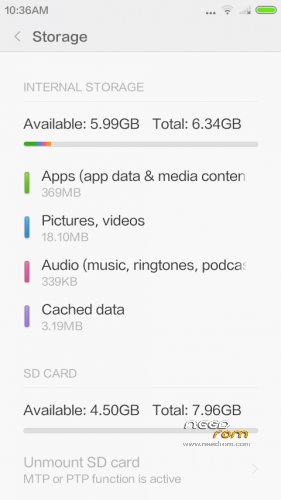
4. Check memmory settings
※Please make a backup of your device before installing or updating ROM
This is still not right. my nearly full sdcard is STILL used by certain apps as the default "data storage" card, because this 6gb partition is still sdcard1 and not sdcard0!!
sr because i did not understand can we do it with miui v6?
I did it with my Doogee DG310 with the MIUI V6 ROM from here(Needrom) and TWRP(from here too) and works fine! I have 6.34 Gb. internal memory partition! And a lot of new apps hehe…thanks to Brutal4028…you must try man…only follow the steps…
will this work on lollipop update ??
> "Run reformat script"
How do you run the script?
Format.zip file does not created
In fact format.zip is not created.
My solution (using AOSP 3, from here):
1. Go to recovery, backup. You really need to backup using recovery or phone will not boot and you'll need to reflash.
2. Install 4×2 reformat (you can download it from here). Phone will reboot to recovery when script is finished.
3. Now, do not run format.zip that was created. Run Reformat 6Gb (download here). Phone will reboot again to recovery.
4. Now you need to run format.zip that was created with first script. After it finishes, got to backup/restore in recovery and restore the backup you made previously.
Hope it works as it did for me.
Hi,
I tried multiple times, the format.zip is never created with this 6gb reformat, it works very well with the 4×2 though!
I tried it with AOSP v3
Any ideas?
Thanks
pudeldoodle
will this work with AOSP3?
will it also work on MUI7?
thanks
works great. just tried with miui 7