
- Title: Mod ROM Umi/Lenteen X1 Pro, Doogee DG350,
- Listed: May, 2014
- Last modified: 05/02/2014 4:17 am
- Version: UMI X1 Pro Xperia Edition 4.2.2
You must be logged for ROM download.
23052 total views, 2 today
 Member Info
DESCRIPTION
Description:
Based on Doogee Pixels DG350 Stock Firmware.
For UMI X1 Pro, Lenteen X1 Pro, Doogee Pixels DG 350 and more. (All LTJ-A25 Phones)
Xperia style + Z1 keyboard, CTR recovery, extra ringtones & wallpapers, rebooter, etc.
Include GAPPS, no rooted, multilanguage.
Install ROM :
- Unpack FlashTools, and Click on Flash_tool.exe
- Select a the MT6589_Android_scatter_emmc.txt in ROM
- Wait file to be added into Flash Tool
- choose Option->USB Model,click USB Model
–> Choose Option->DA DownLoad All->Speed->High Speed, click High Speed
- Turn off your phone, remove the battery.
- "Press F9 (hit Download button)" OR " if upgrade ROM Firmware->Upgrade "
- and connect your phone into the computer via USB data cable.
- The process will start and a red progress bar will appear after color purple, yellow.
- And green circle display.
- Finish !
- You can now safely disconnect your phone and turn it on.
※Please make a backup of your device before installing or updating ROM
Can I flash it without your recovery.img and without EBR1 and EBR2 files?
I have already CWM recovery installed and I use custom partition sizes (2.4GB data partition).
Stuck in bootloop after flashing this ROM.
Cant flash original Firmware from dogee, Flash tools says scatter file os not legal.
pppp3k,
Yes, you can flash it without EBR´s and recovery. I had flashed only EBR´s and recovery in another phone and I had no problems.
lupusworax,
What SP Flashtools version used? I flashed it in my phone (UMI) with SP_Flash_Tool_v3.1328.0.183 without any problem.
lupusworax
Try to flash with the version I uploaded, if you have problems, before flashing uncheck the option "cache".Any videos?
IS the camera fixed?
Thanks
Thank you for this rom, I flashed it and work. Isn´t very polished, but is very beatiful.
Best wishes.
I wasnt able to flash with " Firmware upgrade" I was only able to use " download only"
Has it to be Firmware upgrade? Or will download only will work as well?
I can't select upgrade, only download only, but no response when without battery to link with usb, please help
worked thanks, unchecking cache did the trick. also reseting the whole system after flashing ( factory reset) brought back my Imei numbers as well ^^ thanks a lot.
must be with battery!
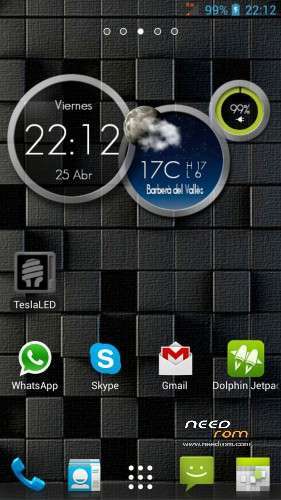
Which one is the widget shown with the 3 circles, weather, clock an battery on the main screeshot? How is it called? Thanks in advance!
This widget is One More Clock, I have it and is veeeeery good widget.