
- Title: Moto G4 Play (Harpia)
- Listed: August, 2017
- Last modified: 08/29/2017 9:12 pm
- Version: 8.1
You must be logged for ROM download.
11812 total views, 1 today
4 Total favorites

 Member Info
DESCRIPTION
How to Install an Android Oreo 8.0 on Moto G4 Play (Harpia)
Download and transfer the Android oreo 8.0 ROM and Gapps for android oreor you wish to flash to your device’s storage.
Boot your device into TWRP recovery.
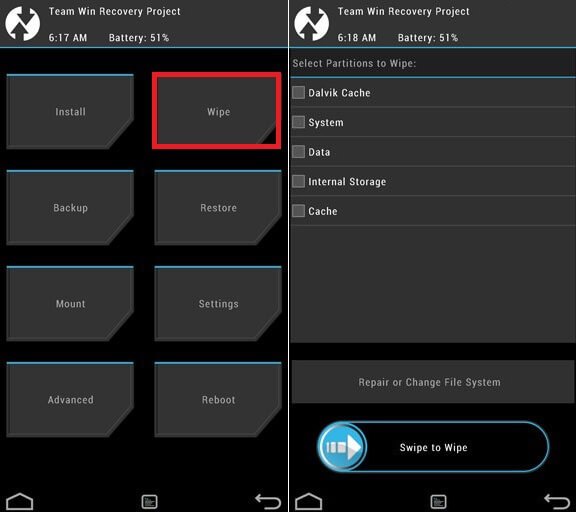
Select “Wipe” from TWRP main menu and do a “Swipe to Factory Reset” on the bottom of screen.
└ Note: This will factory reset your device. If your custom ROM doesn’t require a factory reset, then simply skip this step.
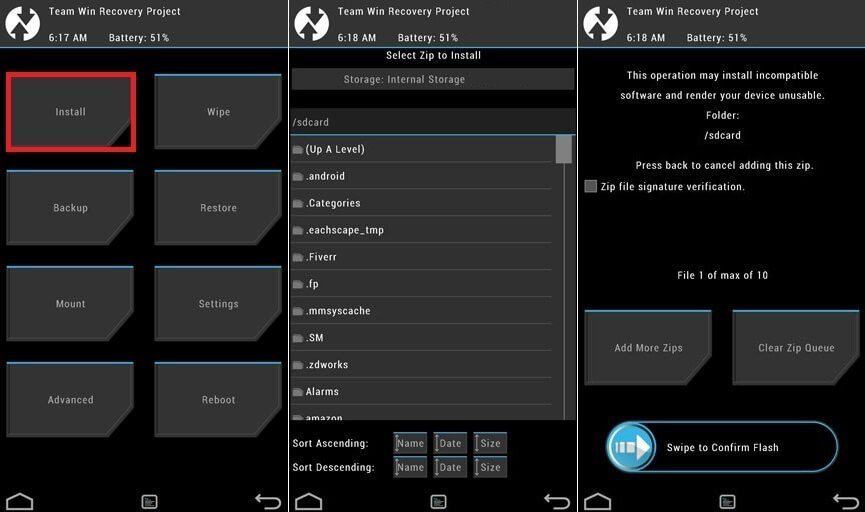
Go back to TWRP main menu, tap on “Install” and select the Android oreo 8.0 ROM .zip file and gapps for Android oreo 8.0 that you transferred to your device in Step 1.
After selecting the .zip file, do “Swipe to Confirm Flash” on the bottom of screen to begin the custom ROM installation process. This may take some time.
Once your ROM is successfully flashed, you’ll see “Wipe cache/dalvik” option, select it and then do “Swipe to wipe” on bottom of screen.
Once cache & dalvik wipe completes, hit the “Back” button on-screen and then select “Reboot System” button.
Loading...
is it stable version??
is it the same with moto g play? cause my updated android version is 7.1.1, no more updates.