
- Title: MTK6572 S4 Mini – CPU – 1.3 CHZ -1350 MB RAM
- Listed: December, 2013
- Last modified: 12/02/2013 3:16 am
- Version: Android 4.2.2
You must be logged for ROM download.
69917 total views, 3 today
5 Total favorites
 Member Info
DESCRIPTION
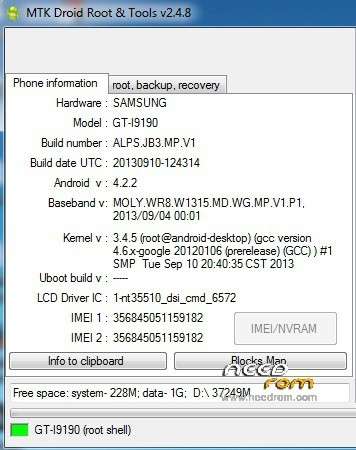
GALAXY S4 MINI I9190 – MTK6572 – CPU – 1.3 CHZ -1350 MB RAM – 2GB ROM – AIR GESTURE/SMART – ANDROID 4.2.2 – 540*960 SCREEN – 4.3" SCREEN – 1:1 COPY
Hardware : SAMSUNG
Model : GT-I9190
Build number : ALPS.JB3.MP.V1
Build date UTC : 20130910-124314
Android v : 4.2.2
Baseband v: MOLY.WR8.W1315.MD.WG.MP.V1.P1, 2013/09/04 00:01
Kernel v : 3.4.5 (root@android-desktop) (gcc version 4.6.x-google 20120106 (prerelease) (GCC) ) #1 SMP Tue Sep 10 20:40:35 CST 2013
Uboot build v : —– should be root shell
LCD Driver IC : 1-nt35510_dsi_cmd_6572
Approved to be working with SP Flash Tool v3.13228.0.183
Steps:
1- Connect phone and install MTK USB Drivers Download : http://www.4shared-china.com/rar/5i7nzGnt/mtk6573_suruculer.html
2- Open SP Flash tool and choose scatter file from rom folder SP Flash Download : http://www.4shared-china.com/rar/ffIqhw5K/flashTool_scatter.html
3- Format device using Memory Test NAND Flash Test (inorder Flash_tool to see your phone you should take out battery and re-insert to continue, for the first time windows may stall you because of the MT65xx preloader driver installation) when you see green circle it means you can continue to step 4
4- Click Download (again take out your phone battery and re-insert it) at green circle you're finished installing rom
5- unplug usb and take out battery, re-insert it and turn on the phone
6- just the userdata2 re-flashed install s4 theme and boot animation
7- open MTK Droid Tool 2.4.5 and plug usb, when MTK Droid Tool 2.4.5 identifies your phone you may now continue to write your IMEI using Replace IMEI button
Thank you for your time and donations will be appreciated
NOTE : CWM Backup rar Password : cepnoloji.com
※Please make a backup of your device before installing or updating ROM
help how to do this response plsssss
Dear I need help.
I have install an application name move2sdcard. Through the application I have deleted MTK files. Now the phone boot and stop at samsung logo.
Can I have an solution to fix this problem?
Thanks in advance
thank u
thanks
Working for me…Thank you
But i didnt installed the s4 mini theme and boot logo can u explain how to do it?
pass cwm please
Many variants this Samsung fake..no other ways
take it and try
thanks friend