
- Title: MULTI TOOL V1.0
- Listed: July, 2025
- Last modified: 07/13/2025 7:58 am
- Version: ANDROID
You must be logged for ROM download.
4083 total views, 1 today
1 Total favorites
 Member Info
DESCRIPTION
Multi Tool v1.0
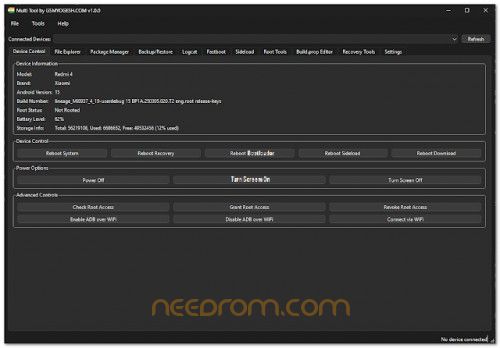
Is an all-in-one device management utility designed for both beginners and power users. With automatic ADB and Fastboot detection, it gives you full control over your Android device from viewing detailed device info and rebooting into different modes to managing apps, exploring files, and performing advanced functions like flashing partitions, sideloading ZIPs, or rooting. It also includes a real-time logcat viewer, build.prop editor, and complete TWRP-based recovery tools.
Features:
Device Management
Automatic detection via ADB & Fastboot
Show device info: model, brand, Android version, root, battery, storage
Reboot modes: system, recovery, bootloader, sideload, download
Power off / Screen on-off
Check & grant temporary root
ADB over WiFi: Enable/Disable & connect via IP
File Explorer
Browse device & local file systems
Pull/push files between device & PC
Delete files/folders remotely & locally
View remote file contents temporarily
Open local files & view file properties
Package Manager
List packages (all, system, 3rd-party, enabled/disabled)
Filter app list
Install APKs (replace, permissions, test-only)
Uninstall (keep data), clear data
Enable/disable apps
View detailed app info (version, UID, path, permissions)
Backup & Restore
Create ADB backups: APKs, shared, system, all/specific apps
Restore ADB backups
Logcat Viewer
Start/stop real-time logcat
Clear buffer, save logs
Filter logs by priority, tag, PID
Fastboot Tools
Flash partitions: boot, system, vendor, recovery, cache, userdata, custom
Flash all partitions at once
Unlock/lock bootloader & critical partitions
Erase & format partitions
Boot custom image & set A/B slot
Sideload
Sideload ZIPs (auto reboot to sideload)
ADB sideload support
Root Tools
Verify root status & grant temp root
Simplified install: SuperSU, Magisk
Remove root
Remount & mount /system as RW
Root shell & permission fix
Install BusyBox
Push/Pull to/from /system
Build.prop Editor
Load/save build.prop
Edit, add, delete properties
Recovery Tools
Reboot to Recovery, Bootloader, System
TWRP: Install ZIPs (manual push), wipe cache/dalvik/data
Create & restore TWRP backups
Settings
Set ADB & Fastboot paths
UI themes: System Default / Dark / Light
Customize font family & size
Create for GSMYOGESH
Thank and Donate…
File Free
※Please make a backup of your device before installing or updating ROM

|
idk how to add image on this.
But i scanned on virustotal and heres what i got.
THANK AND DONATE…