
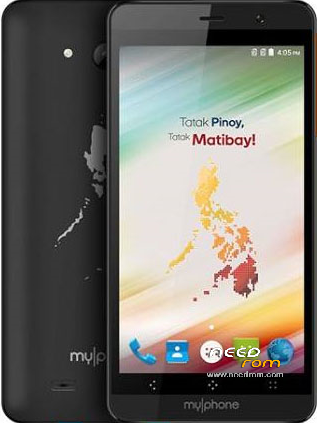
- Title: MyPhone MY85 DTV
- Listed: July, 2016
- Last modified: 10/24/2016 3:35 pm
- Version: ROM Android 6.0
You must be logged for ROM download.
19994 total views, 2 today
1 Total favorites
 Member Info
DESCRIPTION
ROM Mobile Myphone MY85 – ROM Android 6.0
ONLY MT6580
Official ROM Myphone MY85 description: full_w315f-user 6.0 MRA58K 1462782391 release-keys
Firmware Version: S5069_MY85DTV_20160509_V2.02
Gapps include – No Rooted
Language support: Multilang
Preparation:
1. Download the Firmware link (My85_DTV_FW_Link.rar), extract and open the file (My85_DTV_FW_Link.txt) to redirect to the download site of firmware file.
2. Download the Firmware file (S5069_MY85DTV _20160509_V2.02.7z) and extract using Winrar in a folder.
3. Extract and install the Mediatek Driver (MediatekDrivers.zip). Run the program (x64) inside.
4. Extract SP Flash Tool (SP_Flash_Tool_Windows_v5.1516.00.zip) to a nice and easy to browse location.
ROM Install :
1. Turn off your phone, remove then return back the battery, and DO NOT connect yet.
2. Open SP Flash Tool (flash_tool.exe), click the Scatter-loading button then browse the location of MT6580_Android_scatter_emmc.txt file. The scatter file is already at the .7z file you extracted together with .img and .bin files.
3. Check all of the items. Make sure that the check box beside them are checked when you load the scatter file. If it's not checked, then checked them manually, provided that their locations are shown on the location column. If no locations provided on the checked items, then you can browse their location manually by clicking the location column on every items on row.
4. Click Download.
5. Connect your phone to PC and wait for it to finish flashing. You can see now the progress bar below. If it does not do anything after connecting phone, disconnect, remove and return back the battery again, then reconnect the phone to PC. Check also your ports and USB cables if they are working properly. Don't interrupt the flashing process as it may brick your phone!
6. When it's done flashing, it displays a dialogue box with green check image (OK), means that it is success, then disconnect the phone.
Note: Please do not redirect the firmware links on any paid sites. Thank you!
※Please make a backup of your device before installing or updating ROM
Check out our Official Group for more information. Thank you!
where is you group? do you have a official database file for imei writing? thanks a lot
you can use chamelephone or any writing imei tool like miracle box or by engineering mode. sorry for late reply
please upload myphone my81 im bootloop pkease…
I don't have that unit, sorry
is this compatible for my82? i want to know if its working in my82?
my82 dtv tock rom dito guys
http://pinoyfirmware.blogspot......com/
nope. my85 dtv is mediatek mt6580, my82 dtv is spreadtrum sc7731, many roms that compatible on my82 dtv on this site just try to port them,
May tatanong lang po sana. Etong saken ay v2.03 so gusto ko magdowngrade to v2.02 kase ang lag. Papanget ba sya pag binalik ko sa dati or hindi? salamat po sa makakasagot.
it's up to you whether you downgrade it or not, but it depends on how it may affect the performance of your phone by downgrading it.
my phone is bricked.. i think thres something wrong with the scatter file sir.. can you fix it?
did you also checked the preloader.bin file?
Links updated! Thank you for non-stop support!
thanks sir… ill try this one..
hi po..pano po mag upgrade ng phone..myphone my85 po unit q..like q po sana un messaging q ktlad ng rio fun q,,pede po mabgo ng bubble chat at maglagay ng wallpaper s messaging..tyka o instead 8gb parang 4 gb lng un internal nia..thx po..
whooo!!!! thank you very much for the update sir… my phone is working now.
how the process to work your myphone my85?
i cant see the location sir! i cant flash my85 dtv
sir meron po ba kayung back up na stock recovery nito….sir pa add na man ng update file 2.04 para ma root ko
stock recovery na po mismo yang nasa loob ng firmware
pwede b to png ayos s my 85 ko n nadram failed error 5054