
- Title: NEXIAN A850
- Listed: December, 2014
- Last modified: 12/22/2014 3:25 pm
- Version: 2.2.2
You must be logged for ROM download.
13098 total views, 1 today
1 Total favorites
 Member Info
DESCRIPTION
INDONESIAN
Langkah melakukan Flashing :
1. Download semua bahan yang ada diatas
2. Extract semua file kedalam folder yang mudah diingat
3. Install
— Broadcom USB driver
— Visual C++ 2008
— Sprocomm
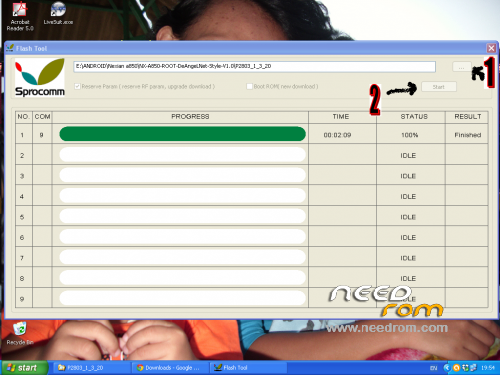
4. Buka Sprocomm>> lihat gambar
5. Ingat handphone kondisi mati,masukkan batery,masukkan kabel usb.
6. Biarkan proses berlangsung dan jangan cabut baterai atau kabel USB sebelum proses 100% (Finished).
saya menggunakan yang versi NX-A850-ROOT-DeAngeLNet-Style-V1.0
………….JIKA KURANG PAHAM BISA MENGHUBUNGI SAYA via email………….
ENG
Step perform Flashing:
1. Download all files
2. Extract all files into the folder that is easy to remember
3. Install
— Broadcom USB drivers
— Visual C ++ 2008
— Sprocomm
4. Open Sprocomm >> see image
5. Remember the phone is powered off, enter batery, insert the usb cable.
6. Let the process take place and do not disconnect the battery or USB cable before the process is 100% (Finished).
※Please make a backup of your device before installing or updating ROM