
- Title: NitrogenOS
- Listed: January, 2017
- Last modified: 01/25/2017 2:15 pm
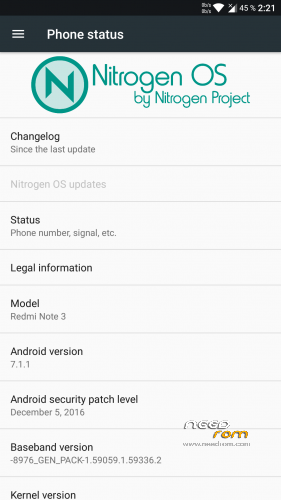
- Version: 7.1.1
You must be logged for ROM download.
12787 total views, 1 today
 Member Info
DESCRIPTION
If you do not understand how your phone if you do not know how to sew if you do not know what to do – do not use it.
I think this is the best firmware
developer – XYYX (http://4pda.ru/forum/index.php?showuser=873092)
AOSP + CAF
Goodix fingerprint - working default
(camera has a standard problem for 7.1) - Open camera + and use an alternative method of flash
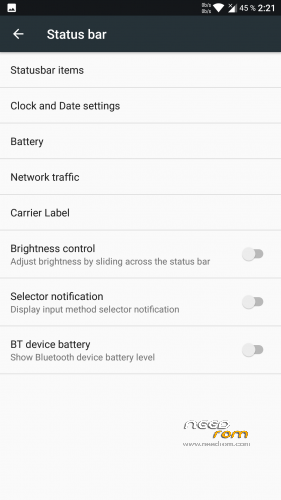
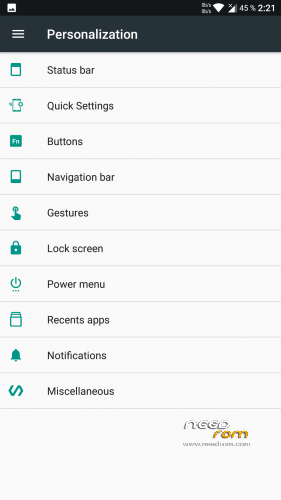
Status bar:
- The date and location of the range of time in the status bar;
- Select the icon of style and display the percentage of battery;
- An indicator of network traffic
- Bluetooth device charge level;
- Brightness control finger movement on the status bar.
- Input Method icon
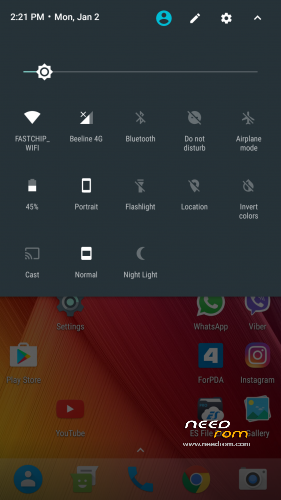
Quick Settings Panel:
- Set the number of tiles
- fast access
- A ban on the lock screen
- Dimmer
- "Smart" notification bar;
- On / off WiFi at the touch of a tile;
- Bluetooth on / off at the touch of a tile;
- Turning on / off the mobile Internet at the touch of a tile;
- Show / hide the Auto Brightness icon in the panel;
- Tiles inclusion / LTE outage.
Hardware buttons:
For devices with hardware buttons:
- Switching on and off buttons
- Backlight adjustment
- Backlight Timeout
- Reassignment action buttons apparatnyyh
- Closing the application while holding the "Back" button
- The awakening of the volume buttons;
- The volume buttons control the player;
- On / off "Do not disturb" mode, the volume buttons.
Navigation bar:
- 2 options of navigation panel: SmartBar (regular) and Fling (navigation of firmware Dirty Unicorns panel);
- Pulse settings Fling panel;
- Adjust the height of the navigation bar in landscape and portrait modes;
- Editing position contextual buttons;
- Adjust the transparency of the panel;
- Animation buttons in the panel when pressed;
- The cursor arrows in the navigation bar when typing.
- Disable snapping navbara to the lowest point of the device
Gestures:
- Turn on the camera by double-pressing the power button;
- Transfer device in sleep mode by double-clicking on the status bar;
- Transfer device in sleep mode by double-clicking on the lock screen.
Lock screen:
- Labels lock screen;
- The weather on the lock screen;
- Font hours;
- The inclusion of a flashlight by holding the power button when the screen is off;
- Turn the lock screen.
food Menu
- Set points;
- A ban on the lock screen;
Recent apps:
- The ability to hide the selected application from the list of recent applications;
- To select display a list of recent applications.
- The choice of the location of the Clear All button
Different settings:
- Options for screen capture (screenshot) – full screen picture and a particular area of the screen;
- MTP when you connect to a PC;
- Wake lock applications;
- Charging awakening;
- Scrolling cache;
- Substitution of signatures (microG)
and further:
- Operation in applications;
- Built-root;
- Fast unlock the screen;
- Night mode;
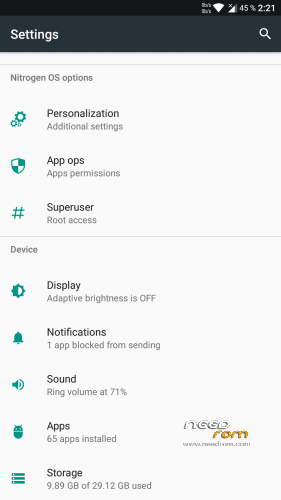
- Disable prompts, notifications and information in the Settings main menu
- Customizable Ambient Display
※Please make a backup of your device before installing or updating ROM
fingerprint sensor is not avaibable…
if you have goodix fingerprint sensor. Don't install fcp_fix file. this is official website http://xyyx-dev.ru/nitrogen-os.....ugat_7.1/kenzo/
Ma non spiega ninete di come deve essere istallato, puoi fare una guida base almeno, ho provato e mettere la tua rome e và in boot loop…
Grazie
Use plain English. Have respect.
Nothing is clear from your words.
Asking password to start android
E' vero, chiede una password per avviare android… dovè la password???
you hand curves. Before you do something you will be examined in the course.
Not any passwords there. Install firmware correctly.
He asks for a password to install what I have to put ??
Check good friend !!
A password will be requested if you have encrypted data partition.
Learn the theory and make the correct setting firmware.
This firmware is not any password.
I have flashed the rom using zcx twrp. Was trying to flash the rom dated 02/02/17. Still asking for password when os starts. I dindt c anything like data partition encrypt. Did c any setting. Pls explain. Thnx
Asking password to start android
Asking password to start android