
- Title: Nous NS5004
- Listed: August, 2020
- Last modified: 08/28/2020 1:03 pm
- Version: 6.0.1
You must be logged for ROM download.
7123 total views, N/A today


 Member Info
DESCRIPTION
Instructions for firmware via SP Flash Tool v5.1628
=================================================================================================
1. Installing drivers.
- MediaTek_USB_VCOM_drivers
- Driver_Auto_Installer_v1.1236.00
Using a microUSB cable, we connect the device to the computer and install the firmware drivers. After the driver is installed, disconnect the device from the computer.
2. Device firmware.
SP_Flash_Tool_v5.1628.zip to unpack to drive C:
Turn off the device completely, remove the battery.
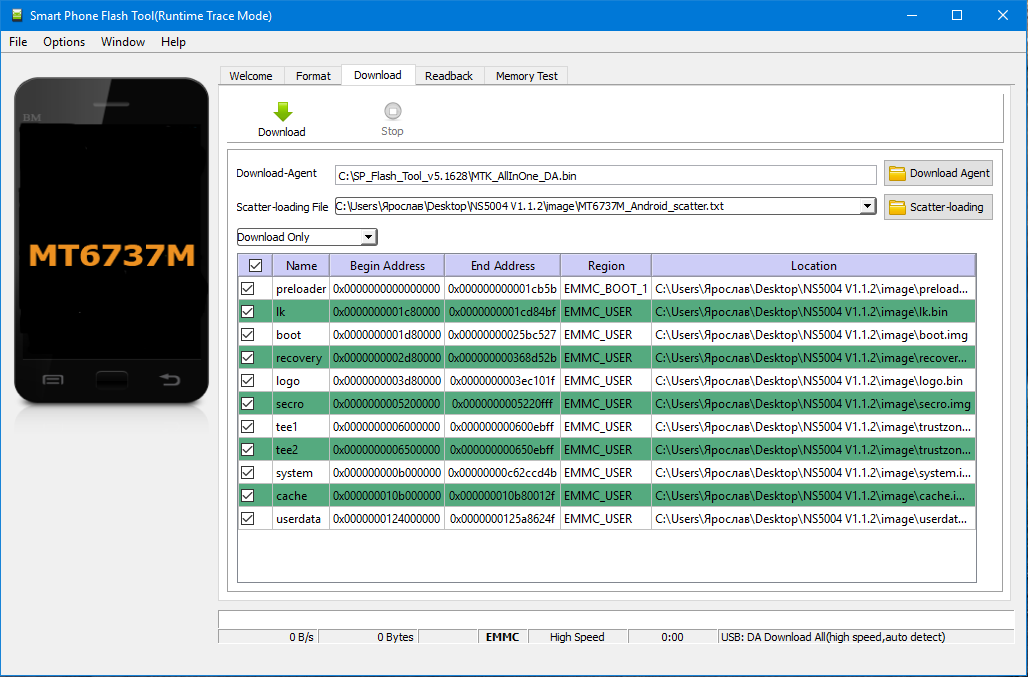
Run the SP Flash Tool on the computer – (flash_tool.exe) and fill in the fields:
– Download Agent select the MTK_AllInOne_DA.bin file
– Scatter-loading File select the MT6737M_Android_scatter.txt file
EXAMPLE SEE THE IMAGE BELOW !!
Click on the "Download" button. The application will go into standby mode for device connection.
Using a USB cable, we connect the device to the computer. If everything was done correctly, multi-colored stripes will appear at the bottom of the program, displaying the status of "uploading" the firmware to the device.
Eventually, a green circle window will appear on the computer screen, indicating that the firmware has been successfully uploaded to the device. After that, we reboot the flashed device.
Инструкция по прошивке через SP Flash Tool v5.1628
=================================================================================================
1. Установка драйверов.
- MediaTek_USB_VCOM_drivers
- Driver_Auto_Installer_v1.1236.00
С помощью кабеля microUSB подключаем устройство к компьютеру и устанавливаем прошивочные драйвера. После того, как драйвер установлен, отключаем аппарат от компьютера.
2. Прошивка устройства.
SP_Flash_Tool_v5.1628.zip распаковать на диск C:
Полностью выключаем устройство, вынимаем аккумулятор.
Запускаем на компьютере программу SP Flash Tool - (flash_tool.exe) и заполняем поля :
- Download Agent выбираем файл MTK_AllInOne_DA.bin
- Scatter-loading File выбираем файл MT6737M_Android_scatter.txt
ПРИМЕР СМОТРИТЕ ИЗОБРАЖЕНИЕ ВЫШЕ !!
Нажимаем на клавишу «Download». Приложение перейдет в режим ожидания подключения устройства.
С помощью USB-кабеля подключаем аппарат к компьютеру. Если всё было сделано правильно, то в нижней части программы будут появляться разноцветные полосы, отображающие статус «заливки» прошивки на аппарат.
В конечном итоге на экране компьютера отобразится окно с зеленым кружком, обозначающее успешную «заливку» прошивки в устройство. После этого перезагружаем перепрошитый аппарат.
※Please make a backup of your device before installing or updating ROM