
- Title: OPPO Demo Unlocker Pro
- Listed: February, 2026
- Last modified: 02/24/2026 2:56 pm
- Version: Android
You must be logged for ROM download.
1681 total views, 2 today
2 Total favorites
 Member Info
DESCRIPTION
OPPO Demo Unlocker Pro
Many people buy display phones because the price is low. It looks like a smart deal. But when you turn the phone on at home, a demo video keeps playing. You cannot install apps properly. Sometimes the phone resets again and again.
This problem is called Demo Mode. Today, let us understand what it is and how you can remove it easily from your OPPO phone.
What is Demo Mode?
Demo Mode is a special setting used in mobile shops.
When a new phone like an OPPO device arrives in the store, the company puts it in Demo Mode. This mode shows:
Bright videos
Special features
Camera samples
Ads about the phone
It runs again and again so customers can see the phone features.
But this mode also locks many settings. You cannot use the phone like your personal device.
Why Companies Use Demo Mode?
It is mainly for safety.
In a shop, many people touch the phone. Some may try to:
Change system settings
Add passwords
Install unwanted apps
Reset the phone
Demo Mode stops all this. It protects the phone while it is in the shop.
But once the phone is sold, this mode should be removed. Sometimes shop owners forget to remove it. That is when the problem starts.
Real-Life Example
Think of Demo Mode like a TV in an electronics shop.
In the shop, the TV shows a colorful video again and again. It looks nice there. But at home, you want to watch your own channels, right?
Same with a demo phone. In the shop, it is fine. At home, it becomes irritating.
New Update:
Now there is good news.
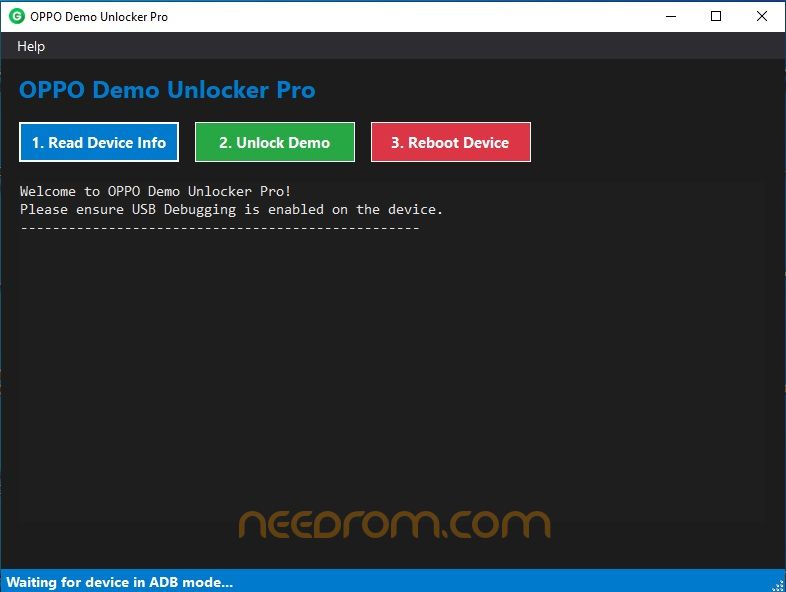
A simple computer tool called OPPO Demo Unlocker Pro is helping many users remove Demo Mode easily.
Earlier, people had to:
Use complicated commands
Flash the phone
Pay money to repair shops
Now, this new tool makes the process very simple. No hard steps. No confusing commands.
It works directly with OPPO phones and removes the demo lock in seconds.
How to Remove Demo Mode (Step-by-Step)
Here is the simple process:
Step 1: Turn on USB Debugging
Open phone Settings
Go to About Phone
Tap Build Number many times
Enable Developer Options
Turn on USB Debugging
Step 2: Connect the Phone
Use a good USB cable
Connect phone to Windows computer
Step 3: Open the Tool
Run OPPO Demo Unlocker Pro on your PC
Step 4: Read Device Info
Click "Read Device Info"
Make sure your phone is detected
Step 5: Unlock Demo Mode
Click "Unlock Demo"
Wait for a few seconds
Step 6: Restart Phone
Click "Reboot Device"
After restart, Demo Mode will be gone
That’s it. Now your OPPO phone works like a normal device.
Why This Tool is Helpful
Here are some benefits:
Very easy to use
No technical knowledge needed
Saves money
Works fast
No need to visit repair shop
Safe method
Many shop owners and users are already using it.
After Removing Demo Mode
Once Demo Mode is removed:
You can install any app
You can change wallpaper
You can use camera normally
No more demo videos
No automatic reset
Password: 123
Thank and donate…
File free
※Please make a backup of your device before installing or updating ROM

|