
- Title: P8000 Stock Rom + TWRP Custom Recovery (Easy&Updated 2018) All in One #
- Listed: November, 2016
- Last modified: 06/27/2018 3:20 pm
- Version: Android 5.1 (Default)
You must be logged for ROM download.
21480 total views, 1 today
5 Total favorites

 Member Info
DESCRIPTION
# ALL IN ONE # ELEPHONE P8000 UPDATED 06/2018
–> Stock Rom + TWRP Custom Recovery + Root
About ROM:
Stock Rom Elephone P8000 – K05TS-A.A.vR1J.E2.160412.
Custom Recovery (TeamWin Touch Recovery)
Includes SuperUserPro Zip to Root Elephone P8000
Needed:
YOUR PHONE MUST BE TURNED OFF TO FLASH WITH SpFlashTool
- Download "All Files.zip" file or separately "#All_In_One Flashable Setup#.zip" or "#Normal_Setup#.zip"
- Install MTK Drivers. (Included in Zip)
- Download SpFlashTool.
- Choose a Setup and Follow Instructions.
Instalation: ( #All_In_One Flashable Setup# )
This may not work depending on your current rom, TWRP Recovery sometimes doesn't get flashed correctly. If this happens, do #Normal_Setup# instead.
–> Extract Zip folder.
–> Open SpFlashTool
–> Go to Format Tab, click Start Button and connect your phone to the pc to format our device. Then unplug the device.
–> Click Scatter-Loading, choose Scatter file inside "Elephone p8000 Stock Rom" Folder…
–> Click Download Button
–> Finally Plug your phone in and wait until its finished.
DONE! Stock Rom + TWRP Recovery Installed …
Instalation: ( #Normal_Setup# )
Step 1 – Install Stock Rom:
–> Extract Zip folder.
–> Open SpFlashTool
–> Go to Format Tab, click Start Button and connect your phone to the pc to format our device. Then unplug the device.
–> Click Scatter-Loading, choose Scatter file inside "Elephone p8000 Stock Rom" Folder…
–> Click Download Button
–> Finally Plug your phone in and wait until its finished.
DONE! Stock Rom Installed …
Step 2 – Install TWRP Custom Recovery:
–> Open SpFlashTool
–> Click Scatter-Loading, choose Scatter file inside "Elephone p8000 Stock Rom" Folder…
–> Uncheck all values (preloader, lk, boot, recovery, logo, etc) and check only the recovery.img, then click over the recovery location to choose custom location and select our "recovery.img" inside "TWRP Custom Revovery" folder.
–> Click Download Button
–> Finally Plug your phone in again and wait until its finished.
DONE! TWRP Custom Recovery Installed …
How To Root Elephone P8000:
This needs to be done separately after any of the above setups.
–> First of all Dowload SuperUser.zip from here or use the one inside folder and Extract it to your SDCARD. (UPDATED: new SuperUserPro ZIP inside folder)
–> Now with your phone turned Off , Long Press VOLUME UP + POWER buttons until a menu pops up, then choose recovery (VOLUME UP to move around menu and VOLUME DOWN to choose)
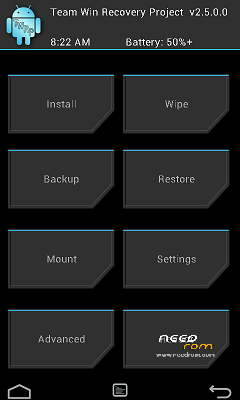
–> Now that you are in TWRP Recovery , Click Install Button and search for the SuperUser Zip File (UPDATE-SuperSU-v2.65-20151226141550.zip) (SuperSU_Pro_v2.49.zip) and install it.
DONE! You are now with the Original Stock Rom + Custom Recovery and Fully Rooted! Easy!
※Please make a backup of your device before installing or updating ROM
what is the version of elephone rom?
Why Beautiful ROM for p8000 is not supplied
Like this
https://www.needrom.com/downlo.....d/vibe-ui-v3-5/
Mobile phone must be rooted?
no this is to install to flash elephone p8000 stock rom and custom recovery and to root your phone
the MT6753_Android_scatter is bad. please help me.
pense que era el unico hondureño comprando telefonos chinos….este elephone es una aventura, ahorita tengo problemas de bateria hahahaha
its probably not the scatter cause it works just fine i flashed my phone 3 or 4 times already , and it works perfect every time, try to install a diferent version of spflashtool or try running spflashtool as admin
hahahahah ya somos dos man, fijate q actualize el cel a la version 6.0 pero con esa version no puedo ser usuario root. por eso quiero regresar a la 5.1 q es la mejor.
the MT6753_Android_scatter is bad
its probably not the scatter cause it works just fine i flashed my phone 3 or 4 times already , and it works perfect every time, try to install a diferent version of spflashtool or try running spflashtool as admin
Que timo, esta versión es la del 14 de enero
checksum error in scatter
I ran Checksum_Gen.exe in ROM folder and now checksum is OK
i have problems with the Wifi.. Signal signal is down
for checksum error, delete checksum.ini in the Stockrom folder
Please put new link
New link…!