
- Title: Qmobile Noir A900 Stock Rom (Sp Flash Version)
- Listed: October, 2014
- Last modified: 10/17/2014 2:46 pm
- Version: Android 4.2.1
You must be logged for ROM download.
25810 total views, N/A today
6 Total favorites


 Member Info
DESCRIPTION
Qmobile Noir A900
Overall Specification
Size 137 *68 * 7.9 mm
Weight 140 g
SIMs Dual SIM
Battery Li-Ion 1800 mAh
OS Android 4.2.1 Jelly bean
Memory 4 GB built-in, 1GB RAM, microSD card (supports up to 32GB)
Processor 1.2 Ghz Quad-core, ARM Cortex A7
Display Size 720 x 1280 pixels, 5.0 inches
Rear Camera 8 Mega Pixel Camera
Front Camera 2 Mega Pixel Camera
Network GSM 850/900/1800/1900 WCDMA 900/2100
3G, GPS, GPRS/EDGE, WAP/MMS, WLAN, Bluetooth
Technical Details
Hardware : MT6589
Model : A900
Build number : SV1.0
Build date UTC : 20130731-021453
Android v : 4.2.1
Baseband v: MOLY.WR8.W1248.MD.WG.MP.V6.P24, 2013/07/09 09:57
Kernel v : 3.4.5 (znsj_bianyi5@znsj-ian5) (gcc version 4.6.x-google 20120106 (prerelease) (GCC) ) #1 SMP Wed Jul 31 10:12:41 CST 2013
Uboot build v : —–
LCD Driver IC : 1-gn_truly_nt35590
How to Flash..!
First of all, make sure that you have MediaTek USB VCOM drivers installed. use "Qmobile_Android_usb_driver.zip"
Download latest SP flash tools v 5.13 from
http://www.mediafire.com/download/5f5h3owa7s7y6g2/SP-Flash-Tool-v5.1352.01.zip
or from https://app.box.com/s/q1jvksn59qw1wtww7k5s
1- Download all 7 parts of stock Rom. (total size compressed 604 MB and uncompressed size 1.05GB)
2- Use WinRar to extract all parts into one folder.
3- Activate USB debugging from Deleloper options. Then switch off Your phone and remove battery.
4- Open SP Flash tool folder and click on Flash_Tool.exe
5- Browse to the scatter File MT6589_Android_scatter_emmc.txt in the stock rom folder and ignore any message that may appear
6- Make sure all item are checked except USRDATA and CACHE. Then press F9 (or hit Download button)
7- Connect your phone (without battery) into the computer via USB data cable.
8- The process will start and a red progress bar will appear.
9- After the red progress bar is complete, there will appear a purple progress bar, then yellow progress bar.
10- When the yellow bar is complete, you'll get a popup with a green circle and Download OK message,
which means that the process has been successfully terminated.
11- You are done. Put the battery in and Power on the mobile.
12- Enjoy your new Alive Handset.
Note: if you want to replace the original stock recovery with CWM recovery, then rename "A900_CWM_Recovery.img" with "recovery.img) and copy, paste/overwrite it in stock rom folder. Then do the above all procedure.
Credit:
Imtiaz ahmad Khan
※Please make a backup of your device before installing or updating ROM
Thanks a lot
Hi,
I downloaded this rom and followed the steps mentioned. My phone is now stuck in bootloop. Can you help ? what should i do now to make my phone alive again ?
?
Regards
my phone got stuck too on bootloop.. then i took my battery off and place it again… and press volume down + power button at same time for few seconds to get in factory mode… then i select " Clear EMMC " which did factory reset on its own and wallah my phone worked.
I dont think this is a perfect QMobile A900 stock Rom as i just flashed this rom and now my A900 is not working … so heads up to guys wanting to use this rom for Q A900
This rom is not working my phone is stuck at bootloop and nothing happening and not even going to recovery
do not install this rom
sir cach and user data files are missing plz help me
AOA ….. Please anyone help me???
When i am flashing my q mobile A900 then enable brom error occurred.The error tells that the file is not suitable for this model please help me to resolve it………..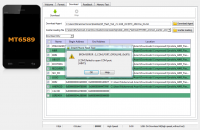
I am waiting for your reply????…:(
please sir imtiazz2004 help me to fix the above stated problem
Its not working no one should try it you might brick your phone Be CAREFUL!!!