
- Title: QUALCOMM & MEADIATEK HELP TOOL LAUNCHER
- Listed: January, 2025
- Last modified: 01/12/2025 8:26 pm
- Version: ANDROID
You must be logged for ROM download.
4194 total views, 1 today
 Member Info
DESCRIPTION
Qualcomm & MediaTek Help Tool Launcher
- Qualcomm and MediaTek Help Tool launcher is a complete utility program. the tool works on Windows computers with lots of new functions added in the tool Qualcomm module can be the same as you can already use on the motokingpro tool. but in the tool, you can find out the new option for Mediatek devices that helps you to fix the many problems that work with a wide range of devices.
Features:
- MediaTek
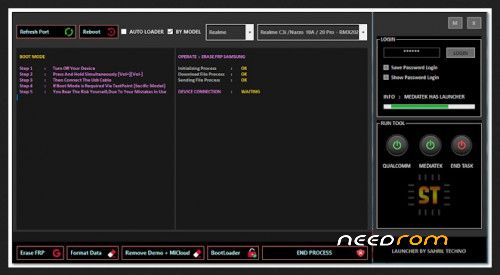
The MediaTek section of the tool provides a wide range of solutions for different device needs, including data management, FRP removal, bootloader operations, and demo removal.
- Erase FRP
Supports Samsung and all major brands.
Works seamlessly with new operating systems.
- Format Data
General data formatting.
Unlock features for safe data management, compatible with both old and new device models.
- Remove Demo + MiCloud
Effortlessly remove MiCloud accounts.
Eliminate demo modes on VIVO and OPPO devices.
- Bootloader Operations
Unlock and relock the bootloader.
Check the bootloader status directly in fastboot mode.
- Qualcomm
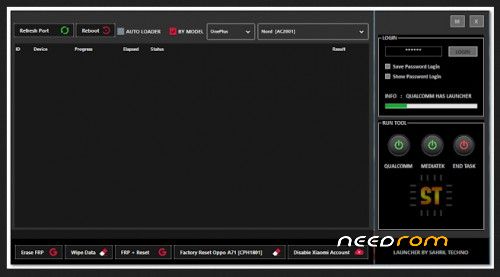
This section includes tools for partition management and specialized data operations.
Partition Manager
Manage device partitions easily through bootloader access.
KingUtils
A versatile set of utilities designed to handle data wiping and account management for a variety of devices.
Wipe Data
Universal wipe-data method.
Patch method for enhanced compatibility.
Master clear functionality tailored for Oppo and Vivo devices.
Restore AI settings with ease.
Format user data with an efficient erase method.
Also read :MTKController A small tool for tuning the MTK Dimensity series processor performance.
Erase FRP
Universal FRP erasure.
Patch method for FRP bypass.
Combined FRP and reset features.
Dedicated factory reset support for Oppo A71 (CPH1801).
Disable Xiaomi Account
Easily disable or enable Xiaomi accounts.
How to install and use it?
- Step 1: Download the Setup File
Download the setup file from the official source.
Note: The file size is approximately 600 MB or more.
- Step 2: Extract the Setup File
Use the WinRAR program to extract the downloaded file.
During extraction, you'll be prompted for a password.
Enter the password: HTL2025
Wait for the extraction to complete.
- Step 3: Install the Tool
Locate the extracted setup file.
Right-click on the setup file and select Run as Administrator.
Follow the installation instructions to complete the setup.
Once the installation is successful, a desktop shortcut will be created for the tool.
- Step 4: Launch the Tool
Double-click on the desktop shortcut to open the program.
When the tool opens, it will ask for a valid login password.
Enter the password: TOMSEL
After entering the password, the tool will enable all its functions.
- Step 5: Using the Tool
To use a specific module:
For Qualcomm tasks, click on the Qualcomm button.
For MediaTek tasks, click on the MediaTek button.
Follow the on-screen instructions for the selected module.
- Step 6: Closing the Tool
After completing your tasks, click on End Task to close the module and exit the tool safely.
THANK AND DONATE…
FILE FREE
※Please make a backup of your device before installing or updating ROM