
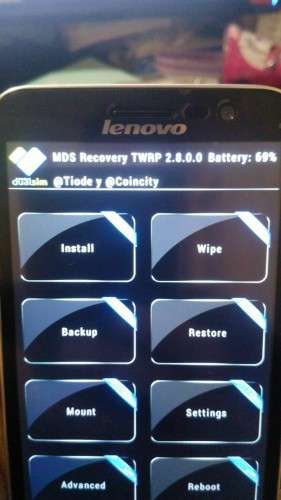
- Title: Recovery TWRP MDS 2.8.0.0 (Lenovo A806)
- Listed: September, 2014
- Last modified: 09/21/2014 11:46 pm
- Version: TWRP 2.8.0.0 MDS
You must be logged for ROM download.
52752 total views, 1 today
19 Total favorites
 Member Info

DESCRIPTION
Recovery MDS (Based TWRP 2.8.0.0) for Lenovo A806
Ported by @tiode (Movilesdualsim.com moderator)
Themed by @coincity (Movilesdualsim.com moderator)
Install:
For root and non root users:
- You need drivers MTK Preloader installed in PC
- You need FlashTool (tested with Mediatek SP Flash Tool v 5.13.52.200) installed in PC
- Copy in your PC this files: recovery.img and MT6592_Android_scatter.txt
- Run MTK Flashtools, choose the scatter in the recovery folder and choose the MTK_AllInOne_DA.bin in MTK Flashtool folder.
- Turn off the phone completely and remove the battery
- Connect the USB cable to the phone, click Download in MTK Flashtool and connect the cable to the PC, put the battery on the phone
- MTK Flashtool will flash in seconds and leave the green circle icon (If you receive an error COM port you will have to review the installation of the drivers preloaders)
- You can to root your phone in Recovery
For root users only:
- Copy recovery.img to sdcard
- Install movileuncle.apk or download it from Play Store
- Open app MobileuncleTools, give root permissions and go to Change Recovery
- Select recovery.img in sdcard, and install.
When you have recovery installed:
With phone off, You press both buttons Volume Up + Volume Down + Power to enter recovery
If you want to root your phone:
On the first screen, bottom left, just click on advanced
In top right, Fix permissions
If root button appears stablish click it or sliding to the right to confirm the root.
Reboot and you should have the superuser application.
I'M SORRY FOR MY BAD ENGLISH, I ONLY SPEAK SPANISH
DONATE WITH PAYPAL HERE PLEASE
or TO EMAIL: JUANIS @ COINCITY .ES
※Please make a backup of your device before installing or updating ROM
bagaimana cara pasannya…..?
i dont understand you
thank you guys for making an english twrp recovery for the a806. you did an amazing job and i will use this recovery once my phone will arrive.
For donations
http://www.coincity.es/donar
Thanks
not working for me
I tried but there is some issue which is wipe cache n data so it will wipe whole internal storage..
Hi Coincity,
When i select the "MT6592_Android_scatter.txt" file in SP Phone Flash Tool I get the message:
SP FLASH TOOL ERROR: (8417)
The load scatter file is invalid!
[HINT]:
Please check the scatter file and select again!
Can you please help?
find right version flashtool for your model. before this i got same message.
SP FLASH TOOL ERROR: (8417)
The load scatter file is invalid!
Thanks… i will see the scatter file tomorrow
Good job, thank you !
Your english is perfect for me
Good….terbaik..