
- Title: SM-J320FN rooting (Galaxy J3(6))
- Listed: June, 2016
- Last modified: 06/09/2017 4:55 pm
- Version: Android 5.1.1
You must be logged for ROM download.
79003 total views, 6 today
60 Total favorites
 Member Info
DESCRIPTION
2018.09.24 update:
For Wed jan 3 16:46:50 KST 2018 kernel, but you can use the previous boot.img for this version too.
2017.06.09 update:
Modified and stock boot.img files.
ONLY FOR Mon Feb 27 20:36:15 KST 2017 KERNEL!
You can try on other versions, but if something goes wrong, you have to reinstall the boot.img from your stock firmware.
After reboot the SuperSU may update the su binaries.
2017.01.02 update:
It seems to be this method not working with new firmwares because of new boot.img.
This img has to be used only for wed Mar 16 18:51:05 KST 2016 kernels.
Maybe i will update the boot.img. Maybe… Use TWRP for rooting…
2016.06.17 update:
- stock boot.img added
- busybox added. Just copy the new root.img to /sdcard and reboot, if have not busybox yet.
Hi!
Sorry for my english.
Because of not found a working rooting method and/or custom recovery for SM-J320FN, i think that make one based on Chainfire's scripts and tools. Thanks to him for it.
The results are a modified boot.img and an another image file with files needed for root.
ONLY FOR SM-J320FN (Spreadtrum SC9830A)!
How to:
1. Install Samsung USB driver.
2. Download Odin v3.x from anywhere.
3. Phone: Switch on the OEM unlock in Developer Menu.
4. Unzip the downloaded files.
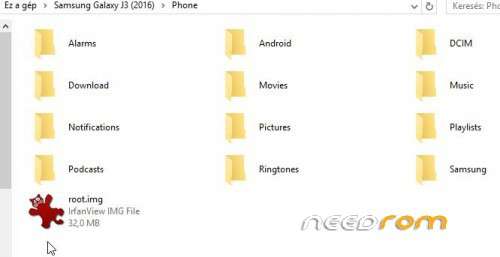
5. Connect phone to PC (MTP mode) and copy the root.img file with File Manager to root of Phone folder (Yes, it is the inner, emulated SD, see the picture)
6. Reboot to Download mode. (Turn off device and then press and hold the volume down + Home + Power buttons)
7. Press Volume up button.
You should see FAP LOCK: OFF status!
8. Odin: You should see a COM port number. Make sure that the "Auto Reboot" and "F. Reset Time" options are only checked.
9. Click on AP button and select the needed boot.img file.
10. Click Start.
11. After flash the phone will reboot. Then install Chainfire's SuperSU from Play.
Attention! Without SuperSU the root is working too, but you couldn't get message about if an application uses root privilegies!
Enjoy.
If you have question about the steps, use the Google or whatever i am lazy to explain everything.
Warning!
Flashing the modified boot.img will void the warranty of phone!
But you could restore the Stock State with flashing stock boot.img and with switching off the OEM unlock.
※Please make a backup of your device before installing or updating ROM
it says success but my phone is bricked now, its stuck uin j3 and samsungs logos!! why¿? i have J320FN and did all the steps !! …do i have to drag the root.img file into the main folder as a normal folder? just click and drag or.. ?
PLEASE HELP !!!
What I need to do with the boot.img?
yo could you help me out i have done the steps n all that but it just boots to the samsung loading part and then jumps back to the samsung galaxy j3 6 logo.. done everything u said and it doesnt work pal
only samsung boot image…Why,Boss? Thanks Sir your answare!
Much easy, such working. Thanks pal!
Will work your rom whith this model and kernel?
J320FNXXU0AQC6
3.10.65-10519280 DPI@SWHD7318#2 MON MAY 15 18:20:25 KST 2017
Merci tanck you
works perfectly on my j3 2016 sm-F320F BOARD 9830I THNX MAN
SAMSUNG J3 2016 SM-J320G…? it is work..?
samsung j3 (2016) sm-J320G can use it…???