
- Title: CyanogenMod 12.1 port for HDC Samsung S6 4G A228_mula MTK6735m [64bit]
- Listed: January, 2017
- Last modified: 01/13/2017 3:19 pm
- Version: Android 5.1.1 / MTK6735m
You must be logged for ROM download.
14877 total views, 3 today
2 Total favorites


 Member Info

DESCRIPTION
Hello friends!
Here is my CyanogenMod 12.1 port for HDC Samsung galaxy S6 4G A228_mula MTK6735m[64bit]
be a positive and give me 5 STAR if you like!!!
And please respect my work for this port rom!!!
Thanks to:
BlueFlame4 – walter79 – for this rom!
http://forum.xda-developers.com/elephone-p8000/orig-development/rom-cyanogenmod-12-1-p8000-t3259022
CYANOGEN_MOD 12.1 – PORT FOR HDC Galaxy S6 A228_mula MTK6735m / 64bit /
It boots and is hardware accelerated!
Gapps
WiFi
GSM 2G , 3G , 4G
RIL for SMS/Calls/Internet
Microfon
Vibration
FM Radio
Audio
notification LED
Rotation
Proximity Sensor
Bluetooth
Camera Back + Flash
Camera Front
Ambient Light Sensor
External SD
Virtual key
Fisical buttons
GPS
MTP and Mass Storage mode
Double tap 2 sleep on status bar
And more…
Not working: …………
——————————————————————————————————————————————————
TWRP_3.0.2 [64bit] INFO.!!!
How to install TWRP : Unrar and install via (SP_Flash_Tool with stock rom scatter.txt) or (Fashify) app on Google play store.
How to install CM12.1:
Go in to recovery TWRP 3.0.2 and / create Backup – on Stock_rom / very important if something goes wrong!!!
1. Factory reset
2. Wipe cache - Wipe Dalvik cache – Wipe Data – Wipe System
3. Go to main menu in recovery and Install zip from external_sd
4. Install -CM12.1 , Gapps , SuperSU.
※Please make a backup of your device before installing or updating ROM
when we see it?
it's redy friend download again TWRP and flashed see.
when we see the 14 cm?
When is ready for dealy use.
will wait!!!!!!
with this rom
with this rom HOME button not work on my phone, how to fix?
Does experience in settings buttons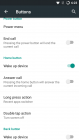
If this does not work you have to replace from system\usr\keylayout -> (Generic.kl) and (mtk-kpd.kl) from stock rom.
I replaced the file from system/usr/keylayout and it now works, thanks
How are things going with SM 14
Only camera not work for now.
Lay out for a sample.