
- Title: Samsung SM-9100 Note 4 (clone) MTK6572
- Listed: May, 2015
- Last modified: 05/08/2015 6:42 pm
- Version: ALPS.KK1MP6.V1
You must be logged for ROM download.
56059 total views, 4 today
24 Total favorites

 Member Info
DESCRIPTION
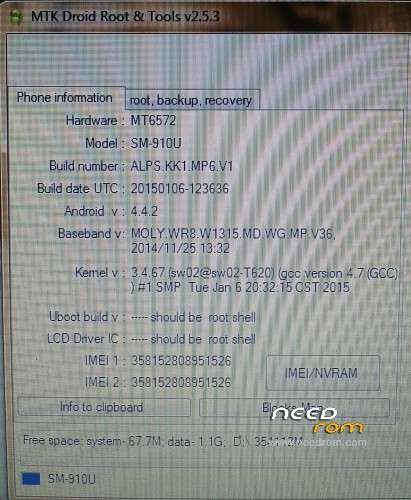
Hardware : MT6572
Model : SM-910U Note 4
Build Number : ALPS.KK1.MP6.V1 (JDQ39.ANDROIDXXUAMDL)
Build Date UTC : 20150106-123636
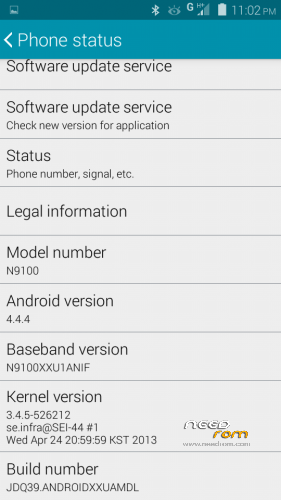
Android V : 4.4.2 (4.4.4 is fake)
Baseband V : MOLY.WR8.W1315.MD.WG.MP.V36.2014/11/25 13:32 (N9100XXU1ANIF)
Kernel V :3.4.67 (sw02@sw02-T620) (gcc version 4.7 (GCC)) #1 SMP Tue Jan 6 20:32:15 CST 2015
Use SP Flash Tool V3.1xxx or latest
Hope this stock rom work fine on your devices
If there are any questions about android rom please contact me
tango.pkw@gmail.com | bbm 51E09A73 | (+62) 8563532353
Password for file => java1511 <=
※Please make a backup of your device before installing or updating ROM
Les traigo la soluciòn, le instale este y funciono todo excelente, esa rom si esta completa.
aqui el link https://www.needrom.com/downlo.....572-fake-1-sim/
Hello! I have that damn phone (single sim), I'm trying to flash your files using the latest flashtool and I get an error:
BROM ERROR : S_CHIP_TYPE_NOT_MATCH (3168)
[H/W] Target baseband chip is inconsistent with scatter files!
[HINT]:Please select the correct scatter files for the target's baseband chip.
I almost definately downloaded the wrong rom for flashing, right? Can anybody help?
(Also, as shown is settings)
Model number: N9100, Baseband version: N9100XXU1ANIF, Build number: JDQ39.ANDROIDXXUAMDL
Open your flashtool, press Ctrl+Alt+V button on your keyboard
Then go to Option -> Baseband Chip Option, untick EMI and …. or Enable NFI ….
Let me know if it worked
Thanks for your reply! There is no Ctrl+Alt+V command… It doesn't do anything. Also there are no such options in any tab in the options menu… I'm using Mediatek SP Flashtool V5.1436.0. Did I miss something?
my phone didn't showing any logo excepts some black and white lines on the centre of the screen
plz help me
my mobile is totally dead and i am to shop for download software its ask the mobile file are internal corrrupted plz solution
ananızı sıkıyım sızı
sp flash tool how is good version ????
please password
http://adf.ly/1a2YLp
pasword
http://adf.ly/1a2YLp
i need rom for this device plz visite this link click-here