
- Title: LA-Q1 – FonzoChili
- Listed: June, 2013
- Last modified: 11/25/2014 3:22 pm
- Version: ROM Android 4.1.1 v008 (b1r024)
You must be logged for ROM download.
25583 total views, 3 today
3 Total favorites
 Member Info
DESCRIPTION
Updated 25th November 2014 to v008.
_
FonzoChili _//
v008 /'-?
,' ;/
./' ;'
,-" _;'
,-'_;-" Arfonzo's LA-Q1 ROM
"'
http://rocksteady.poorcoding.com/art/android/LA-Q1
NOTES
Dear friends, it has been a while! I have been very busy, and although I had intended to stop providing any further upgrades to this ROM, I've decided to release the latest version of the ROM, v008, for any brave Small Chili users still out there. 
Major improvements: OpenSSL Heartbleed vulnerability has been fixed, fix for those experiencing Home button not working, installer script cleanup and more.
I debated whether I should put any more effort into supporting FonzoChili, but I decided that if any loyal users are out there, the least I can do is provide them with an updated ROM with the above improvements.
Thank you all for your support and kind words, and keep them coming.
- arfonzo
v008 CHANGES
- Fix Heartbleed (SSL vulnerability).
– Note: this fix uses the same OpenSSL version 1.0.1c, but disables the exploitable capability. Some "Heartbleed Check" apps only go by version number alone: ensure you check with an app like Lookout Mobile Security's Heartbleed Security Scanner. This type of app checks the version, and as well the exploitable feature to accurately determine that the vulnerability no longer exists on this ROM.
- Fix Home button not working in some upgraded scenarios.
- Update Google Framework (Play) Services to 6.5.87.
- Update Google Play store app.
- Remove default application(s):
– Calendar (I suggest you download the improved Google Calendar app, the new widget now works with new framework)
FEATURES
FonzoChili aims to stay as close to the official stock ROM as possible, giving you the stuff you need (i.e., root, Google services framework), and removing the stuff you don't need (i.e., crazy Chinese applications that add little green robots to your Home screens).
Briefly, the latest version of FonzoChili features:
From the stock rom:
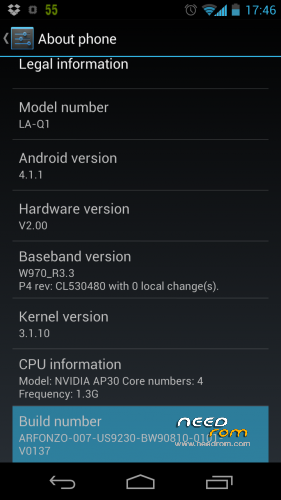
- Android version: 4.1.1
- Based on official ROM: US9230-BW90810-0101-V0137
FonzoChili removes from stock:
- System applications removed, including:
– AreaSearch.apk
– BaiduInput.apk
– Browser.apk
– Calendar.apk
– CooeeRota_Signed.apk
– ThinkFree.apk
- Some applications that cannot be removed from /system/apps. They reside on a separate partition. FonzoChili removes them, too:
– AndroidAppManager.apk
– BaiduSearch.apk
– FromXiaolajiao.apk
– LA-Q1QQ.apk
– LajiaoMarket.apk
– TencentMobileManager.apk
– UCBrowser.apk
– iReader_V1720_yuxin.apk
FonzoChili changes from stock:
- English as default language.
- Comes with:
– Root.
– BusyBox.
– Chainfire SuperSU.
– Google apps and services, including Play.
- No Google Play/Market restrictions (as noted with some other ROMs for this device).
- Zip aligned.
- Deodexed.
- Camera/camcorder shutter sounds completely disabled.
- Debugging tweaks:
– Enable performance tuning (in Developer options).
– Disable USB Debugging notification.
- Dalvik VM tweaks:
– Heap's growth limit set to 256m, and other tweaks.
- Memory management tweaks:
– Automatically purge assets from memory as needed.
- Phone behavior change:
– No delay before ringing.
- Camera tweaks:
– JPEG encoding quality set to 100%.
- Networking tweaks:
– Network buffers set to widely accepted improved values.
– DNS servers set to Google's 4.4.4.4 and 8.8.8.8.
- Battery life tweaks:
– Reduce WiFi scan interval.
- New in v008:
– Heartbleed OpenSSL vulnerability fixed.
…and more.
INSTALLATION
WARNING: There is a chance you may lose everything, or even worse, brick your device. If you attempt to use FonzoChili, you do so at your own discretion and agree not to hold its authors liable for anything that happens.
Follow the steps pertaining to the recovery ROM you have:
[A] If you have the stock recovery.
[B] If you have CWM recovery such as Arfonzo's CWM Recovery ROM.
METHOD A: STOCK RECOVERY.
- Put the ROM's .ZIP file on the root of the SD Card.
- Make sure the ROM's filename is renamed to "update.zip".
- Power off the phone.
- Make sure the USB cable is not plugged into the phone.
- Hold: Volume Down + Power, until you see a green "RECOVERY" on the screen.
- In recovery, apply update.zip from SD Card.
METHOD B: CWM RECOVERY.
- Put the ROM's .ZIP file anywhere on the SD Card. You don't need to rename it.
- Power off the phone.
- Make sure the USB cable is not plugged into the phone.
- Hold: Volume Down + Power, until you see a green "RECOVERY" on the screen.
- In CWM recovery, pick a zip from SD Card.
- Pick out the ROM's .ZIP file and apply.
For either method, after the above steps, you should:
- Factory reset the phone.
- Wipe the cache partition.
- Wipe the Dalvik cache.
- Reboot.
UPGRADING FONZOCHILI
If you are upgrading your FonzoChili system, things should be easier. Follow the install steps in order to pick and apply the new ROM's .ZIP.
Afterwards, there is NO NEED TO FACTORY RESET, but you do need to:
- Wipe the cache partition.
- Wipe the Dalvik cache.
- Reboot.
It will spend some time next bootup, ODEXing the APKs. This should only happen once, and you should notice a quick bootup process following first boot.
THANKS
Thanks to everyone using FonzoChili. In particular, thanks to Gijs, for testing FonzoChili since inception, and providing the feedback.
CONTACT
For discussion/questions/support, please join IRC.
IRC: #SmallChili, on OFTC IRC network.
Email: ART at POORCODING dot COM
Enjoy!
- arfonzo
※Please make a backup of your device before installing or updating ROM
I think that is oficial recovery in your phone on Chines if you want to installs custom ROM you must change recovery to custom in this page you can find recovery foe LA-Q1 and steps to install the same https://www.needrom.com/downlo.....recovery-la-q1/ .
Thanks krogan for the speedy reply but its not the recovery its the actual bat file for the recovery I’m having the problems with
Whic recovery did you use.
Hi, @krogan: you can use the recovery ROM which I have uploaded here to NeedROM, also here: http://rocksteady.poorcoding.c.....LA-Q1/recovery/
Regards,
arfonzo
Hi everyone,
I want to install this rom but my phone is no longer entering recovery.
Any idea how to flash a rom using fastboot and after that install this rom?
Regards
none?