
- Title: Micromax A110 Spike™ Rom-4.1.1
- Listed: February, 2014
- Last modified: 02/28/2014 2:41 pm
- Version: 4.1.1
You must be logged for ROM download.
15473 total views, 1 today
CUSTOM







 Member Info
DESCRIPTION
Powerup in 5 sec
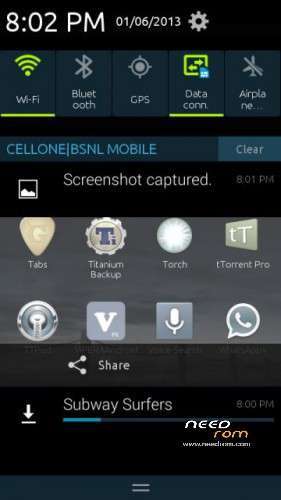
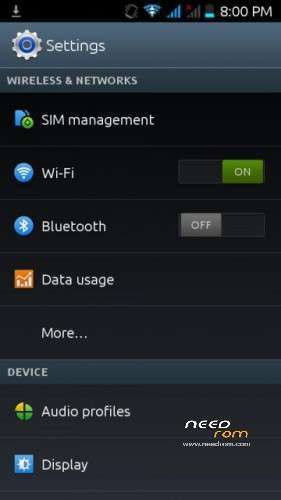
-Galaxy User Interface
-Super Smooth and Fluid
-Xposed Framework
-Xtheme Engine
-Xtheme Status Bar Module
-Crossbreeder
-Viper Audio Engine
-In-Built Ad Blocker
-S3 Dialer and Status Bar
-Bravia Engine 2
-Full GPU & CPU Utilization
-Smooth & Improved Touch
-Canvas Music Apps
-S4 Music Player
-Special Optimization For Gamers
-Vibrate on Call Connect
-Pre-Rooted
-Latest Version of Superuser
-Improved Touch Quality
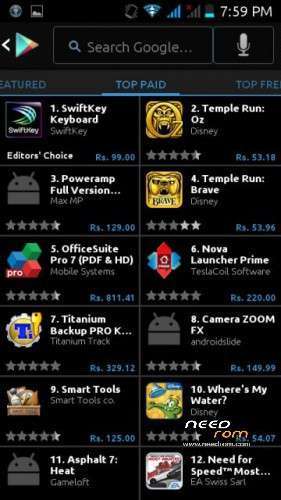
-Inverted Play Store
-Dark Themed Google Apps
-Amazing New Tones
-New Boot Animation and Logo
-New Ubuntu Font
-Many Build.prop Tweaks
-Best Battery Backup
-New Alarm & Lock Sounds
-Nova Launcher as default
-12MP Back Camera and 1.3MP Front Camera
-Improved GPS Lock Speed
-60 FPS (Frame Rate per Second)
-Quadrant Score above 3050
-Wi-Fi Improved
-Super Fast Internet Speed
-Proximity Sensing Improved
-CyanogenMod Calculator
-Removed Bloatware
-Removed Useless Ringtones
-Quick Boot Option
-Super Smooth Performance
-8 init.d scripts total added
-Zipalign data & system apps on each boot
-Battery Callibration
-Optimized RAM usage
-Ext4 Tweaks
-No Interface Lag at all
-Maximum Speed & Performance
-All logging activities disabled
-GPS enhancements
-Sqlite3 Added
-Better App Processing
-Disabled logcating
-Lots of kernel tweaks
-VM heap tweaks
-Net speed tweaks
-No redirects on data
-RAM booster binary
-New Power Menu
-Super Smooth and Fluid
-Xposed Framework
-Xtheme Engine
-Xtheme Status Bar Module
-Crossbreeder
-Viper Audio Engine
-In-Built Ad Blocker
-S3 Dialer and Status Bar
-Bravia Engine 2
-Full GPU & CPU Utilization
-Smooth & Improved Touch
-Canvas Music Apps
-S4 Music Player
-Special Optimization For Gamers
-Vibrate on Call Connect
-Pre-Rooted
-Latest Version of Superuser
-Improved Touch Quality
-Inverted Play Store
-Dark Themed Google Apps
-Amazing New Tones
-New Boot Animation and Logo
-New Ubuntu Font
-Many Build.prop Tweaks
-Best Battery Backup
-New Alarm & Lock Sounds
-Nova Launcher as default
-12MP Back Camera and 1.3MP Front Camera
-Improved GPS Lock Speed
-60 FPS (Frame Rate per Second)
-Quadrant Score above 3050
-Wi-Fi Improved
-Super Fast Internet Speed
-Proximity Sensing Improved
-CyanogenMod Calculator
-Removed Bloatware
-Removed Useless Ringtones
-Quick Boot Option
-Super Smooth Performance
-8 init.d scripts total added
-Zipalign data & system apps on each boot
-Battery Callibration
-Optimized RAM usage
-Ext4 Tweaks
-No Interface Lag at all
-Maximum Speed & Performance
-All logging activities disabled
-GPS enhancements
-Sqlite3 Added
-Better App Processing
-Disabled logcating
-Lots of kernel tweaks
-VM heap tweaks
-Net speed tweaks
-No redirects on data
-RAM booster binary
-New Power Menu
Steps to Flash Spike Rom:
(Following each and every step properly is strongly recommended)
1) Download Rom Zip File from the Link Above
2) Put into External/Internal SD Card
3) Go To CMW/TWRP/LEWA Recovery
4) Wipe Data/Factory Reset
5) Go to 'Mounts and Storage' and Format System
6) Select 'Install zip From Sdcard' and choose the Rom Zip File
7) Select Yes and The Installation will Start
 Reboot Phone after Installation is Complete
9) Put Information & Complete Setup Wizard
10) Open 'Xposed Installer' from App Drawer
11) Select 'Install/Update' and close the App
12) Open 'Viper4AudioFX' from App Drawer
13) Select 'Cortex A8 with Neon' and Install Viper Drivers
14) Reboot & Go to Recovery Again
15) Fix Permissions and Wipe Dalvik Cache from Advanced Menu
16) Reboot the Phone
17) Enjoy the Rom
Note: The First Boot Up Might take 3-5 Minutes So Please be Patient…
(Following each and every step properly is strongly recommended)
1) Download Rom Zip File from the Link Above
2) Put into External/Internal SD Card
3) Go To CMW/TWRP/LEWA Recovery
4) Wipe Data/Factory Reset
5) Go to 'Mounts and Storage' and Format System
6) Select 'Install zip From Sdcard' and choose the Rom Zip File
7) Select Yes and The Installation will Start
Reboot Phone after Installation is Complete9) Put Information & Complete Setup Wizard
10) Open 'Xposed Installer' from App Drawer
11) Select 'Install/Update' and close the App
12) Open 'Viper4AudioFX' from App Drawer
13) Select 'Cortex A8 with Neon' and Install Viper Drivers
14) Reboot & Go to Recovery Again
15) Fix Permissions and Wipe Dalvik Cache from Advanced Menu
16) Reboot the Phone
17) Enjoy the Rom
Note: The First Boot Up Might take 3-5 Minutes So Please be Patient…
※Please make a backup of your device before installing or updating ROM
does it have TV out ? I need this…
is this rom available for my phone a919?