
- Title: SPRD UPGRADE TOOL V12.00.01
- Listed: December, 2023
- Last modified: 12/29/2023 3:46 am
- Version: ANDROID
You must be logged for ROM download.
5491 total views, 3 today
 Member Info
DESCRIPTION
La herramienta de actualización SPRD es una aplicación de software robusta que permite a los usuarios actualizar o actualizar el firmware en dispositivos que funcionan con chipsets Spreadtrum y UniSoc. Su compatibilidad con múltiples idiomas y firmware, opciones de conectividad, función de borrado y función de guardar configuración lo convierten en una gran herramienta tanto para desarrolladores como para técnicos que buscan actualizar o reparar el firmware en dispositivos con estos chipsets. La descarga de la herramienta de actualización SPRD para Windows La herramienta de actualización SPRD para Windows es un paso crucial para aprovechar al máximo su dispositivo.
SPRD Upgrade Tool program in software that is used by developers and technicians to install or flash firmware to devices running with Spreadtrum as well as UniSoc chipsets. It comes with variety of functions that simplify your job.
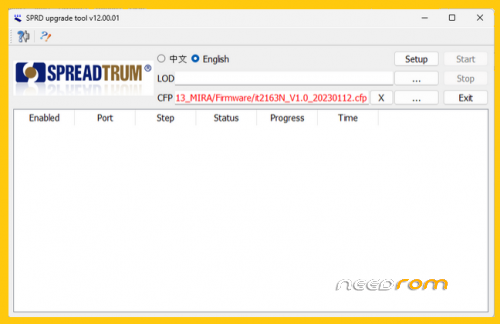
A single of the prominent aspects in SPRD Upgrade Tool SPRD upgrade tool is the support it offers for various languages. It offers Chinese as well as English support, making it accessible to a large variety of users that have a language of their own. This feature can also broaden the audience for the tool, and increases the accessibility of professionals and individuals alike.
Another major characteristic one of the key features SPRD Upgrade Tool’s key feature is that it works to each of .lod or .cfp software files. Users are able to provide the main .lod file with correct header information, and then include the .cfp file, if they would like. This allows the tool to work to work with different types of firmware and allows users to choose the type of firmware they require to update their devices.
It is also possible to connect through the SPRD Upgrade Tool also offers several options for connecting. Users can connect via USB and COM ports according to what is most suitable for their particular setup. This feature lets you flash multiple phones at once, however users should be aware in mixing USB and COM connections within one session.
The tool also features an erase function, which removes all data from FLASH memory even radio frequency calibration files. This will ensure it is free of any contamination prior to the installation of a new firmware to avoid issues caused by data that has been left.
Furthermore it is worth noting that SPRD Upgrade Tool SPRD Upgrade Tool comes with an option to save settings to speed up and simplify firmware updates. Users are able to select the port, then initialize factory data and run phases tests. This allows them to have more control over their settings and the ability to customize them according to the individual requirements of each.
¿Cómo se utiliza?
Make sure that your device is fully charged at least 40-50% and make a full back-up of your devices. Download and install all the drivers and other tools, such as SPRD Upgrade Tool and the SPD Driver and SPRD Upgrade Tool.
- Turn off the device on your SPD/UniSoc and connect to your PC via USB cable, while pressing the boot button.
- Start SPRD Upgrade Tool SPRD Upgrade Tool by double-clicking the fpupgrade.exe file (found within the SPRD Upgrade Tool folder).
- After SPRD Upgrade Tool is launched, once the SPRD Upgrade Tool is launched After that, you can enable the English option for language by selecting the English checkbox.
- Select the LOD Browse button, and then find the .lod firmware for your device on the computer.
- After the .lod firmware has been loaded into the tool, press”Start” to start the flashing process.
- The flashing of firmware typically takes just a few seconds to finish.
- Una vez que se haya completado el proceso de flasheo, recibirá una notificación de error en la parte inferior.
-
¡Felicidades! Ahora cierre la herramienta de actualización SPRD. Cierre la herramienta de actualización de SPRD. Luego, desconecte el dispositivo de su PC y reinícielo.
AGRADECER Y DONAR…
※Please make a backup of your device before installing or updating ROM