
- Title: STAR N9500
- Listed: June, 2013
- Last modified: 07/29/2013 6:28 pm
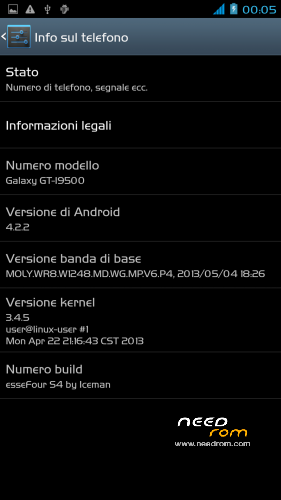
- Version: JB 4.2.2 - esseFour (S4) by Iceman V2
You must be logged for ROM download.
62029 total views, 1 today
1 Total favorites


 Member Info
DESCRIPTION
ROM: esseFour S4 by Iceman – ROM Android 4.2.2 – V2
News V.2 (www.technoforum.it)
-Proximity Sensor Calibration deleted from settings menu–> display (not working)
-deleted the application "CentoApps" and submitted as an application user (easily eliminated)
-Open default DNS-revised schedule-revised alarm
-clock-redesigned battery percentage scale from 0% to 100%
-13mp camera and 8mp rear opening front-mounted Nova Launcher First (Classic version)
-Phone section-Magazine "Italianizzate" 99% of the voices (excluding applications)
-enriched the ScanSnap quick menu new entries-added Advanced Settings (Menu–settings option > developer–> advanced settings) or from the pull-down menu (quick menu) the new Advanced Settings Menu incorporates more selectable options as required, such as:
1- Lockscreen Changes
2- Statusbar Changes
3- Battery Changes
3- Display impostazioni
6- Volume setting
7- General fixes
8- Activating and manipulating the Navbar (function ACTIVATED at FIRST INSTALLATION – if it concerns the navbar on each reboot to enable the appropriate general setting option)
Advanced menu within each entry but let me highlight:
-the ability to set the color and transparency of the Statusbar, centering on the same clock and set show/hide battery icon
-for lovers of lower resolutions the possibility of activating the NavBar with transparent, change the number of buttons and the action to be assigned to each key; choice of different themes and icons
NOTE: Uncheck quick launch
Apk and Framework: deodex-zipalign – the rom includes the root permissions
Launcher: touchwiz
Application: full S4, S-Voice
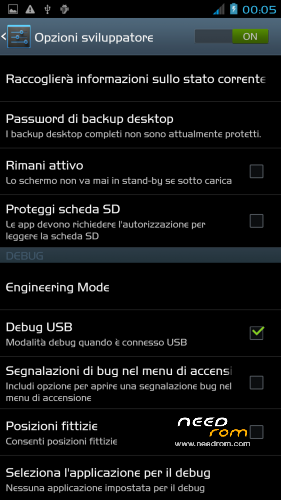
Functions: dual ring, auto-hide, engineering mode is accessible directly from developer options
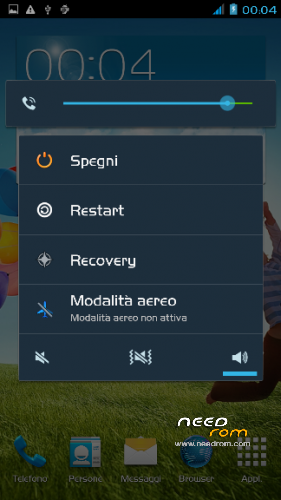
Power-menu: shutdown, restart, recovery, airplane mode
Language support: Multilang
ROM Install:
- unpack file .rar
- install the recovery (cmw or twrp) through mobileuncle
- copy file .zip in sdcard
- reboot into recovery mode (cwm or twrp)
- Perform nr. 2 Wipeall
- install from sdcard
- reboot system
※Please make a backup of your device before installing or updating ROM
Really great ROM. Works out of the box. Only drawbach: Cento apps doesn't work outside of Italy. Well, no problem because I don't use it . Thanks a lot.
Thank you. I'm glad you like it. Come and see me. Watch in build. prop (ro.build.host) Hi.
hello you see any bug or otherwise you see any really improvement ?
GPS works speedly and reliable?
worki in PHONE STAR S7589?
Works on Feiteng H9500 !
try it and let me know. Come and see me. Watch in build. prop (ro.build.host) Hi.
che cosa sono i wipeall? E come si usa mobileuncle?
Come and see me. Watch in build. prop (ro.build.host) Hi..
lo trovi nella recovery wipe data cache e wipe factory reset
Everything works great, really good rom. Thank you very much!
Thank you. I'm glad you like it. Come and see me. Watch in build. prop (ro.build.host) Hi
working only Star N9500
Great Rom.
N9500
8gb but in settings 1,7gb.
Why?
It is not possible. The fat has not been touched.
By recovery make a wipeall.
how i can normalize internal memory?
Install the original rom with Flash Tool
@ alemin_kraliyim - Install the original rom with Flash Tool
I have a problem after the firmware 4.2.2, I'll do a full charge, and after a reboot immediately shows 14% charge, how to fix?
Remove the battery. Insert a charged battery 100% and reboot.
and the camera takes very bad, used to be good
Hai problemi con i drivers della telecamera. Devi installare i drivers esatti.
Having trouble with the camera drivers. You need to install the correct drivers.
Thanks for the advice but how do I do it, how to install the driver?
the camera is just the pictures are poor quality
recommend flashing with
SP_MDT_exe_v3.1304.00_A2013.02.26
use a rom original.
loaded the scatter and select the drivers
Main sensor = ov8825_mipi_raw (back to camera), Sub sensor = hi253_yuv (front), LCD = LT050ANKP019A (display)
click start to connect the dispositio and part flash. avvisera the end of flash but there's going to be the green dot on the left. click stop all remove battery and replace the battery. turn on the device.
I think a lot of questions will be connected to the camera
where can I find the drivers, and how can I install them?
and one more request, where can I find the serial recovery, bekup but I did not use his magician
Edit build.prop. find a link. they are the original rom.