
- Title: STAR N9500
- Listed: June, 2013
- Last modified: 07/29/2013 6:28 pm
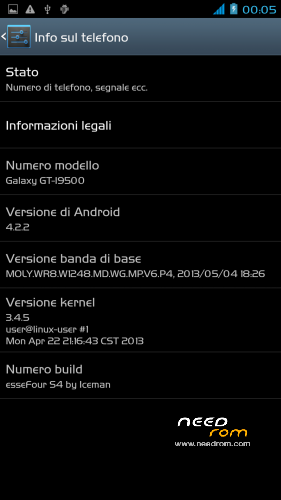
- Version: JB 4.2.2 - esseFour (S4) by Iceman V2
You must be logged for ROM download.
63585 total views, 3 today
1 Total favorites


 Member Info
DESCRIPTION
ROM: esseFour S4 by Iceman – ROM Android 4.2.2 – V2
News V.2 (www.technoforum.it)
-Proximity Sensor Calibration deleted from settings menu–> display (not working)
-deleted the application "CentoApps" and submitted as an application user (easily eliminated)
-Open default DNS-revised schedule-revised alarm
-clock-redesigned battery percentage scale from 0% to 100%
-13mp camera and 8mp rear opening front-mounted Nova Launcher First (Classic version)
-Phone section-Magazine "Italianizzate" 99% of the voices (excluding applications)
-enriched the ScanSnap quick menu new entries-added Advanced Settings (Menu–settings option > developer–> advanced settings) or from the pull-down menu (quick menu) the new Advanced Settings Menu incorporates more selectable options as required, such as:
1- Lockscreen Changes
2- Statusbar Changes
3- Battery Changes
3- Display impostazioni
6- Volume setting
7- General fixes
8- Activating and manipulating the Navbar (function ACTIVATED at FIRST INSTALLATION – if it concerns the navbar on each reboot to enable the appropriate general setting option)
Advanced menu within each entry but let me highlight:
-the ability to set the color and transparency of the Statusbar, centering on the same clock and set show/hide battery icon
-for lovers of lower resolutions the possibility of activating the NavBar with transparent, change the number of buttons and the action to be assigned to each key; choice of different themes and icons
NOTE: Uncheck quick launch
Apk and Framework: deodex-zipalign – the rom includes the root permissions
Launcher: touchwiz
Application: full S4, S-Voice
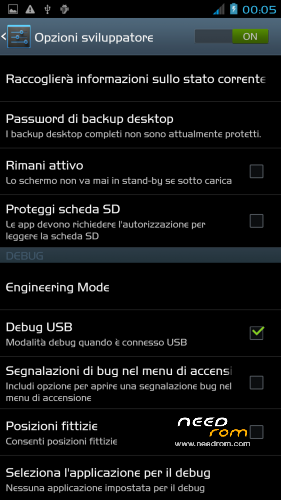
Functions: dual ring, auto-hide, engineering mode is accessible directly from developer options
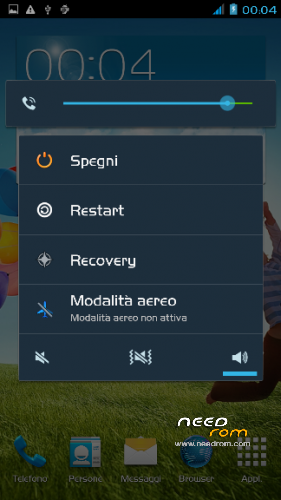
Power-menu: shutdown, restart, recovery, airplane mode
Language support: Multilang
ROM Install:
- unpack file .rar
- install the recovery (cmw or twrp) through mobileuncle
- copy file .zip in sdcard
- reboot into recovery mode (cwm or twrp)
- Perform nr. 2 Wipeall
- install from sdcard
- reboot system
※Please make a backup of your device before installing or updating ROM
/wp-content/uploads/userfiles/2_Untitled.jpg
I have a problem with the preloader, the connection disappears after 2 seconds. firmware using fleshtul not poluchaettsa any way, please help me?
Скачать файл
I have a problem with the preloader, the connection disappears after 2 seconds. firmware using fleshtul not poluchaettsa any way, please help me?
I put the fillets with fleshtul please take a look and help
Hi,
Anyone know that STAR N9500 and this FW support MHL function?
Also GPS is improoved in this FW? I have this older ROM now:
https://www.needrom.com/mobile...../star-n9500-3/ and GPS is very bad.
Install this and you'll see that you'll be fine.
Hello.
I Just bought the ORIEN N9500 it look like Star N9500 (ALPS N9500) i thought this method work on it but i was wrong . After i did what u said, nothing happens. Any idea? I really want to change the ROM of this cellphone.
Hello.
I Just bought the ORIENT N9500 it look like Star N9500 (ALPS N9500) i thought this method work on it but i was wrong . After i did what u said, nothing happens. Any idea? I really want to change the ROM of this cellphone.
Thank you for this rom, it is very good and easy to install, my problem is that after you root, connect the phone to charge and not charge the battery, I checked all the hardware and good, any suggestions, is very strange after install rom not loading, thanks again
I like it
how to download
Does this rom have gaaps on it, or do i need to install separately?
Molto bella… complimenti all'autore dela rom… ha solo un piccolo problema… quando viene spento e poi si prova a riaccenderlo non parte se non tenendo premuti tutti e tre i tasti fisici come per andare in recovery mode.