
- Title: Star S7599T DRX PORT
- Listed: October, 2013
- Last modified: 10/29/2013 2:08 pm
- Version: 4.2.2
You must be logged for ROM download.
18260 total views, 1 today
1 Total favorites
CUSTOM
 Member Info
DESCRIPTION
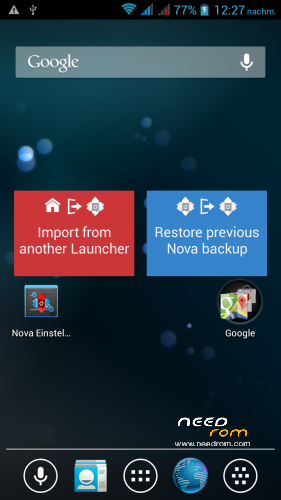
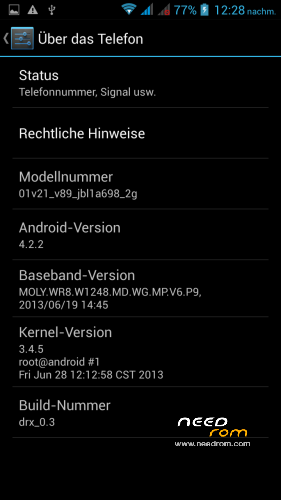
Ported spemm's STAR N9500 DRX ROM to S7599T, Android version 4.2.2!
How To Install:
- Put ROM zip to the SDcard
- Boot into CWM Recovery ( Power + Volume up)
- All Wipe is recomended:
– Wipe Data / Factory Reset -> delete all user data
– Wipe Cache Partition -> Wipe cache
– Advanced -> Wipe Dalvik Cache
- Install zip from sdcard -> choose zip from sdcard -> Select the Rom zip
- Wait to the message "Installation Finished"
- Reboot and wait (first boot takes a while)
- Enjoy the ROM!
※Please make a backup of your device before installing or updating ROM
Sorry but I didn't understand.
Is it a N9500 ROM porting for S7500T device (the ROM should be installed on S7599T)?
Or is it a S7599T ROM porting for N9500 device (the ROM should be installed on N9500)?
As it says in the description, the ROM is spemm's STAR N9500 DRX ported to S7599T. Means it should be installed on a S7599T
Thank you for this great Rom!
It all runs fine on my S7599T.
Battery lasts a long time.
The best of Rome all I've tried!
Thanks for your feedback! That's the first ROM I ever created
Hello all. Tell me in the archive with the firmware should be a folder in the < data >or antivirus removed during the ride.
Hello, you mean /system/data? Yes, there's one file in /system/data/misc called ProjectConfig.mk. If there are files missing due to you antivirus program, please redownload the ROM, since flash a incomplete ROM may not work properly.
hi
Why the scroll while browsing webpages is choppy? I have a S7599 1,5 ghz cpu 16GB rom
This is not the first rom with this problem for me.
Some roms for s7589 works fine for me.
Do you know why?
Hello,
yes I already read about this issue on the S7599T on the internet. I also own a S7599T and never had any scrolling lags.. maybe it's a hardware issue? Try swapping SIM cars(s)/memory cards or contact your seller. Anyway I don't think it's a ROM related issue
Hi TheFlair, Do you know what files are for the video drivers or video rendering or that have something to do with the video in general? Im asking this because My phones works fine with some of the S7589 roms but in the same time I want to try a rom for S7599T. Maybe I can change the files for myself from one rom to another…. but I need to know whitch are the files for the graphics(video) in general to overcome the scrolling chopiness in web browsers.
Thx
As far I know the graphic drivers are embedded directy in the kernel. The kernel lies in boot.img. Replacing the kernel is tricky but possible. However I don't think this will fix it since other devices run fine with working graphic.. also by using the S7589 kernel you will most likely loose the 0.3GHz boost from 1.2GHz zu 1.5GHz (MT6589 <-> MT6589T)
sorry, the 0.3GHz boost from 1.2GHz *to 1.5GHz
Thx for the info… Now my phone works fine and my cpu scales up to 1,5 Ghz…. I remeber that my actual rom is a combination of 2 roms…. I remember flashing the system.img from another rom but dont know of witch one. Thx for the info. I will try to keep my working boot.img and flashing the rest of your rom…. but….. my working rom is 4.2.1 and i think it is not compatible with your 4.2.2… if a take your rom with boot.img from a 4.2.1 rom…. I remeber I've tried this but I got a blank screen… altough the phones boot up because when I long press the power button, the reboot menu appeared.
Thx for the info anyway.
Hello, great rom. But there is one problem: In thetering & Portable Hotspot> WiFi Hotspot Settings> Change passphrase does not exist. Why?
Gracias por esta ROM amigo! funciono perfecto en mi equipo… great job!
Hi theflair,
thanks a lot for your Work. The ROM run´s very fast and stable.
I have flashed the CWM-Recovery_Touch 2.5/V6 from Carliv/xda on my Phone. Enclosed the Link for download with patched boot.img and Scatter. Listen: The scatter is for my Phone with 2GB internal Storage. Flash it with SP Flash-Tools – check only Recovery and boot.img.
Greetings from Germany
Louis777
Here the Link for Touch-Recovery etc.:
https://my.pcloud.com/publink/.....X6A7uAv0ydJKNzX
Hi theflair,
I've installed this ROM in my smartphone, but I've a problem. This ROM duplicates the DICM, Whatsapp, and others folders in both cards: internal storage and MicroSD Card. At this moment I've duplicate the DCIM folder with pictures inside both. When I take a photo, the system shows an error message and system doesn't record the photo. It's necessary to reboot to fix it.
I want the internal storage for programs and MicroSD Card for personal data. I had this setting with 4.2.1 version, and this problem didn't exist.
How do I fix it?
Thanks.