
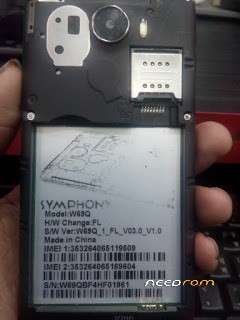
- Title: symphony w69q_1_fl_v03.0_v1.0
- Listed: November, 2017
- Last modified: 11/04/2017 2:19 pm
- Version: w69q
You must be logged for ROM download.
10253 total views, 1 today
3 Total favorites
 Member Info
DESCRIPTION
Symphony_W69Q_1_FL_V03.0_V1.0 Tested by TrechME…
How to Flash scatter Rom:
Step 1: Download and extract with winrar the stock Rom on your computer.
Step 2: After extracting you will find the Firmware file, SP Flash Tool, Driver and instruction manual.
Step 3: Install the USB Drivers.skip if drivers are already installed on your computer.
Step 4: Open the SP Flash Tools and load the Scatter File from the firmware folder.
Step 5: Connect your Smartphone to the computer using the USB Cable.
Step 6: Click on Upgrade or Download Button in the SP Flash Tool to Begin the Flashing.
Step 7: Green Sign will appear at the screen and device will successful Flash.
※Please make a backup of your device before installing or updating ROM