This post was edited by shahzad 12:16,Jul-02-2013
"I have been using MIUI ROMs for long time. These are the tips/tricks mostly specific to MIUI to save battry and moble data from my experience. You can also share your tips here.
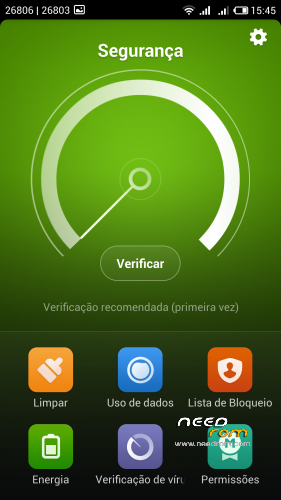
Select the power Mode to power saving Mode in the security app (if available)
MIUI has an excellent app "Autostart". open that app (security/permission) and uncheck the apps you don't want to auto boot in the back ground (i.e Maps, Some games etc ) This will save the battery and RAM too
Pay attention to update intervals for the apps that require syncing. For example I disable background update for Pulse. They are just one gesture away when ever i want to read. Other examples are weather, mail, Google+, twitter and Facebook apps. You also need to check the Sync settings, go to settings under accounts you can see different accounts being synced on phone. Click on every account and what you need to sync and what you don't need! more things being synced mean more/longer wakelocks.
Use app "Better WiFi on/off" This tip is more useful for the people who are worried of battery drain due to wifi, and constantly moving in and out off wifi coverage area. This app have plenty of customizations to meet your requirements.
Open the MIUI app " Permission manager" under the first Tab " Permissions" tap on "Manage App Permissions" here you find list which is permission wise sorted. Although you can see and disable which application have the SMS, or call permission for example, Go to " Position" permission and disable the position permission for all the apps you think don't need you permission or don't want to share with them.
Open the MIUI app "security/data usage" While you are on first tab "Traffic Usage" Press Menu button and then select "settings" here you can set the monthly qouta and warning limits. Now tap on the 2nd Tab "Traffic Ranking", here you can see what app is using how much data (its sorted data usage wise). Now at the bottom tap on "Batch network Control" Now at Top right turn "ON" the control if not already turned ON. Then there are two buttons at the bottom of that button "2G/3G" and "WiFi". I recomend to turn off "2G/3G" button. it will turn RED and you can see column of Crosses. Now scroll down and select tap on the red cross in the front of the app you want to allow to use your precious data:P . Another tip is you can disable data and wifi (both) for the apps with Ads! it will help you to get rid of the in-app Ads, for example games which you dont need you to be online.CAUTION!!!! you might run into a situation when a app can't access data! (because you disable the access to data under this tip and you dont remember that you did THAT:P so go back and enable data for that app ).
Auto brightness. Some people think auto brightness doesn't work on MIUI rom because they can still see the adjustment bar. But that's for fine tuning! some people are not always happy with auto brightness level. So MIUI gives you another option to adjust the sensitivity/level of screen brightness. So you can put it to lower side and save some battery and still have the auto brightness to increase the brightness automatically in daylight and other situations.
Another important tip about WiFi and the 3G/2G. When you are connected a long time in your job with WiFi amount eight hours or something like this, u can desactivate your 3G collection and configure only the 2G (battery saving). With this method, you can save a lot of battery. You only need remember to activate to 3G again when you go out of you job ^_^ (By MIUIes)
Another app Wakelock detector is really good to check which app is not leting your phone to sleep and then take necessary action."

 Member Info
language suport for greek????????
I dont have the github for greek language
language italian?
Today i upload the new version 4.1.24 and added Italian language
Is CWM binding or suffice the classic Recovery Mode?
Turkish language support ?
In next update i insert turkish language
Please hungarian language…
I try to add hungarian language but dont promiss
Does OTA Upgrade works on this ROM (4.1.24) ?
Thanks
I installed this rom and I had the full battery charged whem I wake up the other day the battery was all gone. Is it normal?
The portuguese language is supported to Brazil too or just Portugal?
hello Krattos, the github link to the hungarian repository of miui v5 is next:
github::vagyula1/miui-v5-hungarian-translation-for-miuiandroid=hun miui v5
If you have the time, pls add it to your next roms
PS: Is there a way for us to install the OTA update zip file somehow by ourselves? so that there would be no need to wait until you include it in your next release…
Thanks for your work on this so far, by the way
I dont have the github for brazilian language.
Ota upgrade dont work in this rom unfortunately