This post was edited by shahzad 12:16,Jul-02-2013
"I have been using MIUI ROMs for long time. These are the tips/tricks mostly specific to MIUI to save battry and moble data from my experience. You can also share your tips here.
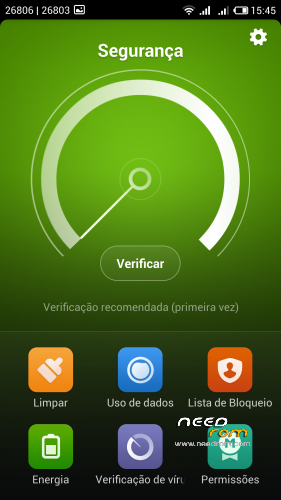
Select the power Mode to power saving Mode in the security app (if available)
MIUI has an excellent app "Autostart". open that app (security/permission) and uncheck the apps you don't want to auto boot in the back ground (i.e Maps, Some games etc ) This will save the battery and RAM too
Pay attention to update intervals for the apps that require syncing. For example I disable background update for Pulse. They are just one gesture away when ever i want to read. Other examples are weather, mail, Google+, twitter and Facebook apps. You also need to check the Sync settings, go to settings under accounts you can see different accounts being synced on phone. Click on every account and what you need to sync and what you don't need! more things being synced mean more/longer wakelocks.
Use app "Better WiFi on/off" This tip is more useful for the people who are worried of battery drain due to wifi, and constantly moving in and out off wifi coverage area. This app have plenty of customizations to meet your requirements.
Open the MIUI app " Permission manager" under the first Tab " Permissions" tap on "Manage App Permissions" here you find list which is permission wise sorted. Although you can see and disable which application have the SMS, or call permission for example, Go to " Position" permission and disable the position permission for all the apps you think don't need you permission or don't want to share with them.
Open the MIUI app "security/data usage" While you are on first tab "Traffic Usage" Press Menu button and then select "settings" here you can set the monthly qouta and warning limits. Now tap on the 2nd Tab "Traffic Ranking", here you can see what app is using how much data (its sorted data usage wise). Now at the bottom tap on "Batch network Control" Now at Top right turn "ON" the control if not already turned ON. Then there are two buttons at the bottom of that button "2G/3G" and "WiFi". I recomend to turn off "2G/3G" button. it will turn RED and you can see column of Crosses. Now scroll down and select tap on the red cross in the front of the app you want to allow to use your precious data:P . Another tip is you can disable data and wifi (both) for the apps with Ads! it will help you to get rid of the in-app Ads, for example games which you dont need you to be online.CAUTION!!!! you might run into a situation when a app can't access data! (because you disable the access to data under this tip and you dont remember that you did THAT:P so go back and enable data for that app ).
Auto brightness. Some people think auto brightness doesn't work on MIUI rom because they can still see the adjustment bar. But that's for fine tuning! some people are not always happy with auto brightness level. So MIUI gives you another option to adjust the sensitivity/level of screen brightness. So you can put it to lower side and save some battery and still have the auto brightness to increase the brightness automatically in daylight and other situations.
Another important tip about WiFi and the 3G/2G. When you are connected a long time in your job with WiFi amount eight hours or something like this, u can desactivate your 3G collection and configure only the 2G (battery saving). With this method, you can save a lot of battery. You only need remember to activate to 3G again when you go out of you job ^_^ (By MIUIes)
Another app Wakelock detector is really good to check which app is not leting your phone to sleep and then take necessary action."

 Member Info
Thank you Master krattos
I have THLW8s with 4.2.1 i was try to make your update 4.2.7 but is aborded .. Any help please ?
Sirnicolas do you have miui or original rom?
Explain a little bit more what did you do please.
romanian ?its posibile?tank you
I think so,I'll try
Hizo friend good job, working perfect in MY thl w8 beyond …
One thing : you can make me a tutorial for port miui ROM with thl w8 beyond stock ROM forma base ROM?
Thanks and good work
Add viet nam (vi) language..thank
Xperia keyboard worked fine in the previous version, but in the 4.2.14 is always stopped (Clear data, reboot did not help). Any idea?
Rom changed my SD cards around. My micro SD which was seconday now becomes the primary. Could that be reversed?
hi all,
i installed 4.2.21 but there is a problem, When i After taking a photo, i cant see miniature pic.
what must i do?
regards
go to settings/stock settings/change default main memory
try that and tell me something
its restarted and when i take photo now its says "insert an sd card" later this settings else no error?
hi puepue,
switching sd card assignment is quite easy. first your phone must be rooted. then use root explorer to find the file vold.fstab. usually it is in /etc directory. open this file through text editor and find these 2 lines:
dev_mount sdcard /storage/sdcard0 emmc@fat /devices/platform/goldfish_mmc.0 /devices/platform/mtk-msdc.0/mmc_host
dev_mount sdcard2 /storage/sdcard1 auto /devices/platform/goldfish_mmc.1 /devices/platform/mtk-msdc.1/mmc_host
replace sdcard0 with sdcard1 and replace sdcard1 with sdcard0. save file and exit. reboot the phone and you have now switched your sd card assignment. hope my explanation is clear…