
- Title: TWRP 2.8.6.0 Lollipop
- Listed: June, 2015
- Last modified: 06/25/2015 2:41 pm
- Version: For Lollipop 5.1
You must be logged for ROM download.
14963 total views, 1 today
3 Total favorites
CUSTOM
 Member Info
DESCRIPTION
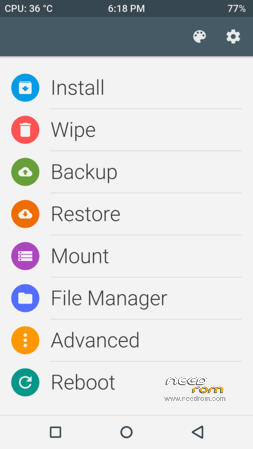
TWRP 2.8.6.0 for a new iOcean M6752 Lollipop 5.1 firmware. Material design, use MTK SP flash tool to install
※Please make a backup of your device before installing or updating ROM
I downloaded this twice and the scatter file is not showing up.
I'm having the same issue, wanted to root my M6752 because I lost my EMEI but there is no way to even install a new recovery
Sorry people, please use scatter from Lollipop firmware.
So add it to the firmware package and re-flash?
Load scatter file, untick everything but recovery, click on file path and choose recovery file manualy.
Thank youIt gave me the big green check mark saying it was OK but I cannot get it to go into recovery and Mobile Uncle tools is saying I need to be rooted in order to get into recovery mode. Any suggestions?
Thanks miljenko, again!
Turn off your phone, keep vol up and power switch until you have a option to choose recovery. With volume up you scroll and with volume down you confirm selection.
When I use this recovery to root my M6752 it gets stuck in a bootloop, after several reflashes I'm using 5.1 with no root. Is there any way to root the phone in 5.1?
Very good Job, everything works fine
got dead bootloop with this recovery. any new version? 2.8.7.0, but I don't know which machine to choose..
I finally got it works. I think to root lollipop 5.1 on the new rom (8.13 on http://www.iocean.cc), u can do:
(1) developer mode — turn on the "oem unlock"
(2) reflash this recovery again and boot into recovery mode
(3) install Supersu or something else. I used SuperSu 2.4.6
o, the new rom (8.13 lollipop) will wipe out IMEI and SN.. do as what they said in the official website. I got the phone root and finally everything runs ok. enjoy