
- Title: twrp 3.2 Mediatek ulefone S7 with toolkit
- Listed: December, 2017
- Last modified: 12/08/2017 4:48 am
- Version: 3.2
You must be logged for ROM download.
10809 total views, 1 today
OFFICIAL
 Member Info
DESCRIPTION
First of all unlock bootloader
flash twrp
fix encryption
then flash magisk or SuperSU
Done.
source and Guide- https://goo.gl/Ukfu1M
※Please make a backup of your device before installing or updating ROM
Steps worked for me:
- Flash stock ROM with Flash Tools
- Enter system normally and in Developer Options set unlock OEM bootloader ON and USB Debugging ON
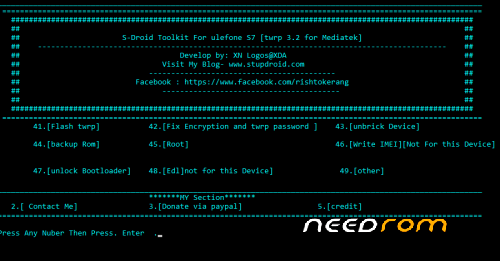
- Run ulefone S7 Toolkit on PC
- Then reestarts mobile system in fastboot mode (bootloader VOLUME UP + POWER keys)
- Choose option 41 on toolkit = flash twrp
- Choose option 42 on toolkit = flash twrpfix encryption
- Then reestarts mobile system in normal mode
- And enter to http://www.supersu.com
- Then download bootable supersu.zip (last version) and save it on internal storage.
- Then reestarts mobile system in recovery mode to install that downloaded zip file
- Flash supersu.zip and then restarts in normal mode and then you will be already root user.
The end!
supersu downloads… http://www.supersu.com/downloa.....d
Ops!!!
Before the step "Choose option 41 on toolkit = flash twrp" I choose option 47 on toolkit = Unlock Bootloader
Sorry…
And when we will enter to TWRP recovery for the first time use "READ ONLY option"
please help! i have tried this and it keeps booting in twrp mode and not in normal mode. What have happened? did my previous rom erased? what can i do? i